Need help?
Do you have a question about the Custom Built eBikes VLCD-5 and is the answer not in the manual?
Details the pin configuration for the VLCD display connector, including signal assignments.
Shows current speed in Km/h or MPH, which can be switched.
Displays battery charge level using four horizontal blocks, each representing 25% of charge.
Displays and allows adjustment of the four available power assistance levels.
Displays diagnostic codes to identify system failures and errors.
Shows the current torque signal value for diagnostics and inspection.
Defines the function of each button on the VLCD-5 display.
Covers powering on/off, adjusting assistance levels, and changing display modes.
Details core functions: Odometer, Trip Distance, Average Speed, and Elapsed Time.
Accesses advanced settings like wheel diameter, magnet selection, speed units, and speed limit.
Displays the initial torque value for service inspection, with a normal range of 56 to 102.
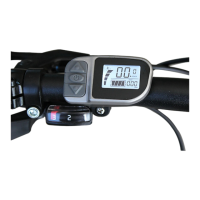
The VLCD-5 display is an intelligent management system designed for electric bikes, primarily used to control power assistance, monitor battery levels, measure the speed of the electric bicycle, and record trip distance.
The VLCD-5 offers a comprehensive suite of functions to enhance your e-biking experience. The Speed display shows your current speed, with units switchable between Km/h and MPH. The Power level indicator features four horizontal blocks, each representing 25% of the battery's charge, providing a clear visual of remaining power. A strobe effect warns you when it's time to recharge the battery.
For tracking your rides, the Trip distance function displays the distance covered during your current journey, which resets when the power is turned off. The Odometer keeps a running total of all miles or kilometers ridden. The Elapsed time records how long you have been cycling for, while the Average speed (AVG) shows your average speed during a trip.
The display also includes a Power assistance level indicator, showing one of four available and adjustable power assistance levels. The Backlight feature allows you to switch between two brightness levels, with the default being off.
Hidden functions provide advanced customization. Wheel-diameter setting (reserved) allows selection from 14-32 inches, with 26 inches as the default. The Speed Sensor Magnet Selection lets you choose the number of magnetic steel sensors, with a default value of 1. You can also switch the Speed unit option between Km/h and Mil/h, with Km/h as the default. The 6km/h function (reserved) can be turned ON or OFF, with OFF as the default. The Max speed setting (reserved) allows you to set a maximum speed between 15-45km/h, defaulting to 25Km/h. The Assist ratio setting (reserved) allows selection of a ratio, with 16 as the default. Mode selection (reserved) defaults to Europe, with speed limit setting on by default.
For maintenance and troubleshooting, the Software version displays the current software version. The Diagnosis code feature shows error codes according to recorded failures, with the fault detection system running whenever the equipment is turned on. This is particularly useful for identifying issues and contacting Custom Built eBikes for assistance. The Torque signal value and Initial torque signal value displays provide data for service inspection, with the normal torque value ranging between 56 and 102.
The VLCD-5 is designed for intuitive operation. To power on the LCD display, simply press the power button. To turn it off, press the power button for 2 seconds. The device also features an automatic shut-off after 5 minutes of inactivity to conserve battery.
Adjusting power assistance levels is straightforward using the '+' and '-' buttons. There are four levels: "OFF", "ECO", "TOUR", "SPEED", and "TURBO". These correspond to none, low, medium, and high power assist, respectively. The default assistance level is medium (SPEED).
The display mode can be cycled through by pressing the 'i' button. This allows you to switch between "ODO" (odometer), "TRIP" (trip distance), "AVG" (average speed), and "TIME" (elapsed time). The default mode is odometer.
For basic functions, the backlight can be switched on briefly by pressing the power button. To reset the odometer, press the power button, '+' button, and 'i' button simultaneously for 10 seconds. In the trip distance state, pressing the 'i' button for 2 seconds resets the trip counter and time.
Hidden functions offer deeper customization. To access these, press the 'i' and power buttons simultaneously for 3 seconds on the startup screen. This reveals 11 adjustable items, including odometer, trip distance, average speed, elapsed time, wheel diameter selection, magnetic steel number selection, speed units selection, 6/Km/h function selection, top speed selection, power adjustment selection, and mode selection. The initial item displayed is the odometer.
Within the hidden functions, you can adjust the Wheel diameter selection (d1) by using the 'i' button to enter the interface and the '+' or '-' buttons to adjust between 14-32 inches. The Magnetic steel number selection is accessed via the 'i' button, with '+' or '-' buttons allowing selection between 1-12 pulses per wheel revolution. The Imperial / metric selection (km/h / MPH) is entered with the '+' button, and units are switched with the '+' button.
The 6km/h – walking mode is accessed via the 'i' button, with '+' buttons to switch ON/OFF. To activate motor assistance for walking, press the 'i' button for 3 seconds. The SD: Speed Limit can be adjusted by pressing the 'i' button to enter the selection, then using '+' or '-' buttons to set the limit between 6 and 35, with 25 being the default. The Mode selection (M) is entered with the 'i' button, and the '+' button switches between Japanese and European modes, with Europe as the default.
The VLCD-5 incorporates features to assist with maintenance and troubleshooting. The Diagnosis code system is a critical tool. If the system detects a problem, an error code will be displayed where the speed is normally shown. This system is active whenever the motor is in use.
Specific error codes include:
These codes provide immediate feedback on potential issues, allowing users to identify the problem quickly and seek appropriate assistance from Custom Built eBikes.
For advanced diagnostics, the Torque signal value display can be accessed by pressing the power and 'i' buttons simultaneously for 10 seconds under the ODO menu. Subsequently, pressing the 'i' button will cycle through "ODO", "TRIP", "AVG", "TIME", "TE", and "TE1". Under the "TE" submenu, pressing the 'i' button again will display the initial torque value, which is solely for service inspection. The normal range for the torque value is between 56 and 102. This allows technicians to verify the proper functioning of the torque sensor.
The Software version display (accessed by pressing the 'i' button under the 3.7 submenu) provides information about the device's firmware, which can be useful for support and updates.
 General
| Display Type | LCD |
|---|---|
| Category | Bicycle Accessories |
| Compatibility | Electric Bikes |
| Functionality | Speed, battery level, distance display |
| Power Supply | Battery Powered |


 To Next Page