Operating Procedure
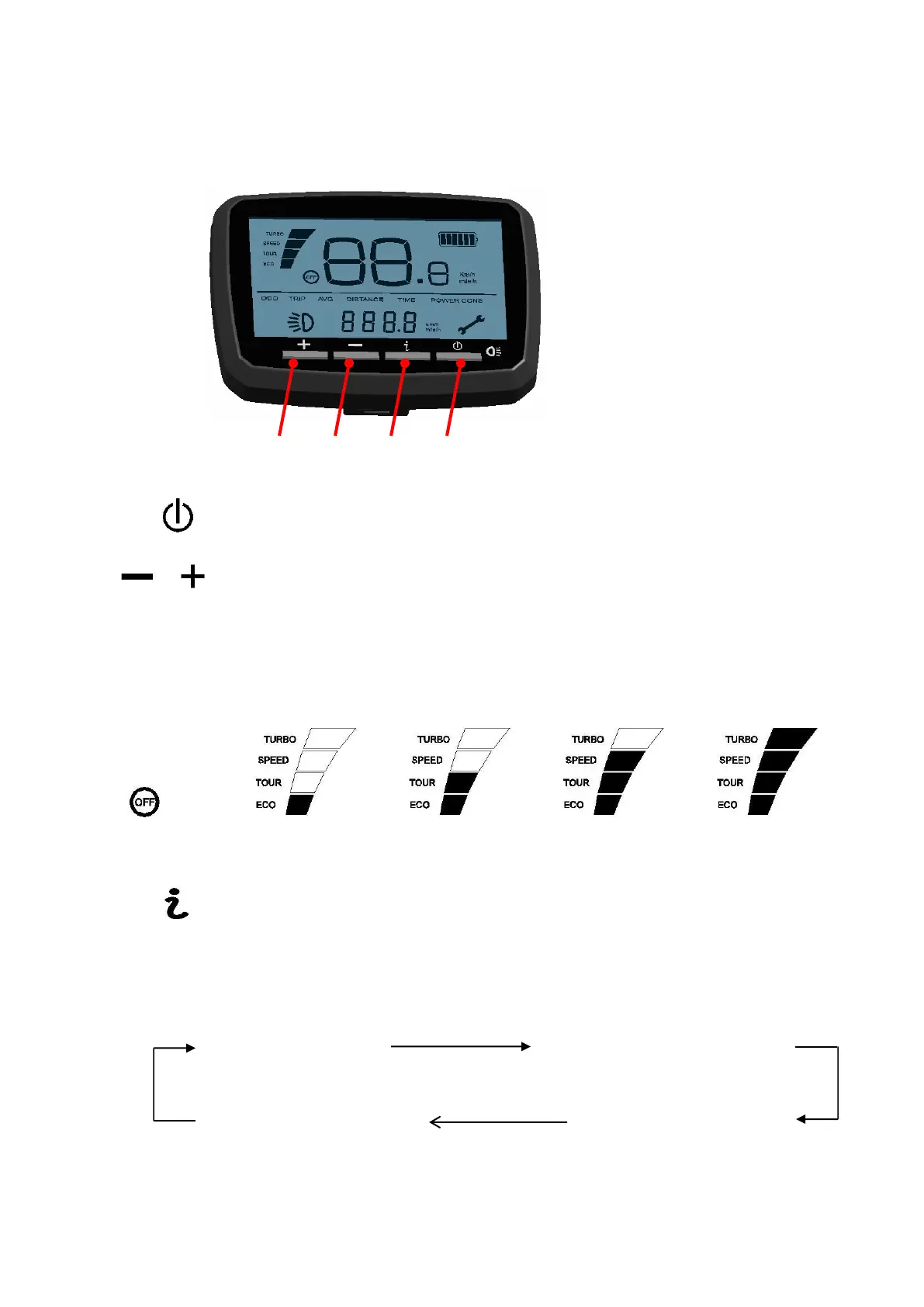
5.1 Button Definition
5.2 Operation and setting
1) Press this button to power on the LCD display. Press for 2 seconds to turn off,
pressing the button for 2 seconds to power off. Automatically shut off after 5 minutes with no use.
These step through the assistance levels - “OFF”,“ECO”,“TOUR”,“SPEED”,
“TURBO”
There are 4 levels of power assist (none, low, medium, high) which are names Eco, Tour, Speed and
Turbo. Press the + / - button to adjust the power assist from low to high. Default is medium assistance
(speed)
(ECO) (TOUR) (SPEED) (TURBO)
None Minimum Medium Max
3) Allows you to change the display >> “ODO” > “TRIP” > “AVG” > “TIME”
There are 4 modes (odometer, trip distance, average speed, elapsed time. Press this button to adjust the
mode. Default is odometer.
Odometer(ODO) Trip distance(TRIP)
Elapsed time (TIME) Average speed(AVG)



 To Next Page