
 Need help?
Do you have a question about the CyberPower ENVIROSENSOR and is the answer not in the manual?
Details on temperature and humidity measurement ranges and accuracy.
Specifications for the sensor's physical dimensions and weight.
Step-by-step guide for attaching the sensor using hook and loop tape.
Instructions for mounting the sensor using screws and anchors.
Compliance information and warnings regarding FCC radio frequency regulations.
Guidance on using input dry contacts and warnings about voltage.
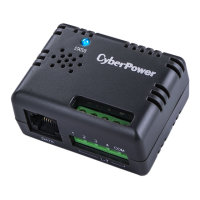
The CyberPower ENVIROSENSOR is an environmental sensor designed to monitor the temperature and humidity of server closets and data centers remotely. When used in conjunction with select CyberPower SNMP/HTTP cards (RMCARDXXX) or most Switched and Monitored PDUs, it allows users to keep track of environmental conditions crucial for the optimal operation of IT equipment. This device is an integral part of a comprehensive monitoring solution, enabling proactive management of server environments.
Beyond environmental monitoring, the ENVIROSENSOR also provides four input dry contacts. These contacts enable users to monitor the status of connected devices, such as door switch sensors. This feature adds an extra layer of security and operational awareness, allowing administrators to detect unauthorized access or other physical events within their server infrastructure. The ability to integrate these various monitoring points into a single system simplifies management and enhances overall control.
One of the key usage features of the ENVIROSENSOR is its real-time environment monitoring capability. This means that temperature and humidity data are continuously collected and made available, providing an up-to-the-minute view of the server environment. This constant stream of data is critical for identifying potential issues before they escalate into more significant problems, such as equipment overheating or damage due to excessive humidity.
The sensor supports remote management and configuration, accessible via web browsers or Network Management Systems (NMS). This allows administrators to monitor and adjust sensor settings from any location with network access, eliminating the need for physical presence in the data center. The web interface provides a user-friendly platform for viewing data, configuring thresholds, and managing connected devices, making it easy to integrate into existing IT management workflows.
Automatic event notification is another crucial feature. With CyberPower's PowerPanel Business Edition software, users can establish specific thresholds for temperature, humidity, or dry contact status. When these thresholds are exceeded or a dry contact changes state, the system can automatically notify users via email, SMS, and SNMP traps. This immediate alert system ensures that administrators are promptly informed of any critical environmental changes or security breaches, enabling them to take swift corrective action.
The ENVIROSENSOR also displays the name and location of the sensor itself, as well as any connected devices. This organizational feature helps in managing multiple sensors across different locations within a data center or server closet. By clearly identifying each sensor and its associated devices, administrators can quickly pinpoint the source of an alert and understand its context, streamlining troubleshooting and response efforts.
For installation, the ENVIROSENSOR offers two primary methods: hook and loop tape mounting or fixed mounting. The hook and loop tape method is designed for quick and easy installation on clean, flat surfaces. Users simply apply one side of the tape to the sensor and the other to the desired location, then press the sensor firmly into place. It is recommended to leave the sensor in place for a few seconds to ensure proper adhesion. This method is ideal for temporary setups or locations where drilling is not feasible.
The fixed mounting method involves drilling a hole, inserting an anchor, and then securing the sensor with a screw. This provides a more permanent and robust installation, suitable for long-term deployment. The sensor can be hung horizontally or vertically, offering flexibility in placement to best suit the environment. Both installation methods are straightforward, ensuring that the sensor can be deployed quickly and efficiently.
Connectivity to the RMCARD/PDU is established using a standard RJ45 Ethernet cable. One end of the cable plugs into the RJ45 port on the ENVIROSENSOR, and the other end connects to the RMCARD/PDU. While a 10-foot (3.05 m) cable is included, standard RJ45 Ethernet cables can be used for longer distances, up to 50 feet (15 m), providing flexibility in sensor placement relative to the RMCARD/PDU.
Maintenance features primarily revolve around troubleshooting common issues. If the RMCARD/PDU is unable to acquire environmental sensor information, the first step is to check the LED on the sensor. A continuously lit LED indicates a proper connection. If the LED is off, users should ensure that the RJ45 Ethernet cable is correctly connected to both the RMCARD/PDU and the sensor. It is important to note that a crossover cable should not be used for this connection, as it is intended for Tx/Rx purposes.
For issues with the input dry contacts not functioning correctly, users should verify that the dry contact wires are properly connected. Additionally, it is crucial to ensure that the open/short circuit setting of the connected devices matches the setting configured on the web interface. The input dry contacts are designed to detect open/short circuits and should not be used with signals that carry voltage. This ensures the longevity and proper operation of the dry contact feature.
The ENVIROSENSOR is designed for reliability and ease of use, making it a valuable tool for any IT environment requiring robust environmental and physical security monitoring. Its integration with CyberPower's broader management solutions provides a cohesive and powerful system for maintaining optimal operating conditions and ensuring the security of critical infrastructure.
 General
| Accuracy | 1 ° |
|---|---|
| Voltage | 12 V |
| Product color | Gray |
| Quantity | 1 |
| Product type | Network management card |
| Compatibility | CE, FCC Class B, EAC, RoHS |
| Country of origin | China |
| Harmonized System (HS) code | 8504909000 |
 Weight and Dimensions
| Depth | 59 mm |
|---|---|
| Width | 45 mm |
| Height | 29 mm |
| Weight | 41.5 g |
| Package depth | 60 mm |
| Package width | 170 mm |
| Package height | 165 mm |
| Package weight | 400 g |

 To Next Page