EasyManua.ls Logo

CyberPower PowerTrip 480 - User Manual

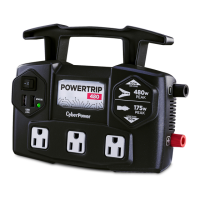
CyberPower PowerTrip 480
2 pages
Print Icon
To Next Page IconTo Next Page
Loading...
1. 120 volt AC outlet
2. USB charging ports (2.4 AMPS)
3. LED indicator light [Power LED(Green), Input / Output Fault (Red)]
4. ON/OFF Switch
5. DC Input positive terminal
6. DC Input negative terminal
7. Cooling Fan
8. Fuse
Follow these steps to connect the PowerTrip 480 to the vehicle cigarette
lighter socket (for loads under 150 watts).
1. Place the inverter on a flat surface on your vehicle floor.
2. Make sure the power switch on the panel is off.
3. Take the power cord equipped with the cigar plug and place the ring
terminals over the two cabling terminals on the back of the inverter.
4. Place the inverter cigar plug in the vehicle cigarette lighter socket.
5. Turn on the power switch. The green light indicates that the inverter is
operating normally and that AC power is available at the outlet.
6. Verify that the connected device(s) draws less than 150 watts and plug
into the AC outlet.
7. Always turn the inverter off when not in use.
Follow these steps to connect the power inverter directly to the vehicle's
battery (for loads over 150 watts).
1. Place the inverter on a flat surface.
2. Make sure the power switch on the panel is off.
3. Take the power cord equipped with battery clamps on one end and
place the ring terminals over the two cabling terminals on the back of
the inverter.
4. Fasten the positive (red) clamp to the positive battery post, and then
fasten the negative (black) clamp to the negative battery post.
5. Turn on the power switch. The green light indicates that the inverter is
operating normally and that AC power is available at the outlet.
6. Take device power cord plug into the inverter AC outlet.
7. Always turn the inverter off when not in use.
Make sure you connect cable red to red and black to black, and make
sure you screw the nuts on tightly.
Use the cigar plug cable only when the vehicle’s engine is running.
Use the cigar plug cable with the engine off will cause excessive
battery drain.
CAUTION :
1. Connect the RED cable to the
POSITIVE terminal of the battery.
2. Connect the BLACK cable to the
NEGATIVE terminal of the battery.
A reverse polarity connection (positive to negative) will blow a fuse in
the inverter and may permanently damage the unit. Damage caused
by a reverse polarity connection is not covered by your warranty.
Batteries contain corrosive materials and present an electrical shock
hazard. To prevent irritation and burns, wear protective eyewear and
clothing when you install the inverter or work with the batteries.Take
special care to ensure that metal tools and personal metal objects like
rings and bracelets do not contact the battery terminals.
CAUTION
WARNING
CAUTION
Battery
Red
Black
(+)
(-)
Front View
Back View
1
2
3
5
6
7
8
4
1 1
Introduction
Product Overview
Product Features
Operation: Connecting the power cord for loads under
150 watts
Operating and Storage Tips
Operation: Connecting the power cord for loads over
150 watts
Package Contents
AC Mobile Power Inverter
CPS480TG2U/B
480 User Guide
TM
This guide contains important information regarding the safety, operation,
maintenance, and storage of this product. Failure to read this guide and
follow the directions could result in injury and/or property damage.
Before installing and using the CyberPower power inverter, please read
the manual. Misusing or incorrectly connecting the Inverter may damage
the equipment or create hazardous conditions for users. Read the
following safety instructions and pay special attention to all CAUTION
and WARNING statements in the manual.
Do not operate the inverter near flammable materials, fumes, or gases.
Always use the inverter where there is adequate ventilation. Do not
obstruct the ventilation slots.
Never immerse the unit in water or other liquids.
Proper cooling is essential when operating the inverter. Refrain from
placing the inverter near the vehicle's heat vent or in direct sunlight.
Always turn the inverter off when not in use by removing it from the DC
accessory port.
Check the warning labels on battery chargers or adapters before
connecting them to the inverter. Do not connect battery chargers or
adapters that have warnings about using with inverters.
Thank you for choosing the CyberPower power Inverter. To enjoy all the
features and benefits of Inverter, please read and follow all instructions.
The power inverter is a portable source of 120 volt AC power. The AC
power converts DC battery power from your vehicle into standard 120 volt
AC power, allowing you to power most notebook computers, cell phone
chargers, camcorders, and other electronic products drawing AC power.
This product package includes:
AC Power Inverter
Cigar Plug Cable
Battery Clamp Cable
User Guide
CAUTION:
1. Connect the RED cable to the
POSITIVE terminal of the inverter.
2. Connect the BLACK cable to the
NEGATIVE terminal of the inverter.
The inverter should only be operated under the following conditions:
Dry - Do not allow water or other liquids to come into contact with the inverter.
Moderate Temperature - Ambient air temperature should be between
32 °F - 104 °F (0 °C - 40 °C). Keep the inverter out of direct sunlight.
Free Air Flow - Keep the inverter's ventilation slots unobstructed to
ensure air flow to the unit. Do not place any items on or over the inverter
during operation. The unit will shut down if it overheats.
Proper storage temperature range is 32 °F - 122 °F (0 °C - 50 °C).
Store and use the inverter in a cool and dry environment.
Avoid exposing the inverter to heating elements, direct sunlight, or high
humidity.

Other manuals for CyberPower PowerTrip 480

Question and Answer IconNeed help?

Do you have a question about the CyberPower PowerTrip 480 and is the answer not in the manual?

Summary

Product Overview

Device Views and Features

Identifies front and back panel components and lists key product features like outlets and ports.

Connecting the Power Inverter

High Load Connection (Over 150 W)

Steps to connect to vehicle battery terminals for loads exceeding 150 watts.

Low Load Connection (Under 150 W)

Steps to connect via vehicle cigarette lighter socket for loads under 150 watts.

Safety and Operating Precautions

General Safety Warnings

Important safety instructions regarding flammable materials, liquids, ventilation, and usage.

Operating and Storage Tips

Guidelines for dry operation, temperature range, air flow, and avoiding heat/sunlight.

DC Fuse Replacement

Fuse Location and Replacement Steps

Instructions for replacing internal and cigar plug fuses to protect the inverter from overloads.

Technical Specifications and Support

Product Specifications

Details on model, input/output voltage, power ratings, frequency, and protection features.

Troubleshooting Common Issues

Diagnosing and resolving problems like no AC output or failure to operate motorized tools.

Product Registration and Warranty

Information on registering the product for warranty and details of the 2-year limited warranty.

Technical Support Contact

Contact information and operating hours for technical assistance with installation or product questions.

Legal Notices (FCC Part 15)

Compliance information regarding radio frequency energy and potential interference.

Summary

Product Overview

Device Views and Features

Identifies front and back panel components and lists key product features like outlets and ports.

Connecting the Power Inverter

High Load Connection (Over 150 W)

Steps to connect to vehicle battery terminals for loads exceeding 150 watts.

Low Load Connection (Under 150 W)

Steps to connect via vehicle cigarette lighter socket for loads under 150 watts.

Safety and Operating Precautions

General Safety Warnings

Important safety instructions regarding flammable materials, liquids, ventilation, and usage.

Operating and Storage Tips

Guidelines for dry operation, temperature range, air flow, and avoiding heat/sunlight.

DC Fuse Replacement

Fuse Location and Replacement Steps

Instructions for replacing internal and cigar plug fuses to protect the inverter from overloads.

Technical Specifications and Support

Product Specifications

Details on model, input/output voltage, power ratings, frequency, and protection features.

Troubleshooting Common Issues

Diagnosing and resolving problems like no AC output or failure to operate motorized tools.

Product Registration and Warranty

Information on registering the product for warranty and details of the 2-year limited warranty.

Technical Support Contact

Contact information and operating hours for technical assistance with installation or product questions.

Legal Notices (FCC Part 15)

Compliance information regarding radio frequency energy and potential interference.

Overview

The CyberPower PowerTrip 480 (CPS480TG2U/B) is an AC mobile power inverter designed to convert DC battery power from a vehicle into standard 120-volt AC power. This allows users to power various electronic devices such as notebook computers, cell phone chargers, and camcorders while on the go. The device is portable and offers a range of features for safe and efficient operation.

Function Description:

The primary function of the PowerTrip 480 is to provide a portable source of 120-volt AC power by converting 11-15 volts DC input from a vehicle's battery or cigarette lighter socket. It features a 120-volt AC outlet and two 2.4 AMP USB charging ports, allowing for the simultaneous charging or powering of multiple devices. An LED indicator light displays the power status (green for normal operation) and indicates input/output faults (red). The inverter uses a simulated sine wave output, making it suitable for most common electronic devices.

Important Technical Specifications:

  • Model: CPS480TG2U/B
  • Input Voltage: 11 to 15 volts DC
  • Output Peak Power: 480 Watts
  • Output Continuous Power: 400 Watts
  • Output Voltage: 120 Volts AC
  • Output USB Voltage: 5 Volts DC
  • Output Frequency: 60 Hz
  • Output Waveform: Simulated Sine Wave
  • Input Fuse (Internal): 25 Amp x2
  • Input Fuse (Cigar Plug): 20 Amp
  • Protection Features: Overload, Overvoltage, Overheating, Short-circuit

Usage Features:

The inverter offers two primary methods for connecting to a vehicle's power source, depending on the load requirements:

  1. For loads under 150 watts (Cigar Lighter Socket Connection):

    • Place the inverter on a flat surface.
    • Ensure the power switch is off.
    • Connect the cigar plug cable's ring terminals to the two cabling terminals on the back of the inverter. Ensure the RED cable connects to the POSITIVE terminal and the BLACK cable to the NEGATIVE terminal.
    • Insert the inverter cigar plug into the vehicle's cigarette lighter socket.
    • Turn on the power switch; a green light indicates normal operation.
    • Verify the connected device(s) draws less than 150 watts and plug it into the AC outlet.
    • Always turn the inverter off when not in use.
    • CAUTION: Use the cigar plug cable only when the vehicle's engine is running to prevent excessive battery drain.
  2. For loads over 150 watts (Direct Battery Connection):

    • Place the inverter on a flat surface.
    • Ensure the power switch is off.
    • Connect the battery clamp cable's ring terminals to the two cabling terminals on the back of the inverter.
    • Fasten the positive (red) clamp to the positive battery post and the negative (black) clamp to the negative battery post.
    • Turn on the power switch; a green light indicates normal operation.
    • Plug the device power cord into the inverter AC outlet.
    • Always turn the inverter off when not in use.
    • CAUTION: A reverse polarity connection (positive to negative) will blow a fuse in the inverter and may permanently damage the unit. Damage caused by a reverse polarity connection is not covered by the warranty.
    • WARNING: Batteries contain corrosive materials and present an electrical shock hazard. Wear protective eyewear and clothing when installing or working with batteries. Avoid contact between metal tools/objects and battery terminals.

General Operating and Storage Tips:

  • Dry Environment: Do not allow water or other liquids to contact the inverter.
  • Moderate Temperature: Operate between 32 °F - 104 °F (0°C - 40°C). Keep out of direct sunlight.
  • Free Air Flow: Ensure ventilation slots are unobstructed to prevent overheating. The unit will shut down if it overheats.
  • Storage Temperature: Store between 32 °F - 122 °F (0°C - 50°C).
  • Store and use in a cool and dry environment.
  • Avoid exposing the inverter to heating elements, direct sunlight, or high humidity.

Maintenance Features:

  • Fuse Replacement: The inverter contains protection fuses (two internal 25-amp fuses and one 20-amp fuse on the cigar plug cable) to protect against overloading. If a fuse blows due to excessive load (over 150 watts via cigar plug or over 480 watts via battery clamp), follow these steps:
    1. Turn off the inverter and disconnect all devices and power sources.
    2. Remove the leads.
    3. Pull the fuse straight out of its holder.
    4. Replace with a new 25-amp fuse for the inverter body or a 20-amp fuse for the cigar plug cable.
  • Troubleshooting: The manual provides a troubleshooting guide for common issues like no AC output (with red or green LED lit) and motorized power tools not operating, offering possible causes and suggested solutions such as checking battery voltage, reducing load, tightening connections, or replacing fuses.

Safety Information:

The manual emphasizes reading all safety instructions and paying attention to CAUTION and WARNING statements. Key safety points include:

  • Do not operate near flammable materials, fumes, or gases.
  • Always use in an adequately ventilated area; do not obstruct ventilation slots.
  • Never immerse the unit in water or other liquids.
  • Avoid placing near vehicle heat vents or in direct sunlight.
  • Always turn off the inverter when not in use.
  • Check warning labels on battery chargers or adapters before connecting them to the inverter.

Warranty and Support:

The CyberPower PowerTrip 480 comes with a 2-year limited warranty covering material and manufacturing defects. For warranty claims, users must pack and ship the inverter to CyberPower, clearly indicating "WARRANTY RETURN" and including their name and address. Shipping costs must be prepaid. Technical support is available via phone and email. Product registration is encouraged for warranty coverage and updates.

CyberPower PowerTrip 480 Specifications

General IconGeneral
BrandCyberPower
ModelPowerTrip 480
CategoryInverter
LanguageEnglish

Related product manuals