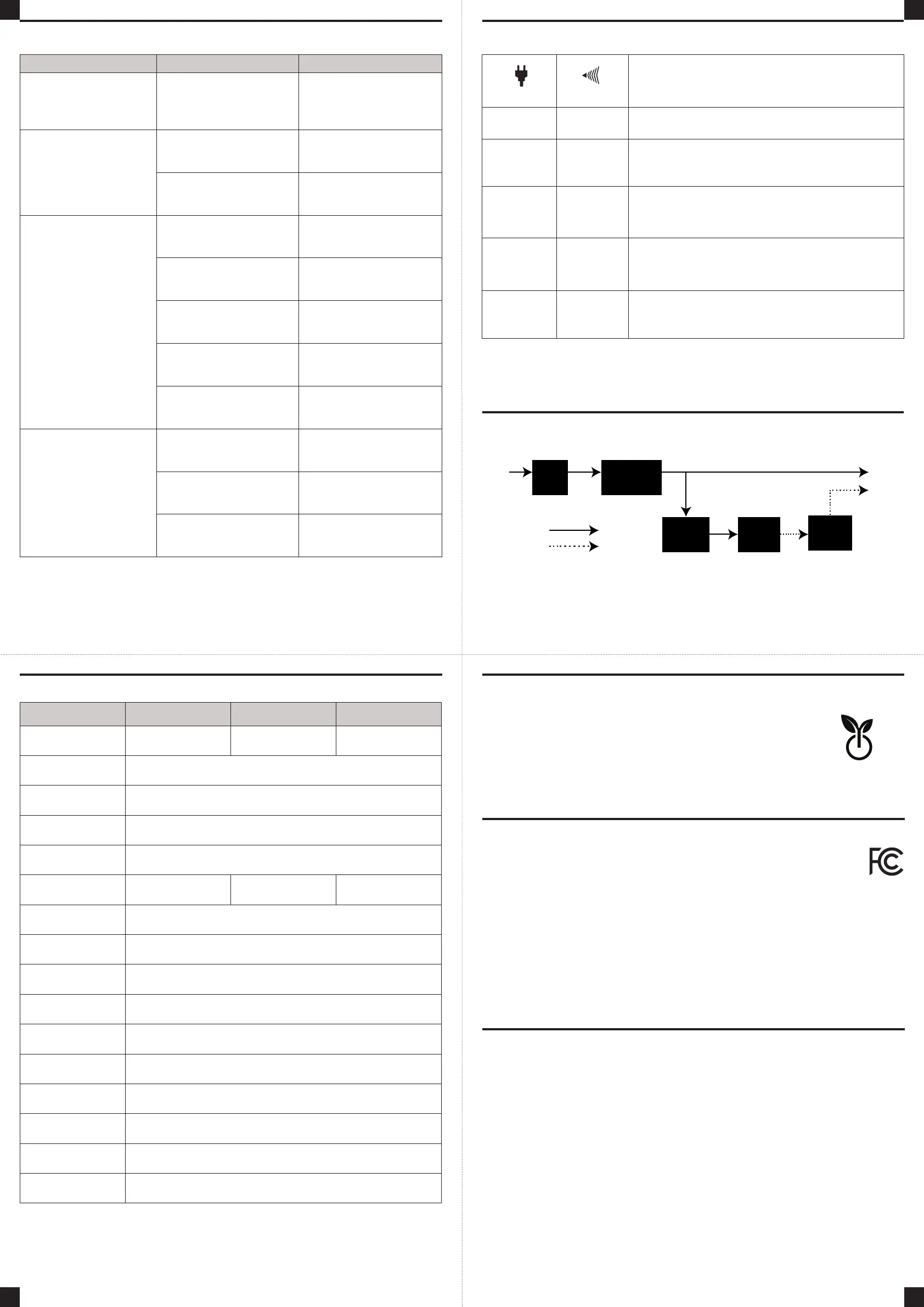
SYSTEM FUNCTION BLOCK DIAGRAM
DEFINITIONS FOR LED INDICATORS & AUDIBLE ALARMS
TROUBLESHOOTING
TECHNICAL SPECIFICATIONS
6
7 8
5
Input Output
Battery Mode
Normal Mode
EMI
Filter
Surge
Suppressor
Inverter
Charger
AC / DC
Battery
Additional troubleshooting information can be found at “Support” at www.CyberPowerSystems.com
Problem Possible Cause Solution
Full-time surge protection outlets stop
providing power to equipment. Circuit
breaker button is projecting from the
side of the unit.
Circuit breaker has been tripped due to
an overload.
Turn the UPS o and unplug at least one
piece of equipment. Reset the circuit
breaker by depressing the button, and
then turn the UPS on.
The UPS does not perform
expected runtime.
Battery not fully charged.
Recharge the battery by leaving the
UPS plugged in.
Battery is worn out.
Contact CyberPower Systems
about replacement batteries at:
cyberpowersystems.com/support.
The UPS will not turn on.
The on/o switch is designed to
prevent damage from rapidly turning
it o and on.
Turn the UPS o. Wait 10 seconds and
then turn the UPS on.
The unit is not connected to an
AC outlet.
The unit must be connected to a
110/120V 50/60Hz outlet.
The battery is worn out.
Contact CyberPower Systems
about replacement batteries at:
cyberpowersystems.com/support.
Mechanical problem.
Contact CyberPower Systems at:
cyberpowersystems.com/support.
The frequency is beyond 47-63Hz
Turn the UPS o. Make sure the
frequency range is within 47-63Hz.
Or you can turn on with battery mode.
PowerPanel® Personal is inactive
(all icons are gray).
The USB cable is not connected.
Connect the USB cable to the UPS unit
and an open USB port on the back of
the computer.
The USB cable is connected to a bad
USB port.
Check for a dierent USB port and plug
the cable in.
The unit is not providing battery power.
Shutdown your computer and turn the
UPS o. Wait 10 seconds and turn the
UPS back on. This should reset the unit.
* LED will flash when UPS alarm is beeping.
POWER ALARM
CONDITION
On O Normal
On*
Beep
twice every
30 seconds
Utility Failure - Battery Mode –
The UPS is providing power to battery power-supplied outlets
from its battery.
On*
Rapid
beeping every
1/2 second
Utility Failure - Low Battery –
The UPS is providing battery power. Rapid beeping indicates
the unit will run out of power soon.
O Constant tone
Overload –
Occurs when connected equipment exceeds the rating of battery outlets
of the UPS. Turn the UPS o, unplug at least one piece of equipment
from battery outlets, reset the circuit breaker and turn the unit on.
O Constant tone
Utility Failure –
The frequency is beyond 47-63Hz. The UPS will not turn on
in line mode.
Model SL700U SL750U SL900UC
Capacity 700VA / 370W 750VA / 375W 900VA / 450W
Nominal Input Voltage 120 Vac
Input Frequency 50/60 Hz +/- 3 Hz
On-Battery
Output Voltage
120Vac +/- 5%
On-Battery
Output Frequency
50Hz/60Hz +/- 1% (auto-sensing)
Max. Load for
UPS Outlets
700VA / 370W 750VA / 375W 900VA / 450W
Max. Load for Full-Time
Surge Protection outlets
12 Amps
On-Battery Output Wave
Form
Simulated Sine Wave
Operating Temperature + 32°F to 104°F / 0°C to 40°C
Operating Relative
Humidity
0 to 95% non-condensing
Size
Width/Height/Depth
12.76 x 5.4 x 2.76 in. / 324 x 138 x 70 mm
Net Weight (lbs./kg) 6.78 lbs. / 3.07 kg
Typical Battery
Recharge Time
8 hours typical from total discharge
Typical Battery Life 3 to 6 years, depending on number of discharge/recharge cycles
Recommended Battery Sealed Maintenance Free Lead Acid Battery
Safety Approvals UL1778(UPS), cUL CSA C22.2 No. 107.3-05, FCC/DoC Class B
Advanced Energy-Saving Design
The GreenPower UPS™ has a high-eciency charger, which makes it
the most energy-ecient UPS in its class. The advanced high-frequency
charging system significantly improves charging eciency and conserves
energy. As a result of this advanced design, the GreenPower UPS™ uses
less energy compared to competitive models. The GreenPower UPS™ is
manufactured in accordance with the Restriction on Hazardous Substances
(RoHS) directive making it one of the most environmentally-friendly UPS
systems on the market today.
CYBERPOWER GREENPOWER UPS™ TECHNOLOGY
GREEN
POWER UPS
™
Energy-Saving Technology
Please visit www.CyberPowerSystems.com for a copy of the Limited Warranty and Connected
Equipment Guarantee.
Where Can I Get More Information?
The application of the United Nations Convention of Contracts for the International Sale of
Goods is expressly excluded. CyberPower is the warrantor under this Limited Warranty.
For further information please feel free to contact CyberPower at:
Cyber Power Systems (USA), Inc. 4241 12th Ave E., STE 400, Shakopee, MN 55379;
call us at (877) 297-6937; or submit a web ticket online at cyberpowersystems.com/support.
Cyber Power Systems (USA), Inc. encourages environmentally sound methods for disposal
and recycling of its UPS products. Please dispose and/or recycle your UPS and batteries in
accordance to the local regulations of your state.
WARNING: This product can expose you to chemicals including bisphenol A (BPA) and styrene,
which is known to the State of California to cause reproductive harm and cancer. For more
information, go to www.P65Warnings.ca.gov.
This device complies with part 15 of the FCC rules. Operation is subject to the following two conditions: (1) this
device may not cause harmful interference, and (2) this device must accept any interference received, including
interference that may cause undesired operation.
Note: This equipment has been tested and found to comply with the limits for a Class B digital device, pursuant to
part 15 of the FCC Rules. These limits are designed to provide reasonable protection against harmful interference in
a residential installation. This equipment generates, uses, and can radiate radio frequency energy and, if not installed and used in
accordance with the instructions, may cause harmful interference to radio communications. However, there is no guarantee that
interference will not occur in a particular installation. If this equipment does cause harmful interference to radio or television
reception, which can be determined by turning the equipment o and on, the user is encouraged to try to correct the interference
by one or more of the following measures:
- Reorient or relocate the receiving antenna.
- Increase the separation between the equipment and receiver.
- Connect the equipment to an outlet on a circuit dierent from that to which the receiver is connected.
- Consult the dealer or an experienced radio/TV technician for help.
Warning: Changes or modifications not expressly approved by the party responsible for compliance could void the user’s
authority to operate the equipment.
Canadian Compliance Statement
CAN ICES-3 (B)/NMB-3(B)
LIMITED WARRANTY AND CONNECTED EQUIPMENT GUARANTEE
FCC COMPLIANCE STATEMENT
© 2023 CyberPower Systems (USA), Inc. PowerPanel® Personal is a trademark of Cyber Power Systems(USA) Inc.
All rights reserved. All other trademarks are the property of their respective owners.
K01-0000740-03


 To Previous Page
 Loading...