EasyManua.ls Logo

cycliq Fly12 CE122 - Default Chapter; Table of Contents

cycliq Fly12 CE122
37 pages
Print Icon
To Next Page IconTo Next Page
To Previous Page IconTo Previous Page
Loading...
2
FLY12 CE122 User Manual
What you get
Features
3
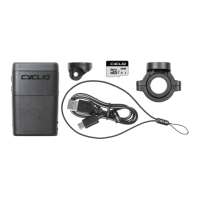
What’s in the box
21
Video resolution
4
Functions
21
Electronic image stabilisation
5
Changing your Fly12 CE settings
21
High dynamic range
6
Registering your Fly12 CE
22
Looping function
22
Manual footage capture
Read this before your set-up your Fly12 CE122
23
Incident protection function
6
Disclaimer
25
HomeSafe™ function
6
Warning against copyright infringement
25
Bike alarm
7
Safety, operating and care information
25
Idle mode
7
Caution
26
Charging on the fly
8
Fly12 CE layout
26
Cycliq Quick Release System™
26
Nanotechnology
Setting up your Fly12 CE122
26
Dashcam mode
14
Charging the battery
26
Heat protection
15
Battery level indicator
27
Master reset
16
Formatting your microSD card
16
Inserting and removing microSD Card
Using your footage
17
Mounting your Fly12 CE122
28
Accessing your footage
28
Video segment length
Using your Fly12 CE
28
Editing footage
18
Turning on your Fly12 CE
29
The CycliqPlus mobile app
18
Turning off your Fly12 CE
32
Join the Cycliq community
18
Light mode settings
33
Technical data
19
Visual and audible alerts summary
34
FCC compliance statement
20
Audio settings
35
IC compliance statement
20
Airplane mode
36
Regulatory information
20
Garmin Connect IQ app – CycliqPlus Connect

Other manuals for cycliq Fly12 CE122

Related product manuals