12 of 16
FLY12 (MANUAL SETTING)
Forgot your WiFi password?
• Connect Fly12 to a PC/Mac.
• Follow the instructions within the help le to reset
your WiFi Password.
Time and Date Setting
• Connect Fly12 to a PC/Mac.
• Follow the instructions within the help le to set your
time and date stamp which is displayed on your footage.
This is an automated procedure when your
Fly12 is paired via the smartphone app.
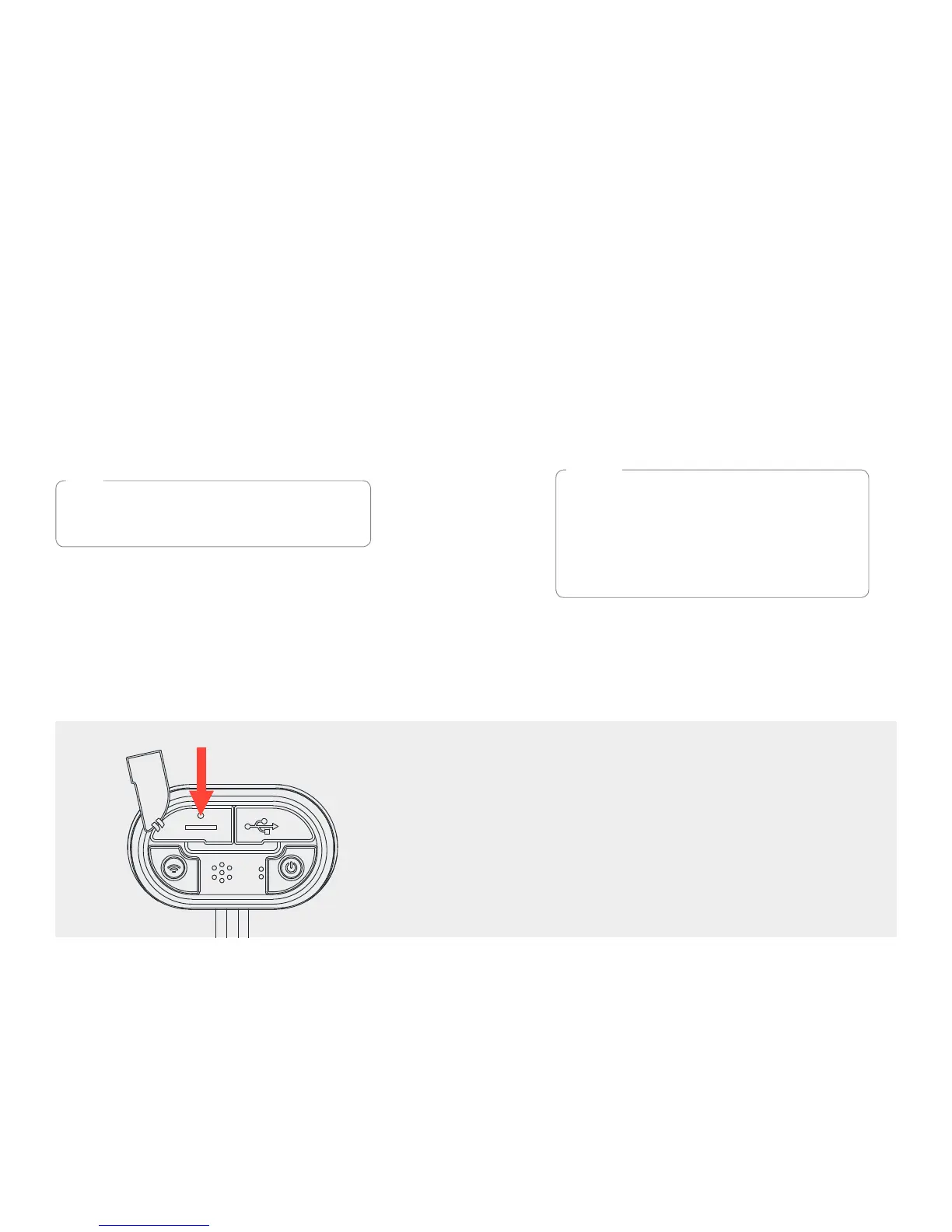
MASTER RESET
In the event that a master reset is required, the reset
button is located within the small cut out as illustrated.
Carefully, using a ne object, press the reset button to
perform the reset.
TIP
MICRO SD CARD
Included with your Fly12 is a 16GB
class 10 microSD card which has been
pre-installed. Fly12 supports up to
64GB class 10 microSD cards.
To achieve optimal performance, Cycliq
recommends you regularly perform a full
overwrite of your microSD card using
SD Formatter – www.sdcard.org/downloads
(free software download).
NOTE


 To Next Page