
 Need help?
Do you have a question about the CyClone Micro 2+ and is the answer not in the manual?
Describes the product as a new type of family high-definition home video player supporting various media formats.
Lists supported video, audio, image formats, USB host, HDMI, and 1080P output specifications.
Lists the items included in the product package, with quantities.
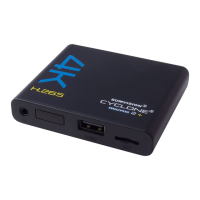
Illustrates the front panel of the media player and defines its elements.
Defines the elements on the back panel of the media player, including AV, HDMI, Coaxial, and DC IN ports.
Details the functions of each button on the remote control, such as Power, Mute, Home, etc.
Details the initial setup steps, including power connection and TV audio/video output connections.
Explains how to connect the player to a TV using composite AV cables.
Explains how to connect the player to an audio device using a coaxial cable for audio output.
Describes how to connect the player to a TV using an HDMI cable for high-quality audio and video.
Explains how to connect external storage devices like USB drives and hard disks to the player.
Describes the main menu options (USB Device, Smart Card, Setup) accessible via the HOME button.
Explains how to configure system settings like Language, Auto Play, Screen saver, and System Info.
Details options for selecting audio output modes, including Normal, SPDIF LPCM, and SPDIF RAW.
Explains how to adjust video output settings, including TV system formats like NTSC, PAL, and various resolutions.
Covers settings for slide shows, transition effects, and background music for photo playback.
 General
| Weight | 200g |
|---|---|
| Video Output | HDMI, Composite |
| Audio Output | HDMI |
| Network | Ethernet |
| USB | 2 x USB 2.0 |
| Card Reader | SD/SDHC |
| Supported Video Formats | AVI, MKV, MOV, MP4, TS, M2TS, VOB, WMV |
| Supported Audio Formats | MP3, WMA, AAC, OGG, FLAC, WAV |
| Power Supply | 5V/2A |

 To Next Page