

EasyManua.ls Logo

Cygnett CY2961CHCSH - User Manual

Cygnett CY2961CHCSH
11 pages
Print Icon
To Next Page IconTo Next Page
Loading...
Smart Hub + IR Remote Control
User Manual
Your Cygnett Smart Hub + IR Remote Control is the centre of your smart home. From controlling your TV, DVD
player, air conditioner and so much more; you can now lose your remotes for good. The Smart Hub + IR Remote
Control also serves as the platform for Cygnett’s Smart Control Button, Smart Motion Sensor, Smart Window &
Door Sensor and Smart Humidity & Temperature Sensor.
Question and Answer IconNeed help?

Do you have a question about the Cygnett CY2961CHCSH and is the answer not in the manual?

Summary

Welcome and Safety Information

Welcome to Cygnett Smart Home

Introduction to the Cygnett Smart Home ecosystem and its integration capabilities.

Safety Warnings

Essential precautions and operating limitations for the Cygnett Smart Home device.

Smart Hub Setup and Configuration

Smart Hub Installation

Procedure for physically connecting the Smart Hub and setting up Wi-Fi and app.

Pairing with Apple Home App

Instructions for integrating the Smart Hub with Apple's Home app and Siri.

Adding a Remote Control

Guide to adding infrared (IR) remote controls or teaching the hub new ones.

Device Management and Features

Maintenance and Disposal

Guidelines for cleaning, maintaining, and responsibly disposing of the device.

Apple HomeKit Compatibility

Information on how the device works with Apple HomeKit and its requirements.

Cygnett Smart Home Screen

Overview of the app's main screen for managing connected smart home devices.

Smart Hub Features

Details on the Smart Hub's role as a platform for sensors and IR control.

IR Remote Control Functionality

Explanation of how the IR remote control feature works within the app.

Account and Support

Account Settings

Options for managing user account preferences and security.

Integration Setup Guides

Guides for integrating Cygnett devices with Alexa, Google Assistant, and Apple HomeKit.

Frequently Asked Questions

A resource for common troubleshooting queries and up-to-date information.

Support Request

Contact information for reaching Cygnett Care for assistance and concerns.

Overview

The Cygnett Smart Hub + IR Remote Control is a central component of the Cygnett Smart Home ecosystem, designed to unify control over various smart home devices and appliances. It acts as a universal infrared (IR) remote control for devices like TVs, DVD players, and air conditioners, aiming to reduce the clutter of multiple physical remotes. Beyond its IR capabilities, the Smart Hub serves as the platform for other Cygnett smart sensors and control buttons, including the Smart Control Button, Smart Motion Sensor, Smart Window & Door Sensor, and Smart Humidity & Temperature Sensor. This integration allows users to manage their home environment from a single, centralized app, offering convenience, security, and peace of mind.

Function Description:

The primary function of the Cygnett Smart Hub + IR Remote Control is to provide a centralized control point for a wide range of smart home devices. It integrates with Google Home Assistant, Amazon Alexa, and Apple HomeKit, allowing for voice control and broader smart home ecosystem compatibility. Users can control their TV, DVD player, air conditioner, and other IR-controlled appliances directly through the Cygnett Smart app. The device also acts as a hub for Cygnett's smart sensors, enabling the collection of live information from the home and facilitating automated actions based on sensor data. The app's intuitive user interface allows for remote power on/off, monitoring of device status, and access to various settings.

The IR remote control feature allows users to either select from a large, constantly updated database of remote controls for various brands and models or "teach" the Smart Hub functions from an existing physical remote control. This learning mode enables the Smart Hub to replicate the commands of virtually any IR remote, making it highly adaptable to existing home entertainment and climate control systems.

The Smart Hub tab within the Cygnett Smart app is where users can add and manage their smart sensors and control buttons. This section provides live information about the home, allowing for real-time monitoring of environmental conditions and security status.
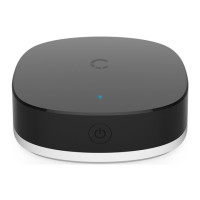
Important Technical Specifications:

  • Item No: CY2961CHCSH
  • Input: DC 5V/1A (5W) via Micro-USB to USB-A charger
  • Wi-Fi: 2.4GHz 802.11b/g/n (supports 2.4GHz Wi-Fi networks only)
  • Working Range: Open area within 5m (for IR remote control functionality)
  • Operating Temperature: 0°C to 45°C
  • Intended Use: Indoor use only
  • Compatibility: Apple HomeKit, Google Home Assistant, Amazon Alexa
  • Device Connection: The Smart Hub connects to the Wi-Fi network and then communicates with other smart devices and sensors.

Usage Features:

  • Easy Installation: The device connects via Micro-USB and a USB-A charger. Pairing with the Cygnett Smart app involves a quick pairing process, requiring the Wi-Fi network password.
  • Centralized Control: All smart home devices and IR-controlled appliances can be managed from the Cygnett Smart Home screen within the app.
  • Remote Control Database: Access to a large and updated database of IR remote controls for various brands and models.
  • IR Learning Mode: Ability to "teach" the Smart Hub functions from existing physical IR remote controls, ensuring compatibility with devices not listed in the database.
  • Smart Sensor Platform: Serves as a hub for Cygnett's range of smart sensors (e.g., motion, window/door, humidity/temperature) and smart control buttons, enabling a more comprehensive smart home setup.
  • HomeKit Integration: Compatible with Apple HomeKit, allowing control via the Home app and Siri voice commands. For remote access and automation with HomeKit, an Apple TV (tvOS 10+), HomePod, or iPad (iOS 10+) set up as a home hub is required.
  • Account Settings: The app provides options for changing passwords, selecting languages, enabling/disabling haptic feedback, and logging out.
  • Integration Setup Guides: Instructions within the app for integrating with Amazon Alexa, Google Assistant, and Apple HomeKit.
  • Frequently Asked Questions (FAQ): An in-app section for troubleshooting and support.
  • Support Request: Direct link to Cygnett Care for assistance with the device.
  • Intuitive User Interface: The Cygnett Smart Home screen is designed for ease of use, allowing users to quickly turn devices on/off and access information.
  • Device Renaming: Users can rename their Smart Hub + IR Remote Control within the app settings for better organization.

Maintenance Features:

  • Cleaning: Before cleaning, disconnect the device from all power sources. Use a soft, dry cloth to clean; avoid using any cleaning agents to prevent scratches.
  • Placement: Place the Smart Hub + IR Remote Control in a cool and dry environment, away from water, and ensure it is not exposed to wet environments.
  • Disposal: The product should not be treated as household waste. It must be sent to an applicable collection point for the recycling of electronic equipment to prevent potential negative environmental and health consequences. Contact your local city office for recycling information.
  • Software Updates: The device's firmware can be updated, as indicated by the firmware version display in the device settings, ensuring access to the latest features and improvements.
  • Troubleshooting: The in-app FAQ and support request features provide resources for resolving issues and maintaining optimal device performance.

Cygnett CY2961CHCSH Specifications

General IconGeneral
BrandCygnett
ModelCY2961CHCSH
CategorySwitch
LanguageEnglish