
 To Next Page
L
Lacey HowardAug 3, 2025
How to fix a Cylinda IHI 6160 Hob that does not work?
- JJoyce CarterAug 3, 2025
If your Cylinda Hob isn't working, first ensure it's turned on. If it is on, check the fuse and replace it if it has blown.

How to fix a Cylinda IHI 6160 Hob that does not work?
If your Cylinda Hob isn't working, first ensure it's turned on. If it is on, check the fuse and replace it if it has blown.
What to do if Cylinda IHI 6160 does not respond and emits an extended beep?
If your Cylinda Hob isn't responding and beeping, it could be due to improper use, such as touching the wrong sensor fields or touching them too briefly. Try reconnecting the hob. Also, check if the sensor fields are covered or dirty; if so, uncover or clean them.
Why does my Cylinda Hob keep switching itself off?
If your Cylinda Hob switches off by itself, it might be because no sensor field was touched for 10 seconds after turning it on. Try switching on the appliance and setting the heat setting without delay. Alternatively, the sensor fields might be covered or dirty, so uncover or clean them.
Why are the sensor fields on my Cylinda Hob not responding?
If the sensor fields on your Cylinda Hob aren't responding when touched, it could be because the appliance isn't turned on, so turn it on. It could also be that you're touching the sensor field too briefly (less than one second), so touch it longer. Finally, make sure you're only touching one sensor field at a time (except when switching off a cooking zone).
What to do if a single cooking zone switches off on Cylinda IHI 6160?
If a single cooking zone on your Cylinda Hob switches off and the residual heat indicator “H” is displayed, try switching the cooking zone on again, as it may be due to limited cook time. Also, check if the sensor fields are covered or dirty and uncover or clean them. It may also be caused by overheated electronic components.
Why is the residual heat indicator extinguished on my Cylinda Hob?
If the residual heat indicator on your Cylinda Hob is extinguished even though the cooking zones are hot, it may be due to a power outage or the appliance being disconnected. The residual heat indicator will reappear the next time the appliance is turned on and off again.
Warns about hot surfaces, fire risks from cooking and stored items, and electrical shock from damaged surfaces.
Details safe operation for children and vulnerable users, emphasizing supervision and proper use.
Specifies worktop dimensions, thickness, spacing, material resistance, and required clearances for installation.
Outlines safety warnings and procedures for connecting the hob to the electrical supply via an authorized electrician.
Presents diagrams for single/three-phase connections, cable specifications, and fuse protection.
Lists problems like appliance not working, sensor issues, and switching off, with possible causes and user remedies.
 General
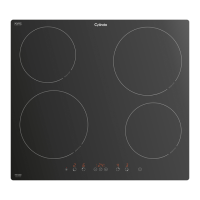
| Hob type | Zone induction hob |
|---|---|
| Product color | Black |
| Top surface type | - |
| Appliance placement | Built-in |
| Number of cooking zones | 4 zone(s) |
| Regular cooking zone shape | Round |
| Large cooking zone diameter | 210 mm |
| Number of gas cooking zones | 0 zone(s) |
| Regular cooking zone diameter | 160 mm |
| Child lock | Yes |
| Control type | Touch |
| Control position | Front |
| Large cooking zone | 2300 W |
| Number of boosters | 4 |
| Regular cooking zone | 1200 W |
| Number of power levels | 9 |
| Boost large cooking zone | 3000 W |
| Boost regular cooking zone | 1400 W |
| AC input voltage | 230 V |
| Connected load (gas) | - W |
| Connected load (electric) | 7400 W |
 Weight and Dimensions
| Depth | 518 mm |
|---|---|
| Width | 576 mm |
| Height | 55 mm |
| Weight | 10500 g |
| Installation compartment depth | 490 mm |
| Installation compartment width | 560 mm |