5
5
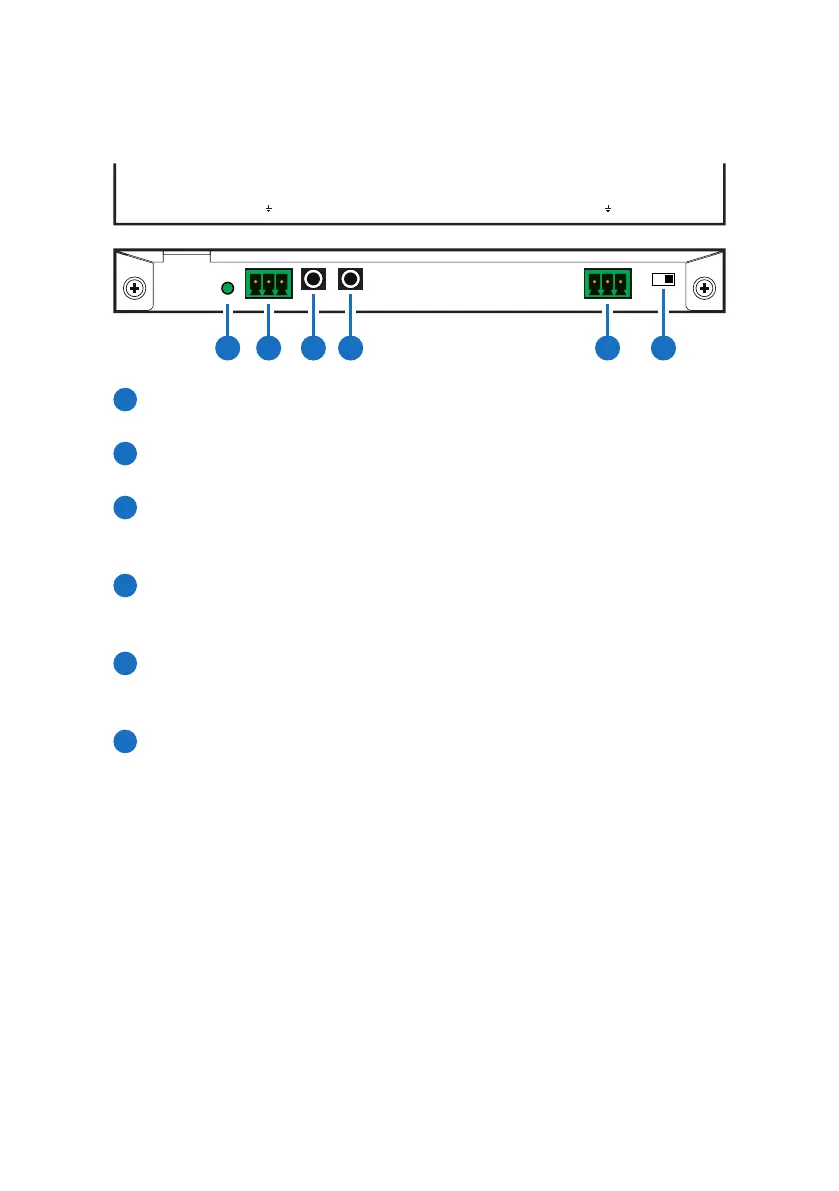
6.3 Receiver Front Panel
POWER AUDIO OUTIR IN1IR OUT2 UPDATERS-232 OUT
TX RXLR
CAT5e/6/7 IN
HDMI OUTLAN
OPT.
IN
ARC
IN
1 2 3 4 5 6
POWER LED: This LED will illuminate when device is connected with
power supply.
AUDIO OUT L/R: Connect to speaker with RCA input for audio
signal output.
IR IN 1: Connect to the supplied IR Extender cable for IR signal
reception. Ensure that remote being used is within the direct line-
of-sight of the IR Extender.
IR OUT 2: Connect to the supplied IR Blaster cable for IR signal
transmission. Place the IR Blaster in direct line-of-sight of the
equipment to be controlled.
RS-232 OUT TX/RX: Connect to the device that is to be controlled
via 3-pin Relay cable by RS-232 commands. For sending command
to Transmitter side, the TX and Rx pin must be reversed.
UPDATE: This is reserved for fi rmware update use only. Switch
this deep switch to left for fi rmware update use, under normal
operation, leave the switch on right. Update procedure may be
done from the same RS-232 port for both Transmitter and Receiver.



 To Next Page