Installation
Quick Install Guide
Package Contents
If any of the above items are missing, please contact your reseller.
Kit includes the DHP-P338AV
and DHP-308AV Network
PowerLine Adapters
2
Plug the DHP-308AV Adapter into an AC wall outlet in the room
with your router. Verify that the Power LED is lit. If not, insert into
another outlet. Now plug the DHP-P338AV 3-Port Passthrough
Adapter into an AC wall outlet. Verify that the Power LED is lit.
©2012 D-Link Corporation/D-Link Systems, Inc. All rights reserved. D-Link and the D-Link logo are registered trademarks of D-Link Corporation or its subsidiaries
in the United States and/or other countries. Other trademarks or registered trademarks are the property of their respective owners. Maximum throughput
based on theoretical transmission PHY rate. Actual data throughput will vary. Network conditions and environmental factors, including volume of trac and
network overhead, may lower actual data throughput rate. Interference from devices that emit electrical noise, such as vacuum cleaners and hair dryers, may
adversely aect the performance of this product. This product may interfere with devices such as lighting systems that have a dimmer switch, short wave
radios, or other powerline devices that do not follow the HomePlug AV standard. Product specications, size and shape are subject to change without notice,
and actual product appearance may dier from that depicted on the package. Visit dlink.com (US) or dlink.ca (Canada) for more details.
Version 1.00(NA) (December 04, 2012) 6HPP339AQ.01G
Power LED - A solid light indicates that the
device is receiving electrical power.
PowerLine LED - A solid light indicates that
the device is connected to the PowerLine
Network.
LED Colors:
Green - Link rate/quality is the best.
Amber - Link rate/quality is better.
Red - Link rate/quality is good.
Ethernet LED - A solid light indicates that
the Ethernet port is linked and will blink
during data transmission.
Technical Support
Having trouble installing your new product? D-Link’s website contains
the latest user documentation and software updates for D-Link products.
U.S. and Canadian customers can contact D-Link Technical Support
through our website or by phone.
United States
Telephone: (877) 453-5465
Internet: http://support.dlink.com
Canada
Telephone: (800) 361-5265
Internet: http://support.dlink.ca
DHP-P339AV
LEDs (from top to bottom)
PowerLine AV+ 3-Port
HD Media Starter Kit
3
Connect the DHP-308AV adapter to the LAN port of your router.
You may now attach up to 3 Ethernet devices, such as a NAS, smart
TV, or game console to the DHP-P339AV via Ethernet cables. With
the Ethernet device powered on, verify that the Ethernet LED is lit
on the adapter to indicate a good connection. Setup is complete.
1
Ethernet Port Trac Priority (QoS)
When connecting devices to your Ethernet ports, be aware of
the Quality of Service (QoS) priorities assigned to each port
Installation Tips
1. For best results, use in a standard wall outlet without any other products plugged into the same outlet.
Connecting this product to a power strip or a surge protector may adversely aect the performance of this
product.
2. Avoid using the PowerLine adapters in an electrical outlet that is located near an appliance that uses a lot of
power such as a washer, dryer, refrigerator, microwave, hair dryer, or air conditioning system.
3. Plug the PowerLine adapters in the same room in order to verify whether your home’s electrical wiring is
suitable. Once congured you may place the PowerLine adapters to the location of your choice.
Port 1. Has the highest priority and gives uninterrupted service to connected
device that require the highest priority, such as media players or Smart TVs.
Port 2. Has high priority. You can connect devices to this port that require high
priority, such as a game console.
Port 3. Has medium priority and is best suited for networking data devices, such
as a printer.
Once the Power LEDs are lit, verify that the PowerLine LED is lit
on both adapters. This indicates that your adapters are properly
connected to each other. If the LED is not lit, insert one or both
adapters into dierent outlets and repeat step 2.
Room 1 Room 2
Adapter 1
Adapter 2
Room 1 Room 2
Adapter 1 Adapter 2
Room 1 Room 2
Routeur
Internet
Computer
Adapter 1 Adapter 2
Two Ethernet Cables
Game
Console
Smart TV
Computer

 Need help?
 General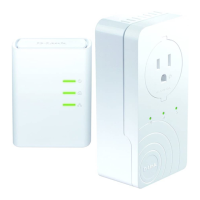

 To Next Page