This document serves as a Quick Installation Guide for the R18 AX1800 Smart Router, providing instructions for setup, troubleshooting, and important regulatory information.
Function Description
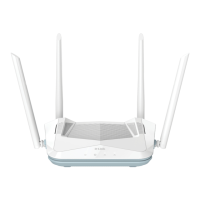
The R18 AX1800 Smart Router is designed to provide wireless internet connectivity, acting as a central hub for network devices. It connects to an existing modem to distribute internet access via Wi-Fi and wired Ethernet connections. The router supports the AX1800 standard, indicating its capacity for Wi-Fi 6 (802.11ax) speeds and features, which include improved efficiency, faster speeds, and better performance in dense environments compared to older Wi-Fi standards. It enables users to connect multiple devices such as computers, smartphones, tablets, and smart home devices to the internet. The router can be configured and managed through a dedicated mobile application or a web-based interface.
Important Technical Specifications
- Model: R18
- Wi-Fi Standard: AX1800 (likely Wi-Fi 6, 802.11ax)
- Connectivity:
- Wireless (Wi-Fi)
- Wired (LAN ports)
- Default Wi-Fi Name (SSID): R18-XXXX (where XXXX represents the last 4 characters of the MAC address)
- Web-based Configuration Utility Address: http://xxxx.devicesetup.net/ (where XXXX represents the last 4 characters of the MAC address)
- Power Input: Requires an external power adapter (not explicitly detailed but implied by the setup steps).
- Physical Ports: Includes at least one WAN/Internet port and multiple LAN ports, as depicted in the setup diagrams.
- Reset Mechanism: Features a physical reset button for restoring factory default settings.
- LED Indicators: Equipped with LED lights to indicate power status, internet connectivity, and potentially Wi-Fi status.
Usage Features
The R18 AX1800 Smart Router offers several usage features to facilitate easy setup and management:
- Multiple Setup Options:
- Option 1 (Mobile App): Users can download the "EAGLE PRO AI" app from the App Store or Google Play. The app allows for scanning a QR code on the router to add the device and complete the setup process. This method is designed for convenience and guided installation.
- Option 2 (Web-based Configuration with Default Wi-Fi): This method involves connecting to the router's default Wi-Fi network (SSID: R18-XXXX) using the provided default Wi-Fi password (XXXXXXXXXX). Once connected, users can access the web-based configuration utility at http://xxxx.devicesetup.net/ to configure the router.
- Option 3 (Web-based Configuration with Wired Connection): For users who prefer a wired setup or encounter issues with Wi-Fi, the router can be connected to a computer via an Ethernet cable to one of its LAN ports. The web-based configuration utility can then be accessed at http://xxxx.devicesetup.net/.
- Quick Installation Steps:
- Connect Modem: Connect the modem to the router's Internet port.
- Power On: Plug in the router's power adapter and wait for approximately 120 seconds for the router to boot up.
- Device Password: The router comes with a default device password, which is essential for accessing the configuration utility. This password, along with the Wi-Fi name and password, is printed on the device label.
- EAGLE PRO AI App: The mention of "EAGLE PRO AI" suggests advanced features possibly related to AI-driven network optimization, smart home integration, or enhanced security, though specific details are not provided in this guide.
- Web-based Interface: Provides a comprehensive interface for managing network settings, security protocols, parental controls, and other advanced features.
Maintenance Features
The R18 AX1800 Smart Router includes features to help users maintain its optimal performance and troubleshoot common issues:
- Power Cycling: A basic troubleshooting step recommended for resolving internet connectivity issues. This involves turning the router off and then on again.
- Factory Reset:
- Purpose: To restore all router settings to their original factory defaults, which is useful for resolving persistent configuration issues or when forgetting the device password or Wi-Fi password.
- Procedure: Locate the reset button (typically a small, recessed button). With the router powered on, use a paper clip to press and hold the button until the LED turns solid red. Release the button, and the router will reboot with factory settings.
- Device Label Information: The device label on the bottom of the router contains critical information such as the default Wi-Fi Name (SSID), Wi-Fi Password, and device password, which are essential for initial setup and troubleshooting.
- Technical Support: D-Link provides technical support through its website (http://support.dlink.com) and offers contact information for specific regions (e.g., United States: www.dlink.com/en/contact-us). This ensures users can get assistance for complex issues.
- Firmware Updates: While not explicitly detailed in the quick guide, D-Link's website typically offers the latest user documentation and software updates (firmware) for its products, which are crucial for security, performance improvements, and new features.
- GPL Code Statement: The router includes software code subject to the GNU General Public License (GPL) or GNU Lesser General Public License (LGPL). D-Link provides access to the full GPL Code Statement and source code upon request, demonstrating transparency and adherence to open-source licensing. This is more of a compliance feature but ensures the underlying software can be inspected and maintained by the community.
- FCC Compliance: The device complies with Part 15 of the FCC Rules, ensuring it operates without causing harmful interference and accepts any interference received, which is a regulatory requirement for electronic devices sold in the United States.

 Need help?
 General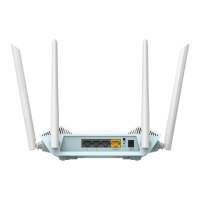








 To Next Page