7
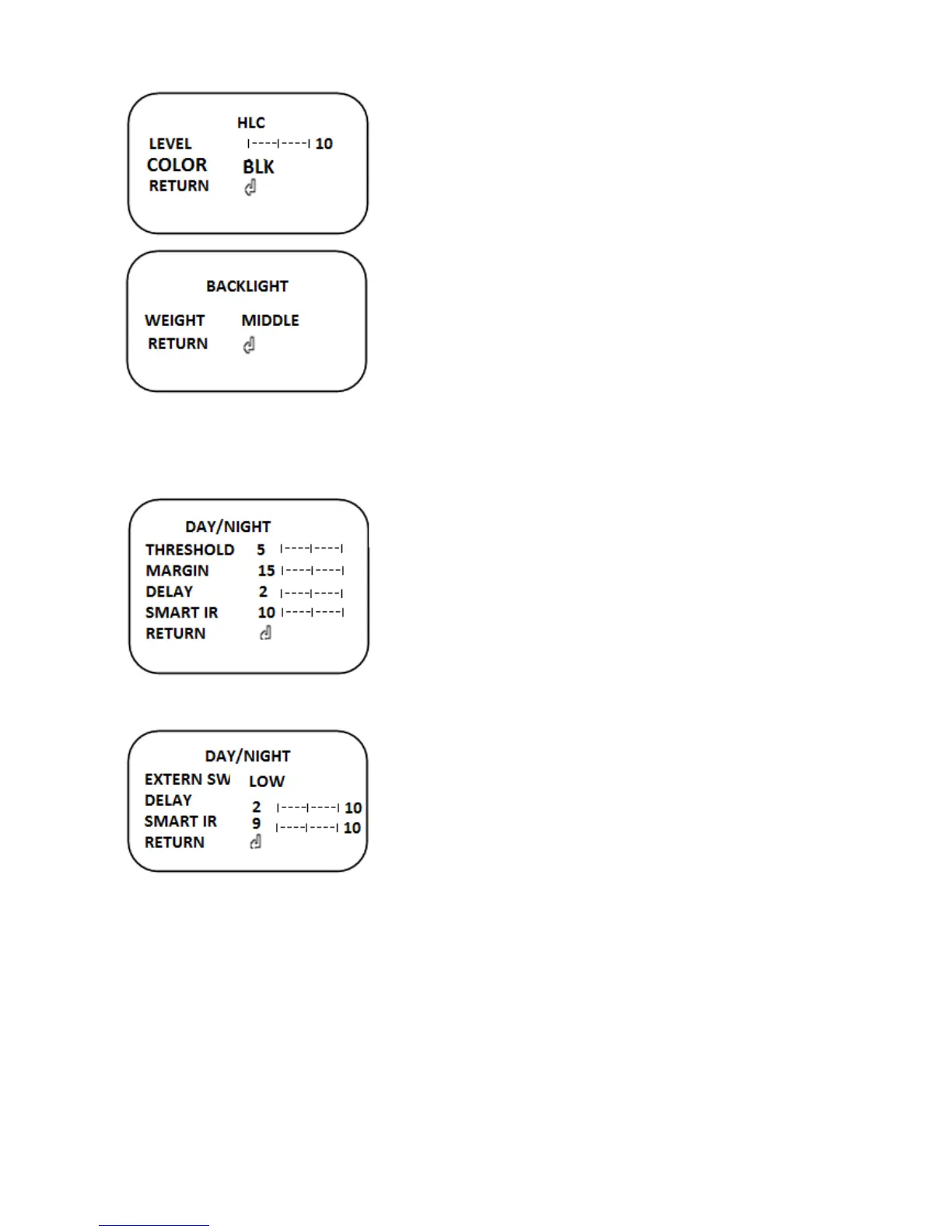
2) HLC
High Light Compensation
▶ON(0~20), OFF
LEVEL: Select HLC level.
COLOR: Select HLC color(CYN, YEL, WHT, BLK, BLU,
RED, MAG, GRN)
3) WDR
Wide Dynamic Range
WEIGHT:LOW/MIDDL/HIGH
5. DAY/NIGHT
The function is used to set the Day/Night function which switches day/Night mode
automatically based on the level of illumination.
1) AUTO
THRESHOLD(0~20): Sets the threshold for identifying
the Night status from the Day status.
MARGIN(0~20): Sets the margin for identifying the Night
status from the Day status.
DELAY: Sets the Night/Day identification transfer time.
SMART IR (OFF/LOW/MIDDLE/HIGH)
Brightness of IR and saturation phenomenon are automatically adjusted.
2) EXTERN
- EXTERN SW
Select the active level.
- DELAY (1~20)
Set the Night/Day identification transfer time
- SMART IR (1~20)
Brightness of IR and saturation phenomenon are
automatically adjusted.
3) COLOR: Only Color
4) B&W: Only B/W
6. WHITE BAL
This function is used to set the White Balance operation which adjusts the color scheme.
1) AUTO: Auto tracking white balance.
2) MANUAL
White balance value can be changed by “R-GAIN” and “B-GAIN” value in manual mode


 To Next Page
 Loading...