13
IDEA Series ENIT
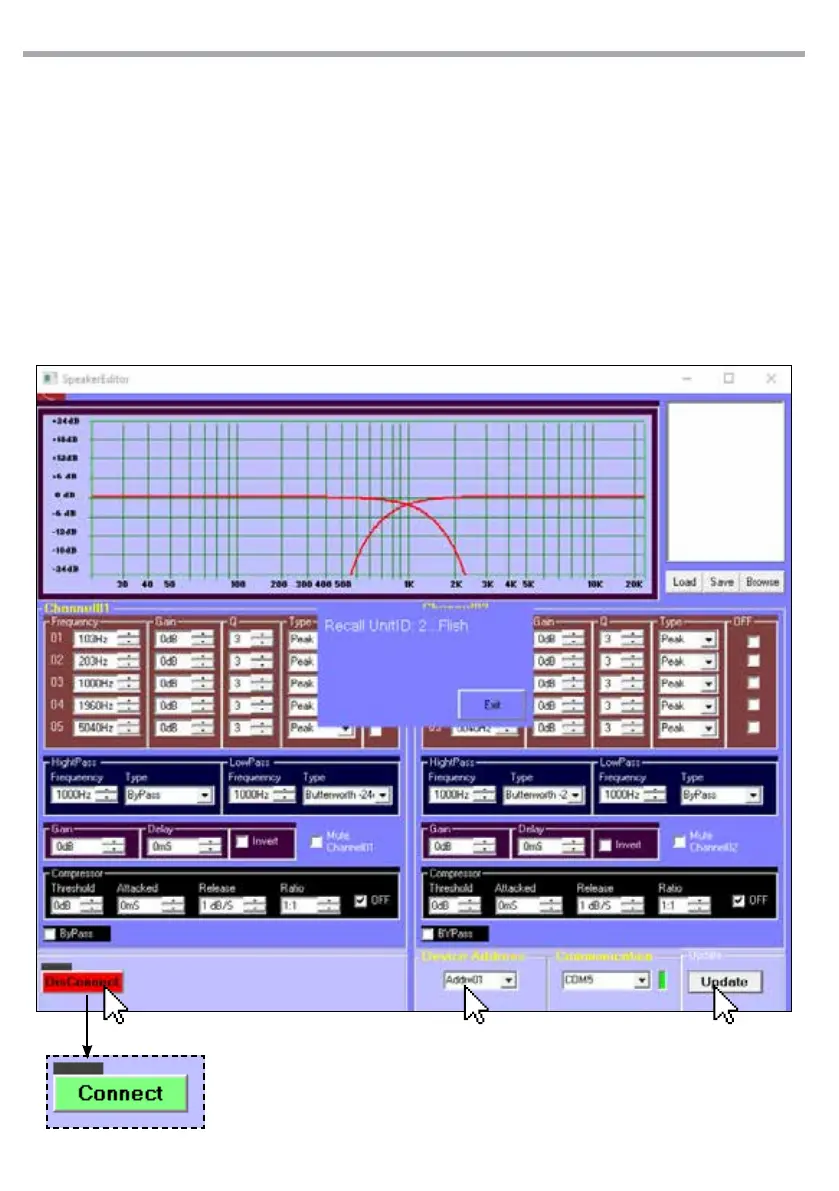
• Cliccare su “DisConnect” (1) per accendere il DSP.
Una volta avvenuta la connessione si accen-
derà l’indicatore verde (“Connect”).
• Cliccare sul menu a tendina relativo agli in-
dirizzi ID “Device Address” (2) e selezionare
quello precedentemente assegnato/rilevato
dal software AddressEditer.
• Premere “Update” (3).
• Apparira la scritta Recall Unit ID:X Flish dove X
è il numero dell’indirizzo ID selezionato. Il DSP
è connesso e mostra nella schermata il graco
e i dati del le preset.
• Click on “DisConnect”to switch on the DSP.
Once connected, the green indicator will light
up.
• Click on the drop-down menu relating to the
“Device Address” ID (2) addresses and select
the one previously assigned / detected by the
AddressEditer software.
• Press “Update”(3).
• The word Recall Unit ID: X Flish appears where
X is the number of the selected ID address.
The DSP is connected and shows the graph
and the data of the preset le on the screen.
1 2 3



 To Next Page