Need help?
Do you have a question about the DAD SX Series and is the answer not in the manual?
General safety instructions and warnings for using the equipment.
Installation precautions, heat sources, confined spaces, and electrical safety.
Information on goods shipment, risk, and claims for damages.
Details on product warranty, registration, and terms.
Overview of the new lightweight DAD SX series amplifiers.
Highlights the series' compact, lightweight, and powerful design.
Describes the focus on tone quality and frequency reproduction.
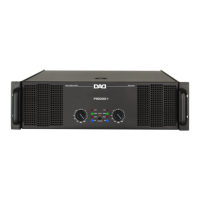
Details controls like handles, power switch, and level controls on the front panel.
Describes indicators for signal presence, clipping, protection, and operating modes.
Details input/output connectors, fuse holder, and ventilation openings.
Describes XLR, RCA, Speakon, Jack inputs, and mode selectors.
Instructions for connecting the power supply cable to the unit and mains.
Overview of the amplifier's built-in reliability and protection features.
Explains the cooling system, fan control, and overheat protection mechanism.
Details short circuit and overload protection for output transistors.
Describes the amplifier's voltage range and automatic shut-off protection.
Explains DC protection, muting for transients, and protection against subsonic frequencies.
Describes protection against VHF signals and feedback.
Explains how the CLIP/Limit function prevents distortion and protects speakers.
Lists the default factory settings for volume, power, clip, and mode.
Explains how to set up and connect the amplifier in stereo mode.
Explains how to set up and connect the amplifier in parallel mode.
Explains how to set up and connect the amplifier in bridge mode.
Guidance on using balanced vs. unbalanced cables for input signals.
Advice on using proper speaker cables and cable care.
Details the wiring and usage of Speakon connectors for speaker output.
Explains the pinout and usage of XLR connectors for signal input.
Details the pinout and usage of balanced 6.3mm TRS Jack connectors.
Explains the connection for RCA signal input/output.
Instructions on how to safely replace a blown fuse.
Provides simple methods for diagnosing and troubleshooting common issues.
Guidance on routine cleaning, particularly dust filters.
Explains speaker efficiency and its impact on sound output volume.
Discusses speaker impedance, its variation with frequency, and connection types.
Guidance on selecting an amplifier based on speaker AES power and impedance.
 General
| Channels | 2 |
|---|---|
| Frequency Response | 20Hz - 20kHz |
| Input Impedance | 10k Ohms |
| Input Sensitivity | 1V |
| Protection | Short circuit |
| Cooling | Fan |
| Connectors (Input) | XLR |
| Connectors (Output) | Binding Post |

 To Next Page