IMPORTANT SAFEGUARDS
When using electrical appliances, basic safety precautions should always be followed.
These instructions should be saved for future reference:
• Read and familiarise yourself with all operating instructions before using your
Bluetooth Earphones.
• Before using your Bluetooth Earphones, visually check that the unit is intact and
has not suffered any transit damage.
• Only charge the earphones from a suitable USB outlet, any other power source
may cause permanent damage to the earphones.
• The earphones must be fully charged via the USB port before use.
• Do not operate these Earphones after a malfunction or after being dropped or
damaged in any way.
• Never allow children to play with the Earphones. Small parts may be a choking
hazard.
• Do not allow the USB charging cable to hang over sharp edges or come in contact
with hot surfaces.
• These Earphones are intended for household use only and should not be used for
industrial purposes.
• Do not use these Earphones for anything other than its intended use.
• Do not immerse the Earphones in water or any other liquids.
• Do not expose the Earphones to moisture, rain or humidity, they are not
waterproof.
• Before cleaning, ensure the Earphones are not connected to the USB supply.
• Never clean the earphones with solvents or harsh or abrasive cleaners.
• Do not attempt to dismantle the Earphones, it does not contain any user
serviceable parts.
• Whilst not in use, store the Earphones in a cool dry place free from extreme
temperatures, humidity or dust.
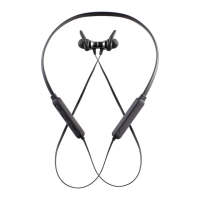
Description of Controls
1. Micro USB DC Charging Port (rear).
2. + Press briefly to Skip forwards to the next track
or press and hold for volume increase.
3. Power/Play/Pause/Phone button.
4. ▬ Press briefly to Skip back to the previous next
track or press and hold for volume decrease.
5. Bluetooth/Charge Indicator.
6. USB Charging Cable.
7. Micro USB Plug.


 To Next Page
 Loading...