Charging the internal Battery
Before use, please ensure that the internal rechargeable battery is fully charged as follows:
1. Insert the Micro USB Plug (7) of the USB Charging Cable (6) into the Micro USB DC Port (1) on rear of the controls
to charge the internal battery.
2. Insert the large USB plug on the other end of the USB Charging Cable (6) into a suitable USB charger rated at 5
volts 1 amp minimum.
3. The Bluetooth/Charge Indicator (5) will light red to show the internal battery is charging. Once the battery is fully
charged, the Bluetooth/Charge Indicator (5) will light blue showing that the internal battery is fully charged and
the USB Charging Cable (6) can be removed.
Using Your Bluetooth Earphones
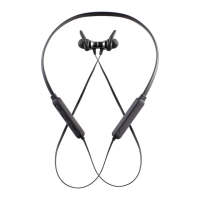
1. Press the Power/Play/Pause/Phone button (3) for 3 seconds to power up the Earphones.
2. The Bluetooth/Charge Indicator (5) will flash.
3. Enable the Bluetooth mode on your Phone, Tablet or other Bluetooth compatible device and set it to search.
4. Select ‘AVS1408’ from the search results found by your device which will now pair with the Earphones and just the
Bluetooth/Charge Indicator (5) will flash slowly to show Bluetooth connection.
5. Enable the music player on your Bluetooth connected device.
6. Briefly press the Power/Play/Pause/Phone button (3) to play music, press the button again to pause the music.
7. Briefly press the + button (2) to skip forwards to the next track or press and hold for volume increase.*
8. Briefly press the – button (4) to skip backwards to the next track or press and hold for volume decrease.
*Two high pitched beeps will be heard warning when the maximum volume setting has been reached.
Handling Telephone Calls
Answering a Call
1. A call coming in will mute (cut) the music you are listening to.
2. Briefly press the Power/Play/Pause/Phone button (3) to answer the call.
3. Press and hold down the + button (2) to increase the call volume level.*
4. Press and hold down the – button (4) to decrease the call volume level.
5. Briefly press the Power/Play/Pause/Phone button (3) again to end the call.
6. The callers voice will be heard through the Earpiece and your voice will be picked up by the built in Microphone inside
the control unit.
Rejecting a Call
1. A call coming in will mute (cut) the music you are listening to.
2. Press and hold the Power/Play/Pause/Phone button (3) for two seconds to reject the call.
Redialling the Last Call Made
1. Briefly press the Power/Play/Pause/Phone button (3) twice to redial the last number you called.
2. Briefly press the Power/Play/Pause/Phone button (3) once to end the call.
*Two high pitched beeps will be heard warning when the maximum volume setting has been reached.
Care and Use of your Earphones
• Always disconnect the Earphones from the USB charging supply before cleaning.
• Clean outside of the Earphones with a clean damp cloth. Never clean with harsh or abrasive cleaners.
• Do not submerge the Earphones in water or any other liquids.
Technical Specification


 To Next Page
 Loading...