ENG
12
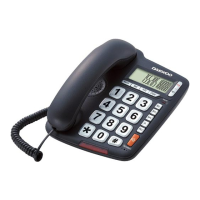
GETTING STARTED
1. Insert one end of the line cord to the line jack of the base and the other end to the
wall outlet of exchange.
2. Connect the handset and the unit with coiled line.
3. Setting the dialing mode to correct mode according to the directions from your
local telecom.
4. Apply for the caller ID from your local telecom o ce.
FUNCTION AND OPERATION DESCRIPTION
RECEIVING A CALL
When a call comes, the telephone rings and LCD displays the incoming call number,
also the Ring LED on the bottom of the base ickers
From handset
1. When the telephone rings, pick up the handset to answer the call and talk to the
other party by handset.
2. When nished, return the handset to the base.
From speakerphone
1. When the telephone rings, press key to answer the call and talk to the caller
in hands-free mode. For the other party to hear your voice clearly, speak into the
speaker from a distance of 32 cm or less.
2. When nished, press key again.
MAKING A CALL
From handset
1. Pick up the handset.
2. When you hear the dialing tone, dial the desired number.
3. When nished, return the handset to the base.
From Speakerphone
1. Press key
2. When you hear the dialing tone, dial the desired number.
3. When nished, press key again.
SWITCH BETWEEN HANDSET AND SPEAKERPHONE
1. When using the handset, press key to turn on the loudspeaker directly, now
the handset microphone and hands-free loudspeaker are Info at one time. Press
key again to turn o loudspeaker, the handset mode is Info still.
2. When hands-free loudspeaker is Info only, pick up the handset to turn to handset
mode, the hands-free loudspeaker turns o .


 To Next Page