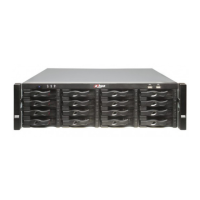
This document provides a user's manual for the Dahua Embedded Video Storage (EVS) server, a device designed for the management, storage, and application of high-definition video data. The EVS utilizes a Linux operating system and a professional customized hardware platform, integrating multiple Hard Disk Drive (HDD) management systems, front-end HD device management, HD video analysis, and a large-capacity video storage system. It supports high-traffic data network transmission and forwarding technology, multi-channel video decoding and display, intelligent management, secure storage, fast forwarding, and HD decoding of large-capacity, multi-channel HD video data. The device also offers standard network file sharing services and an integrated network storage solution, providing centralized storage with high capacity, scalability, and security for various video monitoring systems.
Models Covered:
The manual covers several EVS series, including:
- EVS71 Series: EVS7124S, EVS7136S, EVS7148S
- EVS72 Series: EVS7224S, EVS7236S, EVS7248S, EVS7285S
- EVS52 Series: EVS5224S, EVS5236S, EVS5248S
- EVS51 Series: EVS5124S, EVS5136S, EVS5148S, EVS5160S
- EVS50 Series: EVS5016S-V2, EVS5016S-R-V2
In the model names, "XX" refers to the number of HDDs (24, 36, or 48), and "S" indicates a single-controller type device.
Safety Instructions:
The manual emphasizes several safety instructions for operation, installation, maintenance, and transportation.
- Operation Requirements: The device is a Class A product, which may cause radio interference in domestic environments. It is heavy and requires multiple persons for carrying to avoid injury. Users must ensure correct power supply, operate within rated power input/output, and use under allowed humidity and temperature conditions (0 °C to 45 °C). Liquids should be kept away from the device. Disassembly without professional instruction is prohibited. Configurations will be lost after a factory reset. Do not restart, shut down, or disconnect power during updates, and ensure update files are correct to prevent errors. Frequent power cycling should be avoided to prolong product life. Regular data backup is recommended. The device should be used indoors, at least 3 kilometers away from the sea, to prevent salt spray corrosion.
- Installation Requirements: Do not connect the power adapter while the device is powered on. Local electrical safety codes must be followed, ensuring stable ambient voltage. Batteries should not be exposed to extreme temperatures or low air pressure, or thrown into fire. Standard power adapters or cabinet power supplies must be used. The device should not be placed in direct sunlight or near heat sources, and must be kept away from dampness, dust, and soot. Proper ventilation is crucial. The server must be installed on a stable surface and secured to the building. Power supply must conform to ES1 in IEC 62368-1 and be no higher than PS2, with protective earthing. Power cords must meet local requirements. The power plug and appliance coupler should be easily accessible for emergency power cut-off. Installation should be in an area accessible only by professionals. Extra protection for the device casing is needed to reduce transient voltage. HDD boxes must be fully pushed in before closing handles to prevent damage.
- Maintenance Requirements: When replacing batteries, use the same model to avoid fire/explosion and dispose of batteries according to instructions. Power off the device before maintenance. AI modules do not support hot-plugging; unplug the device power cord before installing or replacing an AI module to prevent file damage. The device casing protects internal components; use a screwdriver to loosen screws before detaching and ensure it is secured back in place before powering on.
- Transportation Requirements: Transport the device under allowed humidity and temperature conditions.
- Storage Requirements: Store the device under allowed humidity and temperature conditions.
Function Description:
The EVS server offers a comprehensive set of functions for video surveillance and management.
-
AI Operations: Supports AI by camera, where intelligent analysis is performed on the camera, and the EVS processes the results. Some AI functions are mutually exclusive.
- Face Detection: Triggers an alarm when human faces are detected. Users can enable a smart plan, configure detection rules (including minimum/maximum face size), set schedules, and define alarm actions. Live view allows displaying target boxes, detection time, face snapshots, and attributes (gender, age, etc.). Face search enables searching by attributes and exporting records.
- Face Comparison: Compares captured faces with a database and triggers an alarm if similarity reaches a defined threshold. Similar to face detection, it involves enabling a smart plan, configuring recognition rules, setting schedules, and defining alarm actions. Live view displays detected faces, comparison results, and database names. Face search is also available.
- People Counting: Counts people flow, in-area numbers, and queuing numbers. Users can enable a smart plan, configure rules (detection zones, counting lines perpendicular to flow direction), set thresholds for entry, exit, or stay numbers, and define alarm actions. Live view shows real-time numbers and queuing time. AI reports can be generated daily, monthly, or yearly.
- Video Metadata: Analyzes real-time video streams to detect human, human face, motor vehicle, and non-motor vehicle targets. When detected, it can record video, take snapshots, and trigger alarms. Configuration involves enabling a smart plan, setting metadata rules, and defining alarm actions. Live view displays target boxes in different colors for different target types, and statistics on detected targets. AI search allows searching for human, vehicle, and non-motor vehicle detection results by attributes and exporting records.
- IVS (Intelligent Video Surveillance): Includes behavior detections like fence-crossing, intrusion, tripwire, parking, crowd gathering, missing/abandoned object, and loitering. Users can enable a smart plan, configure global rules (sensitivity, horizontal/vertical scales), and specific rules for each detection type. Live view shows real-time IVS results, with flickering frames for triggered rules. IVS search is available for records.
- Vehicle Recognition: Triggers an alarm when a detected vehicle meets specific rules. Supports ANPR (Automatic Number Plate Recognition) through AI by camera. Users can enable a smart plan, set deployment time, and define alarm linkage actions. Live view displays recognition results.
- Crowd Distribution Map: Views and monitors crowd density to prevent incidents like stampedes. This function is only available with AI by camera. Users can enable a smart plan, configure global rules (geographical scale) and detection rules (regional or global alarm thresholds for crow density). Live view shows real-time people numbers and distribution status.
- Call Alarm: Triggers an alarm when a person calling is detected. Only available with thermal cameras and AI by camera. Users can enable a smart plan, configure detection rules (detection zone, sensitivity, minimum duration), set schedules, and define alarm actions. Live view shows detection zones flashing red on alarm. Call alarm search is available for videos or images.
- Smoking Alarm: Triggers an alarm when a person smoking is detected. Only available with thermal cameras and AI by camera. Users can enable a smart plan, configure detection rules (sensitivity, minimum duration), set schedules, and define alarm actions. Live view shows detection zones flashing red on alarm. Smoking alarm search is available for videos or images.
-
Live and Monitor:
- View Management: Create and manage view groups and views to categorize and quickly access video images from multiple remote devices. Supports up to 100 view groups and a 2-level hierarchy. Users can add/delete remote devices to views, adjust video window size and position.
- View Window: Provides a taskbar with functions like zoom, talk, instant record, and manual snapshot. The video storage path varies for local interface (USB or device storage) and PC client (default path). A shortcut menu offers options for stream type (Main, Sub 1, Sub 2), bit rate display, and original video window scale.
- Digital Zoom: Allows zooming in on specified zones in the video window.
- Fisheye Dewarp: Sets installation methods (ceiling, wall, ground mount) and display modes (original, corrected panoramic, section images) for fisheye cameras.
- Smart Tracking: Manually or automatically tracks targets. Available only on multi-sensor panoramic cameras + PTZ cameras.
- Thermal: For thermal cameras, displays real-time temperature at any position on the live video.
- Talk: Enables voice interaction between the device and remote devices for emergency events.
-
Device Tree: Displays added remote devices, grouped by type, with status indicators (online, offline, abnormal/alarming). Users can search, filter, view IP/port, connect/disconnect, open webpages, and edit views.
-
Recorded Files:
- Playing back Recorded Videos: Search and play back videos by remote device, recording type (All Videos, Instant Record, Video Detection, External Alarm, Thermal), and time period. Supports timeline and file playback.
- Clipping a Video: Clip and save parts of recorded videos to a designated storage path.
- Video Tag: Add tags to mark important points in videos for easier searching.
- Searching for Snapshots: Search and view snapshots by remote device, image type (Manual Snapshot, Video Detection, External Alarm, Thermal), and snapshot time.
- Backing up Files: Export videos or images by downloading or remote backup. Supports various file formats and batch export.
- Locking Files: Lock specific videos or snapshots to prevent overwriting.
- Watermark Verification: Verify if a video file has been tampered with.
-
Alarm List: Displays alarm events (device name, time, type) and allows confirming them.
-
Display Management: Enables connected monitors and screen locking. Supports multiple monitors with different content and resolutions.
-
System Messages: Views system errors, warnings, and notifications.
-
Background Task: Views the status of tasks running in the background (All, In progress, Waiting).
-
Buzzer: Views buzzer alarm messages.
-
Audio Management: Uploads and manages audio files for alarm events. Supports .pcm, .mp3, .wav, and .aac files (2 KB to 10 MB, total size up to 200 MB).
-
System Configuration:
- Device Management: Add, modify IP addresses and configurations, and export information for remote devices. View online and recording status.
- Network Management: Set basic network parameters (IP address, port aggregation, port number) and applications (P2P, Auto Register, Email, Alarm Center, UPnP, SNMP, Multicast, DDNS, Routing Table).
- Port Aggregation: Bind multiple NICs for load balance, fault tolerance, or link aggregation to enhance bandwidth and reliability.
- P2P: Scan QR code for mobile app access without DDNS or port mapping.
- Email: Configure email for alarm notifications.
- Alarm Center: Configure alarm center server for uploading alarm information.
- UPnP: Establish port mapping between LAN and WAN for direct device access.
- SNMP: Manage and monitor the device using SNMP tools.
- Multicast: Set multicast IP address for multiple users viewing live video simultaneously to save bandwidth.
- DDNS: Dynamically updates domain name to IP address mapping for remote access.
- Routing Table: Configures routing for optimal data transmission.
- Storage Management: Manage storage resources (recorded videos) and space.
- Disks: View disk space, temperature, and information. Configure sleep strategy to prolong disk life. View S.M.A.R.T. information for disk health. Format disks and fix file systems.
- RAID: Create RAID groups (RAID0, RAID1, RAID5, RAID6, RAID10, RAID50, RAID60) for data redundancy and performance. Create hot standby disks to replace malfunctioning disks.
- Network Disk: Network-based online storage via iSCSI protocol. Format network disks and set operation permissions.
- iSCSI Management: Map network disks to the device for storage.
- Storage Settings: Configure disk groups for video and image storage. Set recording modes (Scheduled, Manual, Close) and schedules for channels. Set storage mode (Overwrite, Stop) when disk space is full. Configure automatic file deletion. Set image storage strategy.
- Record Transfer: Transfer recordings from IPCs to the device after network recovery.
- Video Retrieval: Retrieve video files from other devices in the EVS during idle periods.
- Event Management: Configure alarm events for the device and remote devices.
- Alarm Actions: Define actions triggered by alarms (Record, Buzzer, Log, Send Email, Picture Storage, Preset, Local Alarm Output, Remote Device Alarm Output, Access Control, Audio Linkage, Smart Tracking, Upload Alarms, Remote Warning Light).
- Local Device: Set alarms for system errors, offline status, smart plans.
- One-click Disarming: Disarm alarm linkage actions by period or for remote channels.
- Abnormal Events: Set alarms for no disk, disk health exceptions, storage errors, low disk space, abnormal storage pool, RAID exceptions, low quota space, video frame loss, IP/MAC conflicts, abnormal system disk, account lockout, security exceptions, fan speed exceptions, power alarms, abnormal shared service, and device temperature alarms.
- Remote Device: Set alarm actions for video detection, offline alarms, and smart detection alarms from remote devices.
- Security Strategy:
- Security Status: Scans device security status (user/service detection, security modules) and provides details for abnormal items.
- System Service: Enable/disable basic system services (SSH, Multicast/Broadcast Search, CGI, ONVIF, Mobile Push Notifications, Run Log, Login Mode, Password Expiration).
- HTTPS: Enable HTTPS for secure web access.
- Attack Defense: Configure firewall (All, Allowlist, Blocklist), account lockout (failed login attempts), and anti-Dos attack (SYN Flood, ICMP Flood).
- Time Synchronization Permission: Configure permissions for time synchronization from other devices/servers.
- CA Certificate: Install device certificates and trusted certificates for secure communication.
- Video Encryption: Encrypt audio and video data during transmission.
- Security Warning: Provides warnings for security errors.
- Account Management: Manage user groups (admin, Onvif, custom) and device users with different permissions. Change passwords and reset forgotten passwords via email or security questions. Add ONVIF users.
- System Settings: Configure basic system parameters (language, video standard, device name, logout time, sync remote device, tour, virtual keyboard, mouse speed), system time (manual, NTP, DST), and schedules for validity periods.
- Cluster Service: Create clusters for device redundancy (N+M mode) with main and sub devices and a virtual IP. Supports record transfer between main and sub devices. View cluster logs.
- Network Storage: Create storage pools, manage share accounts, configure share folders, and control share services.
-
System Maintenance:
- Overview: View device version, online users, connection/idle status of remote devices, RAID status, recording status, and NIC status.
- System Information: View device information (input bandwidth, system version, web version), legal information (license agreement, privacy policy), and storage information per channel.
- System Resources: View CPU/memory usage, mainboard temperature, and fan speed.
- Network Maintenance: Manage online users (block/unblock) and perform network tests (packet capture).
- Disk Maintenance: Run S.M.A.R.T. detection for HDD status, system disk health detection, firmware update, and health monitoring (only for Dahua disks).
- Logs: View system, user operation, event, and connection logs. Search and export logs (encrypted or unencrypted). Clear logs.
- Intelligent Diagnosis: Export diagnosis data for troubleshooting. View run logs. Perform one-click diagnosis.
- Maintenance Manager: Restart the device, restore factory default settings, and update system/cameras.
-
PC Client: Describes the PC client interface, history record, downloads, client settings (switching computer theme, video/picture storage path, compatibility mode, hardware acceleration), and client version.
-
Log Out, Restart, Shut Down, Lock: Provides instructions for logging out, restarting, shutting down (with warnings about data loss), and locking the device.
Technical Specifications (Glossary):
The manual includes a glossary defining key terms and technologies:
- CGI (Common Gateway Interface): Internet technology for data exchange between client and server programs.
- DDNS (Dynamic Domain Name System): Maps dynamic IP addresses to specified domain analysis services.
- DHCP (Dynamic Host Configuration Protocol): Network protocol for automatic IP address allocation.
- DNS (Domain Name System): Saves host domain names and corresponding IP addresses.
- DVR (Digital Video Recorder):
- FTP (File Transfer Protocol): Controls bilateral file transmission over the Internet.
- HDMI (High Definition Multimedia Interface): Digital interface for audio/video transmission.
- HTTPS (Hyper Text Transfer Protocol over Secure Socket Layer): Secure HTTP channel using encryption.
- IP (Internet Protocol):
- IPC (IP Camera):
- MTU (Maximum Transmission Unit): Maximum data packet amount on one layer of communication protocol.
- NTP (Network Time Protocol): Synchronizes computer time with a server.
- NTSC (National Television Standards Committee): American national standard television and broadcast transmission protocol.
- NVR (Network Video Recorder):
- ONVIF (Open Network Video Interface Forum): General protocol for information exchange among network video devices.
- PAL (Phase Alteration Line): Television standard used in China, Europe, etc.
- PTZ (Pan Tilt Zoom): All-direction movement, lens zoom, and focus control.
- RAID (Redundant Array of Independent Disks): Combines multiple physical HDDs into a logical unit for storage performance and data redundancy.
- S.M.A.R.T (Self-Monitoring Analysis and Reporting Technology): Detects HDD drive status and potential problems.
- SSH (Secure Shell): Security protocol for remote management and debugging.
- SVC (Scalable Video Coding): Video encoding technology that splits video streams into basic and enhanced layers.
- VGA (Video Graphics Array): Video transmission standard.
- WLAN (Wireless Local Area Networks): Adopts radio frequency for data transmission.
HDD Capacity Calculation:
The manual provides a formula for HDD capacity calculation:
Total capacity (M) = Channel number × Demand time length (hour) × HDD capacity occupied per hour (M/hour).
It also includes a table for recording file size per channel in 1 hour at different bit stream sizes.
Particulate and Gaseous Contamination Specifications:
The manual details limitations for particulate contamination (Class 8 as per ISO 14644-1, with specifications for conductive and corrosive dust) and gaseous contamination (copper and silver coupon corrosion rates, classified by ANSI/ISA-71.04-2013 as G1 mild, G2 moderate, G3 harsh, GX severe).
Cybersecurity Recommendations:
Dahua provides recommendations for a more secure security system:
- Mandatory Actions: Use strong passwords (at least 8 characters, including two types of characters, no account name, no continuous or overlapped characters). Update firmware and client software regularly.
- "Nice to Have" Recommendations: Physical protection of devices, regular password changes, timely setup and update of password reset information, enabling account lock, changing default HTTP and other service ports (to 1024–65535), enabling HTTPS, MAC address binding, reasonable assignment of accounts and privileges, disabling unnecessary services and choosing secure modes (SNMP v3, TLS for SMTP, SFTP for FTP, WPA2-PSK for AP hotspot), audio and video encrypted transmission, secure auditing (checking online users and device logs), network log synchronization to a server, and constructing a safe network environment (disabling port mapping, network partitioning/isolation, 802.1x authentication, IP/MAC address filtering).

 Need help?

 To Next Page
 General