English 13
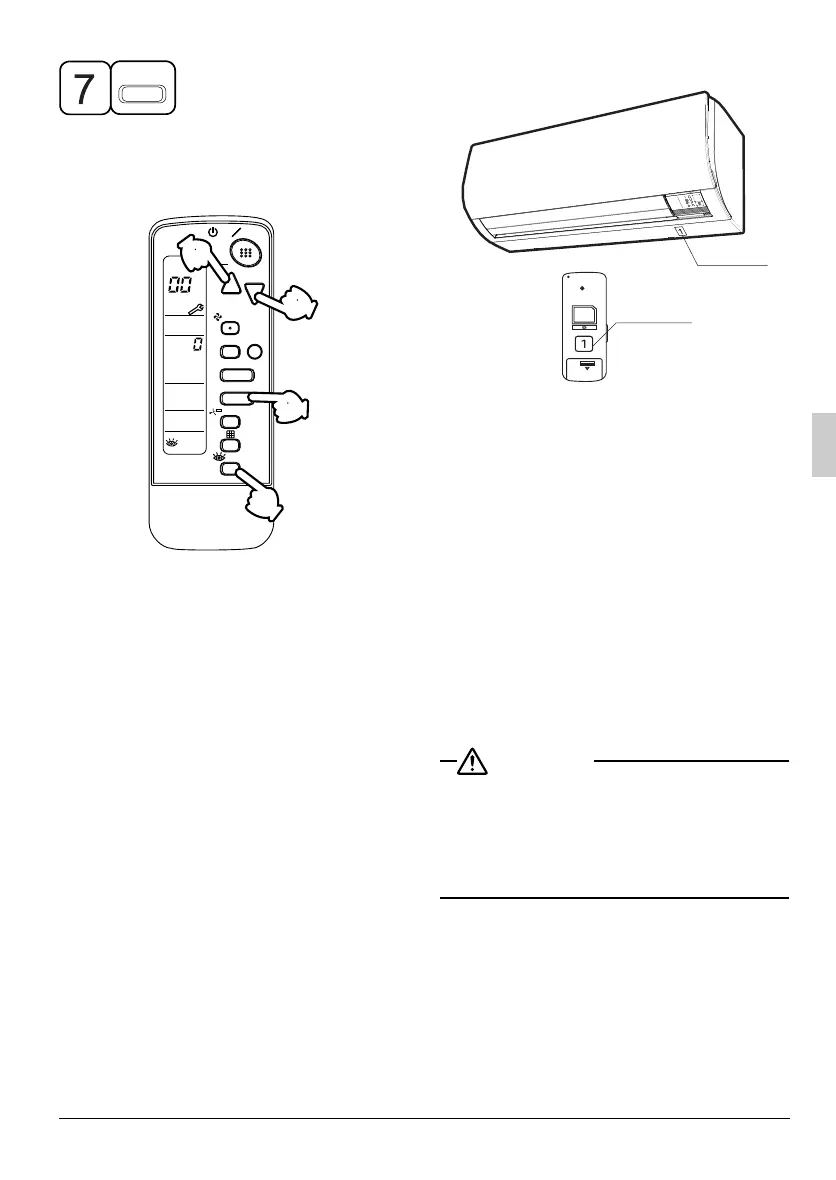
Press OPERATION MODE SELECTOR
BUTTON to get the display back to the
normal state.
II. IN CASE BESIDES EMERGENCY STOP
1. The unit does not operate at all.
• Check if the receiver is exposed to
sunlight or strong light. Keep the
receiver away from the light.
• Check if there are batteries in the
remote controller. Insert the batteries if
they are missing.
• Check if the indoor unit number and
wireless remote controller number are
equal.
Reset of the display
UNIT N
O
.
CODE
MODE
TIMER
RESERVE
CANCEL
DOWN
UP
/TEST
SWING
FAN
TIME
TEMP
1
24
6
35
7
ON OFF
24
6
Operate the indoor unit with the remote con-
troller of the same number.
Signal transmitted from a remote controller of
a different number cannot be accepted. (If
the number is not mentioned, it is considered
as “1”)
2. The system operates but it does not
sufficiently cool or heat.
• If the set temperature is not proper.
• If the FAN SPEED is set to LOW
SPEED.
• If the air flow angle is not proper.
Contact the place of purchase in the fol-
lowing case.
When you detect a burning odor, shut
OFF power immediately and contact the
place of purchase. Using the equipment
in anything but proper working condition
can result in equipment damage, electric
shock and/or fire.
3PEN505118-2B.book Page 13 Thursday, January 7, 2021 10:28 AM


 To Next Page