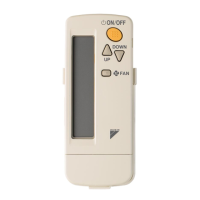
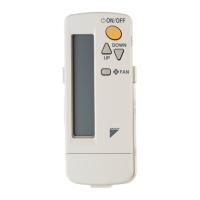
This document outlines the operation and maintenance of the Daikin Wireless Remote Controller Kit, designed for use with Daikin air conditioning systems. The kit includes models BRC7EA628, BRC7EA629, and BRC7EA630.
Function Description
The Wireless Remote Controller Kit serves as the primary interface for controlling Daikin air conditioning units. It allows users to manage various operational parameters, including:
- Power Control: The ON/OFF button (8) initiates or stops the air conditioning system.
- Operation Mode Selection: The OPERATION MODE SELECTOR button (15) allows users to choose between different modes such as COOLING, HEATING, AUTOMATIC, FAN, and PROGRAM DRY. For cooling-only types, only COOLING, FAN, and DRY operations are available. AUTOMATIC operation is exclusive to Heat pump split systems or Heat recovery VRV systems.
- Temperature Setting: The TEMPERATURE SETTING button (10) adjusts the desired room temperature. The setting range for the remote controller is 16°C to 32°C.
- Fan Speed Control: The FAN SPEED CONTROL button (9) allows selection of fan speeds (HIGH/LOW for BRC7EA628/29, and HIGH/MEDIUM/LOW for BRC7EA630). The microchip may automatically adjust fan speed for unit protection.
- Air Flow Direction Adjustment: The AIR FLOW DIRECTION ADJUST button (14) controls the direction of the air flow. Users can select a fixed direction or enable automatic swing.
- Timer Programming: The PROGRAMMING TIMER button (11) enables users to set "START" and/or "STOP" times for the system. The TIMER MODE START/STOP button (12) and TIMER RESERVE/CANCEL button (13) facilitate timer management. The timer can be programmed for a maximum of 72 hours, allowing for simultaneous start and stop times.
- Emergency Operation: An EMERGENCY OPERATION SWITCH (18) is provided for manual control if the remote controller malfunctions due to battery failure or other issues. This switch allows the unit to run in its previously set mode and air flow direction.
- Display Indicators: The remote controller features several display indicators:
- SIGNAL TRANSMISSION (1) lights up when a signal is being transmitted.
- OPERATION MODE (2) shows the current operating mode.
- SET TEMPERATURE (3) displays the set temperature.
- PROGRAMMED TIME (4) indicates the programmed start or stop time.
- AIR FLOW FLAP (5) shows the air flow flap status.
- FAN SPEED (6) displays the selected fan speed.
- Receiver Unit Indicators: The indoor unit's receiver (19) has several lamps:
- OPERATING INDICATOR LAMP (Red) (20) stays lit during operation and flashes if the unit encounters trouble.
- TIMER INDICATOR LAMP (Green) (21) lights up when a timer is set.
- AIR FILTER CLEANING TIME INDICATOR LAMP (Red) (22) illuminates when it's time to clean the air filter.
- DEFROST LAMP (Orange) (23) lights up when defrosting operation begins (not applicable for cooling-only types).
Usage Features
The remote controller is designed for ease of use with several practical features:
- Wireless Transmission: Signals are transmitted from the remote controller to the receiving part of the air conditioner. A successful transmission is indicated by two short beeps from the receiver. The transmitting distance is approximately 7 meters.
- Battery Operation: The remote controller uses two AAA.LR03 (alkaline) dry cell batteries. Instructions are provided for correct battery insertion and replacement. Batteries should be replaced when the indoor unit responds slowly or not at all, or when the display becomes dim. All batteries should be replaced simultaneously, and new and old batteries should not be mixed. For prolonged storage, batteries should be removed to prevent leakage.
- Remote Controller Holder: A holder is provided for mounting the remote controller on a wall or pillar, ensuring it is always within reach and can transmit signals effectively.
- Master Remote Controller Designation (for VRV systems): In systems with multiple indoor units connected to a single outdoor or BS unit, one remote controller must be designated as the master. Only the master controller can select HEATING, COOLING, or AUTOMATIC operation. Slave controllers can only switch between FAN, DRY, and the mode set by the master.
- Group Control and Two Remote Controller Systems: The manual describes specific control systems beyond individual control, including group control (one remote controller for up to 16 indoor units) and two remote controllers controlling one indoor unit. In a two-remote-controller setup, the wireless remote controller cannot control timer operation.
- Air Flow Flap Movement: The microcomputer automatically controls the air flow direction under certain conditions, such as continuous downward air flow during cooling, or when room temperature is higher than the set temperature during heating, or during defrost operation. This prevents cold air from blowing directly on occupants and avoids dew formation.
- Defrost Operation (Heating): During heating, if frost accumulates on the outdoor unit coil, the system enters defrost operation to maintain heating efficiency. The indoor fan stops, and the DEFROST lamp illuminates. After 6-8 minutes, the system returns to heating.
- Safety Precautions: The manual emphasizes several safety precautions, including:
- Avoiding prolonged direct exposure to cool or warm air.
- Turning off power and contacting a dealer if the unit malfunctions.
- Consulting a dealer for installation, modification, repair, and maintenance.
- Not placing objects in air inlets or outlets.
- Being aware of refrigerant leakage and its potential hazards.
- Using correct fuses and dedicated power supply.
- Installing an earth leakage breaker and ensuring proper earthing.
- Avoiding operation during natural disasters like floods.
- Not starting/stopping the unit by turning the power supply breaker ON/OFF.
- Avoiding use in atmospheres with oil vapor, excessive oily smoke, flammable/corrosive gases, or metal dust.
- Not using flammable materials or organic solvents near the unit.
- Not using the air conditioner for purposes other than its intended use (e.g., cooling precision instruments, food, plants).
- Ensuring adequate room ventilation if other burning equipment is used.
- Checking unit stand and mounts for damage after prolonged use.
- Ensuring complete drainage from the outdoor unit.
- Supervising children to prevent accidental operation or injury.
- Not touching internal parts of the controller.
- Not placing strong light beams or inverter fluorescent lamps near the receiver unit.
- Not allowing the remote controller to get wet.
- Not pressing buttons with hard, pointed objects.
Maintenance Features
The manual provides guidance on maintaining the system, particularly regarding the air filter and troubleshooting:
- Air Filter Cleaning: When the AIR FILTER CLEANING TIME INDICATOR LAMP (22) lights up, the air filter needs cleaning. After cleaning and reinstalling the filter, the FILTER SIGN RESET BUTTON (16) on the remote controller should be pressed to reset the indicator.
- Troubleshooting (Malfunction Diagnosis): In case of an emergency stop, the run lamp on the indoor unit blinks. The remote controller can be used to read a malfunction code (A1-UF) by following a specific sequence of button presses (INSPECTION/TEST OPERATION button (17), PROGRAMMING TIMER button, OPERATION MODE SELECTOR button). This code helps diagnose the problem, and users are advised to contact their dealer with the code for faster repair.
- General Troubleshooting: The manual addresses common issues that are not malfunctions:
- System not restarting immediately: This is a safety feature to prevent overload; the system will restart automatically after 3 minutes.
- Rapid beeping (3 times): Indicates centralized control is set.
- Defrost lamp lit during heating: A warning against cold air being blown, not a malfunction.
- Unit not operating at all: Check receiver exposure to strong light, remote controller batteries, and ensure indoor unit and remote controller numbers match.
- Insufficient cooling/heating: Check set temperature, fan speed (avoid LOW SPEED), and air flow angle.
- Disposal Requirements: The product and batteries are marked with symbols indicating they should not be mixed with unsorted household waste. They must be treated at specialized facilities for re-use, recycling, and recovery. Users are advised to contact their installer or local authority for proper disposal information. The manual specifically mentions that batteries may contain lead (Pb).

 Need help?
 General

 To Next Page