3 Operation
Operation manual
8
D2CND024A1/4AB + D2TND012~024A4AB
Wall-mounted condensing boiler
3P469438-3M – 2019.11
NOTICE
A table with all error codes, the reasons for their
appearance, and possible solutions, is located at the very
end of this manual.
3.5 Menu functions
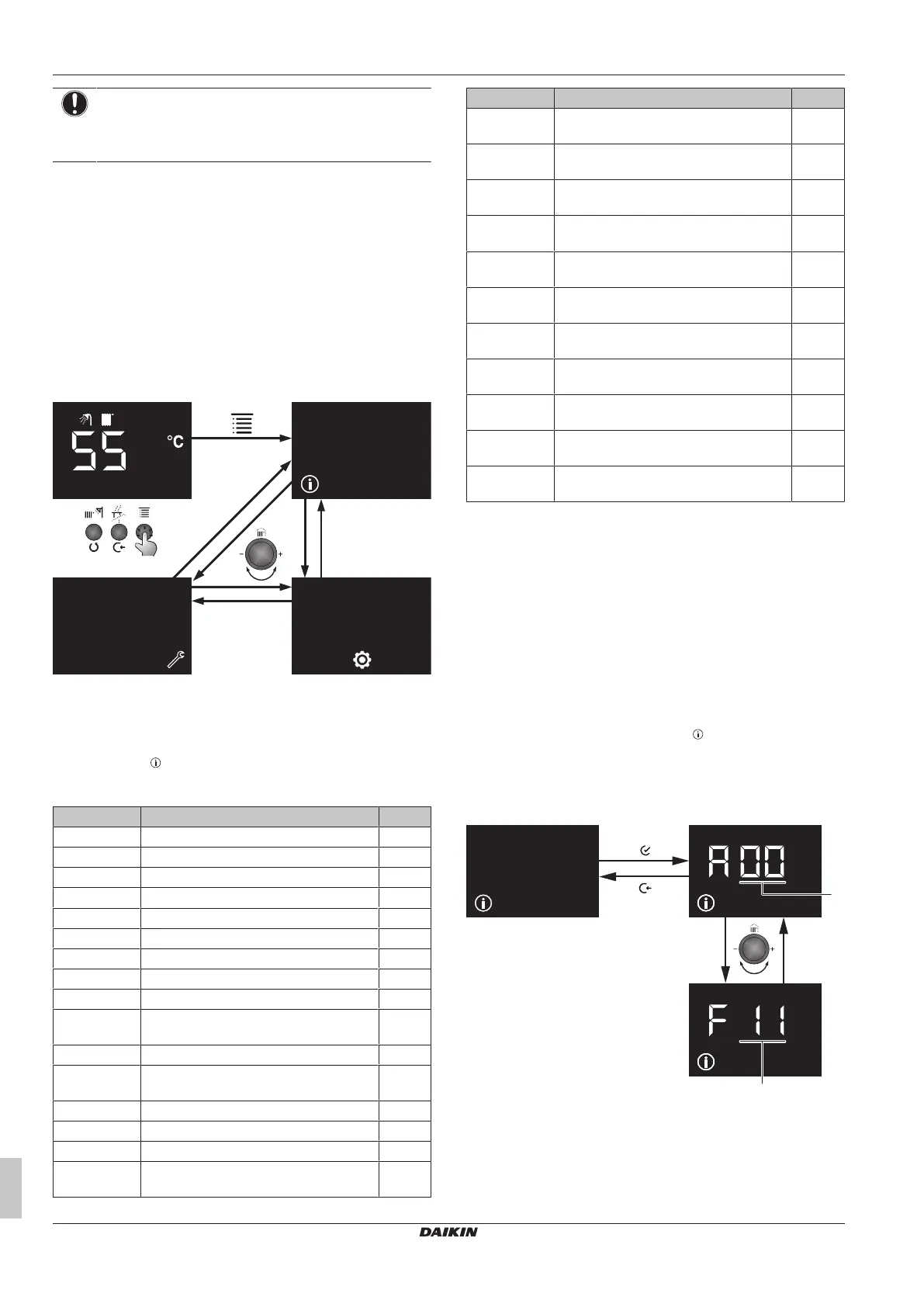
3.5.1 To use menu level 1
1 Press the "Menu" button while you are at home screen to go the
Menu screen. This is menu level 1 screen.
2 To switch between info, user settings and service settings, turn
the left dial.
3 To leave the menu and return to the home screen, press "Back"
for 2seconds.
When there is no user interaction for one minute, the user interface
will leave the menu and switch to the blank screen.
3.5.2 Info menu
Info menu: Parameters
The info menu ( ) covers all possible information that is made
available to the end user and to the installer. This parameters are
read only and cannot be changed.
# Description (short) Unit
A00 Actual flow temperature °C
A01 Actual return temperature °C
A02 Actual domestic hot water temperature °C
A03 Actual flue temperature °C
A04
(a)
Actual outdoor temperature °C
A05
(a)
Actual solar temperature °C
A06 Actual water pressure bar
A07 Actual domestic hot water flow rate l/min
A08
(b)
Current set point of burner capacity %
A09
(b)
Actual capacity of boiler in relation to
nominal capacity
%
A10
(c)
Actual phase of the burner —
A11 Status of On-Off room thermostat,
indicate heat demand (HC1)
—
A12 Actual error code of boiler —
A13 Actual fan speed (rpm/100) rpm
A14 Current setpoint of boiler pump %
F11
(d)
Fuel energy consumption / Central
Heating / Last month
kWh
# Description (short) Unit
F12
(d)
Fuel energy consumption / Central
Heating / Current month
kWh
F13
(d)
Fuel energy consumption / Central
Heating / Current Year
kWh
F21
(d)
Electric energy consumption / Central
Heating / Last month
kWh
F22
(d)
Electric energy consumption / Central
Heating / Current month
kWh
F23
(d)
Electric energy consumption / Central
Heating / Current Year
kWh
F31
(d)
Fuel energy consumption / Domestic hot
water / Last month
kWh
F32
(d)
Fuel energy consumption / Domestic hot
water / Current month
kWh
F33
(d)
Fuel energy consumption / Domestic hot
water / Current Year
kWh
F41
(d)
Electric energy consumption / Domestic
hot water / Last month
kWh
F42
(d)
Electric energy consumption / Domestic
hot water / Current month
kWh
F43
(d)
Electric energy consumption / Domestic
hot water / Current Year
kWh
(a) Not applicable if the sensor is not connected.
(b) Maximum value for central heating = 91%
Maximum value for domestic hot water = 100%
(c) A10=0: Standby mode, burner is not active
A10=1: Start-up, preparation to ignition
A10=2: Ignition and flame stabilisation phase
A10=3: Release control (burner is on, operation phase)
A10=4: Post-purge phase
(d) Applicable if energy metering is enabled. Consumed
energy values are shown with 6 digits. The display
sequence is: parameter ID – first 3 digits – last 3 digits.
E.g. if 3456 kWh central heating fuel energy consumed in
current month, following screens are displayed in a
sequence of; F12 – 003 - 456
To use the info menu
1 Press the "Enter" button when the icon is displayed on the
menu level 1 screen.
2 Select A or F parameters with the left dial.
3 Select the index number with the right dial. Press the "Back"
button to return to menu level 1 screen.
a Index



 To Next Page