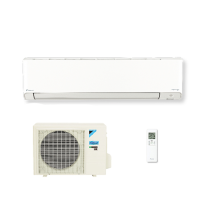
This document is an operation manual for a Daikin room air conditioner, specifically models FTXM41VVLT, FTXM50VVLT, FTXM60VVLT, and FTXM71VVLT. It provides comprehensive information on the device's functions, technical specifications, usage, and maintenance.
Function Description
The Daikin room air conditioner is designed to provide enhanced comfort, energy savings, and air cleaning. It features an inverter for variable speed operation and a Streamer unit for air purification.
Key operational modes include:
- DRY (Dehumidifying): This mode mixes dehumidified cool air with room air to adjust the air outlet temperature and remove moisture, enhancing comfort.
- INTELLIGENT EYE: A sensor detects human movement. If no one is in the room for more than 20 minutes, the unit automatically switches to an energy-saving operation, reducing power consumption.
- WEEKLY TIMER: Allows users to save up to 4 timer settings for each day of the week, enabling personalized on/off times and desired temperatures according to family lifestyle.
- MOLD PROOF: This function dries the interior of the indoor unit after COOL or DRY operation to suppress mold generation and odors. It runs automatically for 130 minutes after the main operation stops.
- FLASH STREAMER AIR CLEANING: The Streamer unit generates a high-speed electron stream with high oxidizing power to decompose mold, allergic substances, and odors. Combined with an enzyme blue air quality filter (PM2.5) and standard air filters, it cleans the air in the room.
- COMFORT AIRFLOW: Adjusts airflow direction to prevent cold or warm air from blowing directly on occupants. Airflow is upward during COOL/DRY operation and downward during HEAT operation.
- OUTDOOR UNIT QUIET: Reduces the noise level of the outdoor unit by adjusting frequency and fan speed, useful for maintaining a quiet neighborhood, especially at night.
- ECONO Operation: Limits maximum power consumption for efficient operation, preventing circuit breakers from tripping when other appliances are used simultaneously on the same circuit.
- POWERFUL Operation: Maximizes cooling or heating effect for 20 minutes, quickly bringing the room to the desired temperature. After 20 minutes, it reverts to previous settings.
Important Technical Specifications
The manual provides a table of product specifications for the indoor and outdoor units across different models (FTXM41VVLT, FTXM50VVLT, FTXM60VVLT, FTXM71VVLT).
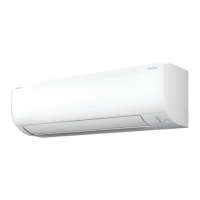
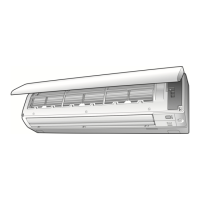
Indoor Unit Dimensions:
- Height: 299 mm
- Width: 1100 mm
- Depth: 275 mm
- Weight: 15 kg
Outdoor Unit Dimensions:
- Height: 595 mm (FTXM41VVLT), 695 mm (FTXM50VVLT, FTXM60VVLT, FTXM71VVLT)
- Width: 845 mm (FTXM41VVLT), 930 mm (FTXM50VVLT, FTXM60VVLT, FTXM71VVLT)
- Depth: 300 mm (FTXM41VVLT), 350 mm (FTXM50VVLT, FTXM60VVLT, FTXM71VVLT)
- Weight: 40 kg (FTXM41VVLT), 53 kg (FTXM50VVLT, FTXM60VVLT), 56 kg (FTXM71VVLT)
Operating Conditions (Cool/Dry):
- Outdoor temperature: 10.0~46.0°C
- Indoor temperature: 18.0~32.0°C
- Indoor humidity: 80% max.
Operating Conditions (Heat):
- Outdoor temperature: -15.0~24.0°C
- Indoor temperature: 10.0~30.0°C
Refrigerant: The appliance is filled with R32.
Usage Features
The remote controller (ARC466A73) is the primary interface for controlling the air conditioner. It features an LCD display for current settings, temperature adjustment buttons, fan setting button, ON/OFF button, and a front cover.
- Clock Setting: Essential for accurate timer operations.
- Indoor Unit Lamp Brightness: Adjustable to High, Low, or Off.
- Operation Modes: AUTO, DRY, COOL, HEAT, FAN, selectable via the MODE selector button.
- Airflow Rate: Adjustable from AUTO to 5 levels (1-5, Low to High), including a "quiet" mode.
- Airflow Direction: Horizontal (flaps) and vertical (louvres) directions can be adjusted, including 3-D airflow for comprehensive room circulation.
- Wireless LAN Connection: The unit can be controlled via a smartphone or tablet using the DAIKIN Mobile Controller application. The manual details steps for connecting the wireless LAN adapter to a home network using WPS or Access Point connection methods. It also explains how to enable/disable the wireless LAN connecting adapter.
Maintenance Features
Regular maintenance is crucial for optimal performance and longevity.
- Front Panel: Wipe with a soft damp cloth; neutral detergent can be used for dirt.
- Air Filter: Vacuum dust or wash with lukewarm water and neutral detergent every 2 weeks. Dry in the shade.
- Air Quality Filter (Enzyme Blue with PM2.5) / Dust Collection Filter (PM2.5): No cleaning required; replace every 6 months.
- Deodorizing Filter (Enzyme Blue) / Titanium Apatite Deodorizing Filter: Vacuum dust or wash with lukewarm water every 6 months (if very dirty, soak for 10-15 minutes). Replace every 3 years.
- Streamer Air Inlet: Ensure no objects block the inlet.
- Long Periods of Non-Use:
- Operate MOLD PROOF mode.
- Turn off the circuit breaker.
- Clean and reattach air filters.
- Remove batteries from the remote controller to prevent leakage.
- Periodical Maintenance: Recommended by a specialist in addition to user cleaning, especially after several seasons of use, to address accumulated dirt inside the unit.
Safety Precautions
The manual emphasizes safety with WARNING and CAUTION classifications. Key points include:
- Use R32 refrigerant only.
- Ensure proper installation and earthing.
- Do not attempt self-repair or modification.
- Do not block air inlets/outlets.
- Avoid direct exposure to airflow for plants/animals.
- Keep batteries out of reach of children and dispose of them properly.
- In case of abnormality (e.g., burning odor), turn off power and contact a dealer.
- Maintain minimum floor area for installation (1.9m² for FTXM41, 3.5m² for FTXM50/60, 3.9m² for FTXM71).
- Maintain an installation height of 1.8m or more from the floor to the bottom of the appliance.

 Need help?
 General

 To Next Page