18
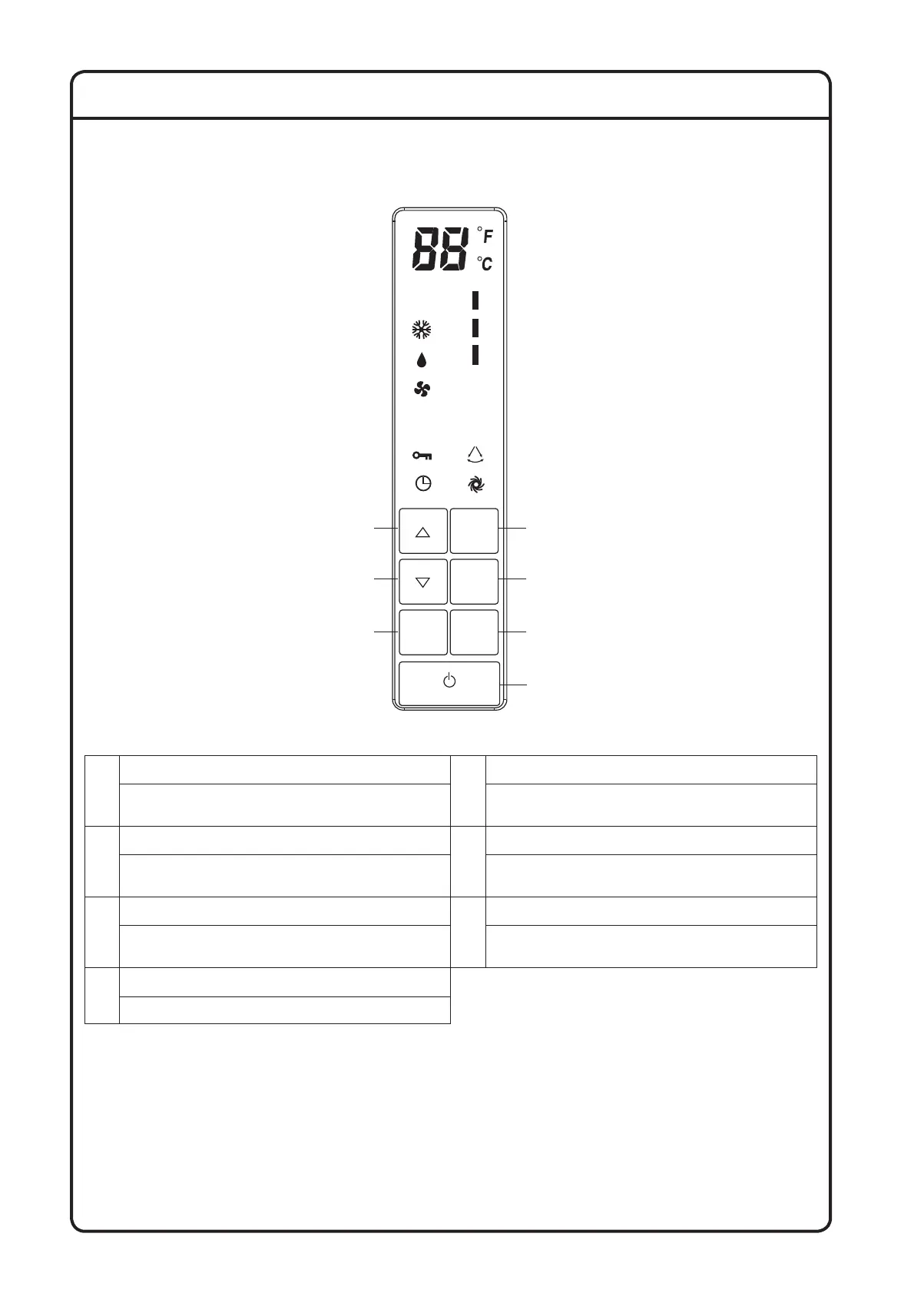
CONTROLLER PART NAMES AND FUNCTIONS
Cooling Model
TIMER
SWING
FAN
FAN
AUTO
FAN
DRY
TURBOMODE
KEY LOCK
1
5
4
7
2
3
6
COOL
TURBO
SWING
1
OPERATION MODE SELECTOR BUTTON
5
TEMPERATURE SETTING BUTTON
Press the button to select OPERATION MODE
(Cool/Dry/Fan)
Press the button to decrease set temperature in °C or °F
2
TURBO BUTTON
6
FAN SPEED CONTROL BUTTON
Press the button to active/deactivate TURBO function Press the button to select fan speed, High/Medium/Low,
of your choice
3
SWING BUTTON
7
ON/OFF BUTTON
Press the button to active/deactivate SWING function Press the button and the system will start.
Press the button again and the system will stop.
4
TEMPERATURE SETTING BUTTON
Press the button to increase set temperature in °C or °F
1-IMOM-FS-FVFC-RZFC-DAIKIN-EN.indd 221-IMOM-FS-FVFC-RZFC-DAIKIN-EN.indd 22 5/14/2020 5:54:00 PM5/14/2020 5:54:00 PM



 To Next Page