BLUETOOTH
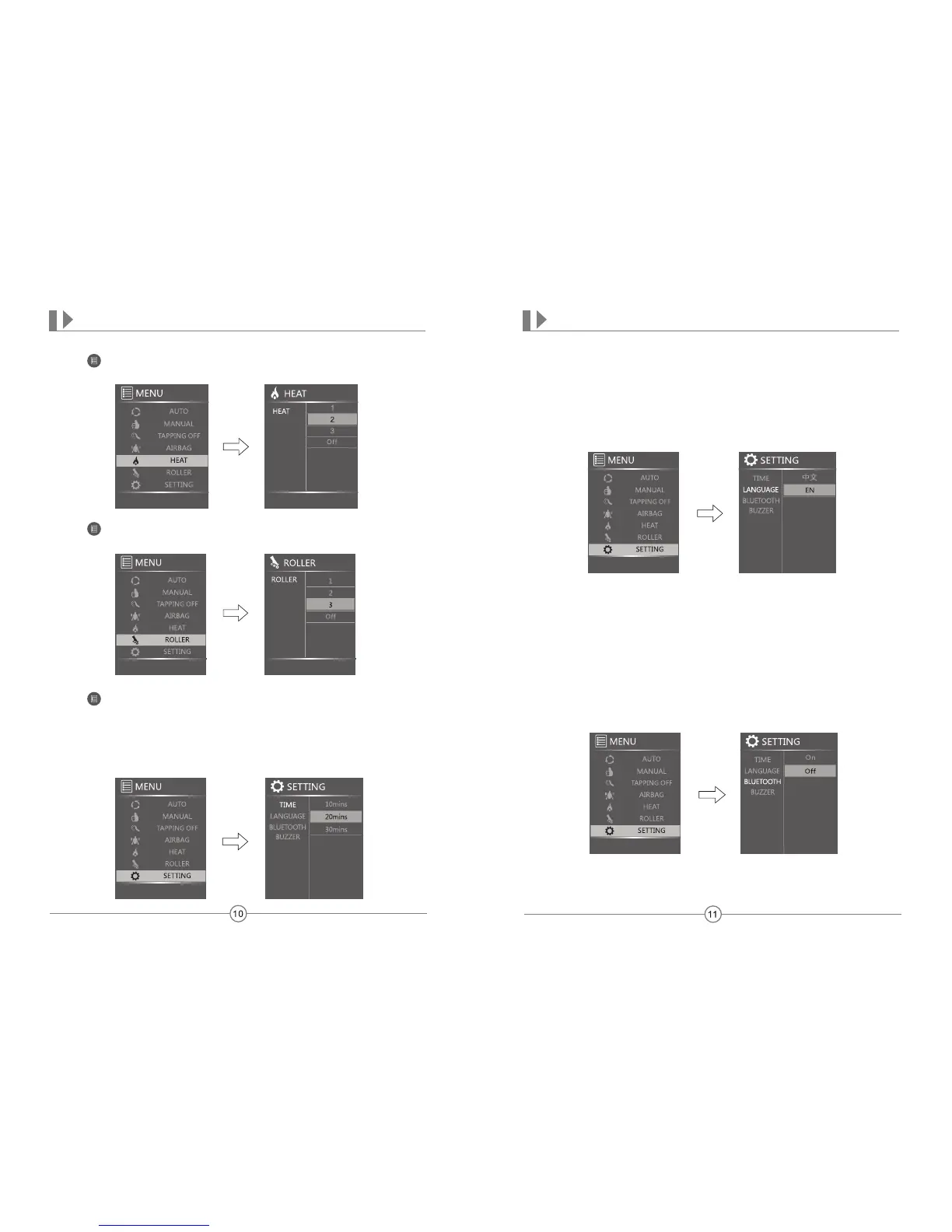
With BLUETOOTH highlighted, press the Right arrow key. Press Up or Down keys turn
this function on or off. Music and volume will be controlled through the device, not the
remote.
OPERATION
LANGUAGE
With LANGUAGE highlighted, press the Right arrow key. Press Up or Down keys to select
desired language to appear on the display screen.
OPERATION
SETTING
Press first. Select SETTING mode and press the OK button. Press Up or Down
arrow keys to choose Time, Language, Music, USB, Bluetooth, or Buzzer.
TIME
With TIME highlighted, press the Right arrow key. Press Up or Down keys to select
your desired length of time for each massage: 10, 20, or 30 minutes. Press the OK
button to select.
HEAT
Press first. Select HEAT mode and press the OK button. Press the Right arrow key
first, then press the Up or Down arrow keys to choose desired heat or turn off.
ROLLER
Press first. Select ROLLER mode and press the OK button. Press the Right arrow
key first, then press the Up or Down arrow keys to choose your foot roller speed or turn off.


 To Next Page