EasyManua.ls Logo

Dalbach GS60V-0B Silver - Control Panel Explained; Button and Indicator Functions

Dalbach GS60V-0B Silver
Print Icon
To Next Page IconTo Next Page
To Previous Page IconTo Previous Page
Loading...
11 Garantiebedingungen
Seite | 31
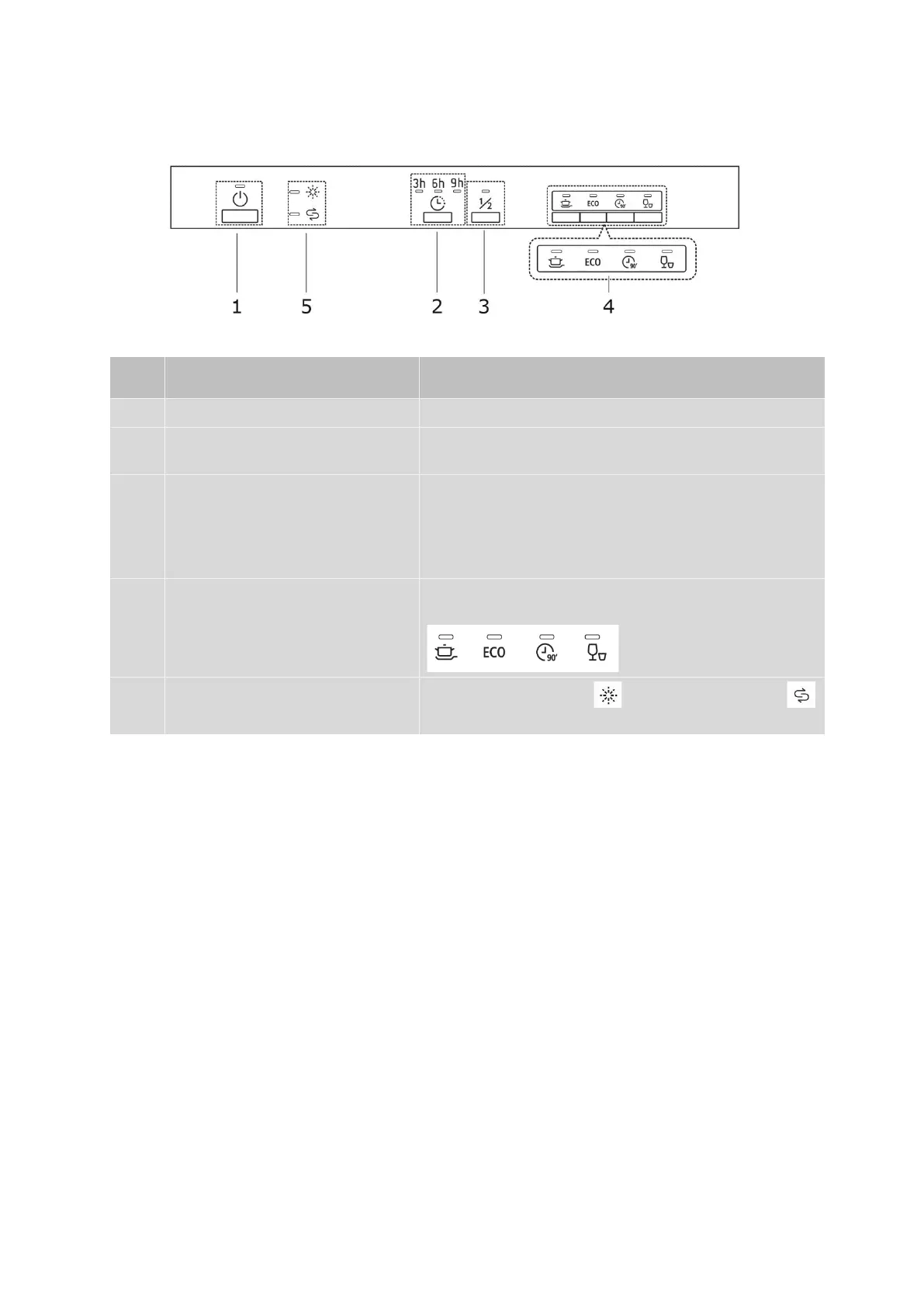
Control panel
Explanation of buttons
NO.
BUTTON/DISPLAY
DESCRIPTION
6
ON/OFF button
Switch appliance ON/OFF
7
Start time delay
Press the button and delay the start time by 3, 6
or 9 hours.
8
Half load (½)
Select the washing programme to wash less than
half the full number of place settings. Additional
function only possible with the programmes:
Intensive, ECO and 90 Min. Energy and Water
Saving.
9
Programme selection
Select the washing programme; the display of
the selected programme lights up.
10
Rinsing agent indicator
Salt indicator
Top up rinsing agent or regenerating salt
if LED lights up