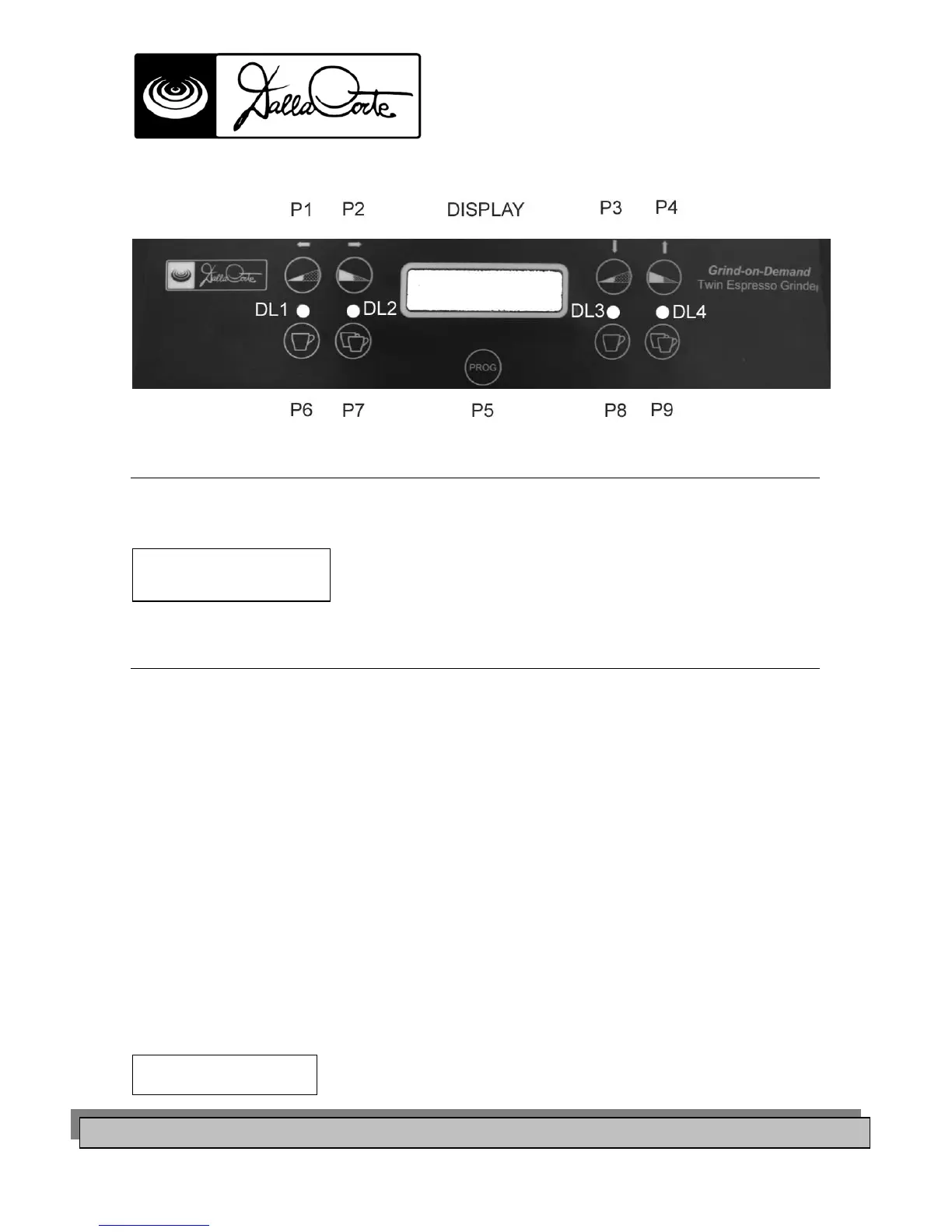
DESCRIPTION COMMAND PANEL
PICTURE 10
START UP
Switch on the general switch of the grinder pic.9.
When on the display you see the following screen , it means that the grinder is ready to start working
FUNCTIONS OF THE GRINDER
The normal functions of the D C II are the following:
• By pressing P6 you get 1 coffee dose from grinder 1
• By pressing P7 you get 2 coffee doses from grinder 1
• By pressing P6 you get 1 coffee dose from grinder 2
• By pressing P7 you get 2 coffee doses from grinder 2
If you need to modify the coffee grinding manually , you have to :
- press P1 or P2 for two seconds to enter the “grinding “ menu of grinder 1
- press P3 or P4 for two seconds to enter the “grinding” menu of grinder 2
then
by pressing P1 you reduce the grinding of grinder 1,while by pressing P2 you raise the grinding of
grinder 1
instead
by pressing P3 you reduce the grinding of grinder 2,while by pressing P4 you raise the grinding of
grinder 2
►the modification takes place by changing the number shown on the display



 To Next Page
 Loading...