
 Need help?
Do you have a question about the Danaher Veeder-Root C346 Series and is the answer not in the manual?
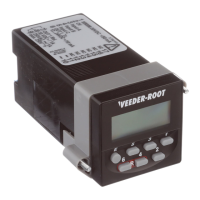
Describes the physical build and design of the instrument, including its compact dimensions.
Details the instrument's primary display capabilities, toggle options, and model variations.
Explains the intuitive button interface for quick parameter changes and access to important functions.
Highlights the NEMA 4/IP65 rating for use in washdown environments.
Describes the layout and function of the instrument's front panel controls, including displays and keys.
Provides a summary of the instrument's five operational modes and their setup procedures.
Outlines the primary operational modes the unit can be programmed for, like Counter or Rate Meter.
Details the programming parameters specific to the Counter function, including inputs and outputs.
Explains programming parameters for the Rate Meter mode, including input types and output timing.
Covers programming parameters for the Elapsed Time counter, such as time format and timing modes.
Details programming for Dual Register operation, including register modes and input types.
Explains programming for Batch Counter mode, focusing on preset values for count and batch totals.
The Veeder-Root brand C346 is a versatile 1/16 DIN instrument designed for various industrial control applications. It can be programmed to function as a preset counter, a rate meter with outputs, or an elapsed time counter. Its enhanced functionality allows for advanced operations such as batching, background totalizing, and dual counter operation with a master sum. When configured as an elapsed time counter, the C346 offers unique capabilities for measuring pulse widths or the time between pulses. The device is available with either an LCD display or a 6-digit LED display, making it suitable for different visibility requirements.
The C346 is equipped with a wide array of features to meet the demands of challenging applications. It supports inputs from both NPN and PNP sensors, dry contacts, or encoders. An input scaling function allows for the display of rate and count inputs in engineering units, providing clear and relevant data. The instrument is available in single and dual preset models. Each preset includes both a transistor output, which can interface with external SSRs or PLCs, and a relay output for direct load control. Outputs can be programmed for either latching or timed operation, offering flexibility in control schemes.
Despite its high level of functionality, the C346 maintains simplicity of operation. Key parameters, such as preset and prescale values, can be quickly accessed using direct access keys. An intuitive button-per-digit interface facilitates easy modification of these values, streamlining setup and adjustment processes. The device features a NEMA 4 rated faceplate, ensuring durability and protection in harsh environments. It is also CE approved and UL and CUL listed, confirming its compliance with international safety and quality standards.
The C346's compact design adheres to the standard 1/16 DIN (48mm x 48mm) faceplate, allowing for easy integration into existing control panels. The main display can be quickly toggled to show the current count value, set value, or prescale value, providing operators with immediate access to critical information. The simple button-per-digit programming, with a dedicated button for each of the six decades in the preset value, enables rapid changes. The Edit key provides quick access to important parameters, further simplifying programming. The front panel seal, rated NEMA 4/IEC IP65, ensures the device is suitable for use in washdown environments, protecting it from water and dust ingress.
For mounting, the C346 is designed for panel installation. The unit is placed into a panel cutout, and an included gasket is slid over the rear to ensure a secure seal. A mounting bracket with tabs catches in grooves on the housing, and panel mount screws are used to tighten the bracket, securing the unit firmly. The housing features four sets of grooves, allowing the bracket to be positioned with screws on either the top or side. The electronic components can be removed from the housing by loosening the bracket and using a small screwdriver in the release slots, facilitating maintenance or replacement of internal parts.
The C346 supports various operational modes, including Count, Rate, Time, Dual Register, and Batch. In Count Mode, it functions as a 1 or 2 preset counter with a background totalizer feature. In Rate Mode, it acts as a rate indicator with two alarm limits. In Time Mode, it operates as a 1 or 2 preset timer. The Dual Register Mode provides two separate totalizing counters (A and B) with a third counter displaying their sum (A+B). Batch Mode configures the device as a preset counter with a presettable batch counter and a batch total display. Each mode has specific setup and operation procedures, detailed in the manual to guide users through configuration.
The reset operation of the C346 is dependent on its operating mode. A front panel reset, achieved by simultaneously pressing the "6" and "4" keys, resets the count, time, or batch value if displayed. For Dual Register mode, it resets Sub Total A or Sub Total B if displayed. A remote reset via Input C resets the count value at any time in Count mode, the time value at any time in Time mode, and both Sub Totals and Primary counts in Dual Register mode. In Batch mode, it resets the count value but not the batch count. The Rate mode does not have a reset function.
Programming the C346 involves setting basic functionality and specific parameters for each mode. The unit's default setting is Preset Counter, but it can be changed to Rate Meter, Elapsed Time Counter, Dual Register, or Batch Counter by holding down the Edit key and the "6" key during power-up and scrolling through the options. To enter Program mode, the Edit key and the "5" key are held down during power-up. The Edit key is then used to navigate between parameters, and the "1" key to scroll through parameter choices. Holding the Edit key for five seconds returns the unit to Operation mode.
Parameters such as F0 (Default Settings) allow users to reset all parameters to their default values. F1 (Count Mode/Rate Mode/Register Mode/Batch Mode) defines the functionality of the three inputs, offering various configurations for counting, direction, inhibit, and reset. F2 (Time Format) sets the units for timing displays (seconds, minutes, or hours). F3 (Display Decimal Point) defines the number of digits displayed to the right of the decimal point for count, preset, rate, and time values. F4 (Reset Operation) determines how the count value behaves when a preset is reached, with options for resetting to zero or preset, with or without autoreset.
Output timing parameters, F6 (Output 1 Time) and F7 (Output 2 Time), set the duration for which outputs are active once a preset is reached, with options for no output, latching output, or specific time durations (e.g., 20ms, 50ms, 100ms, 500ms, 1s). F8 (Timing Operation) in Elapsed Time mode allows selection of cumulative or singular pulse width or period measurement. F9 (Output on Reset) determines if the primary output activates when the unit is reset. F10 (Input Type) configures the unit for sinking (NPN) or sourcing (PNP) inputs. F11 (Count Speed) sets the unit for full speed (5 kHz) or 30 Hz for debounce filtering of contact inputs.
F12 (Static/Dynamic Reset) defines how counting behaves during a reset signal. Static reset stops counting on the leading edge and resumes on the trailing edge, while dynamic reset immediately resets and accumulates while the signal is active. F13 (Start-up Suppression) in Rate Meter mode prevents outputs from triggering on start-up until off conditions are met. F14 (Output Signal Memory) determines if outputs resume their state after a power interruption or reset to zero. F15 (Background Totalizer) activates the totalizer function. F20 (Front Panel Reset Enable) controls whether the front panel reset is active or requires a longer key press.
Access control parameters, F21 (Preset 1 Access Enable), F22 (Preset 2 Access Enable), and F23 (Prescale Access Enable), determine how easily preset and prescale values can be accessed. They can be set to allow immediate access, restricted access (requiring a 10-second key press), or no access. F29 (Lockout Mode) further controls access to these values when F21, F22, and F23 are set to inactive. These lockout features enhance security and prevent unauthorized changes to critical settings.
 General
| Stacker Capacity | 200 notes |
|---|---|
| Power Supply | 100-240 VAC, 50/60 Hz |
| Display | LCD |
| Supported Currencies | Multiple currencies |
| Detection Methods | UV, MG, IR |

 To Next Page
