Operating Instructions
CHANGING THE
BATTERIES ON THE
REMOTE
CR202 5
CR 2025
1
2
1
2
+
A
B
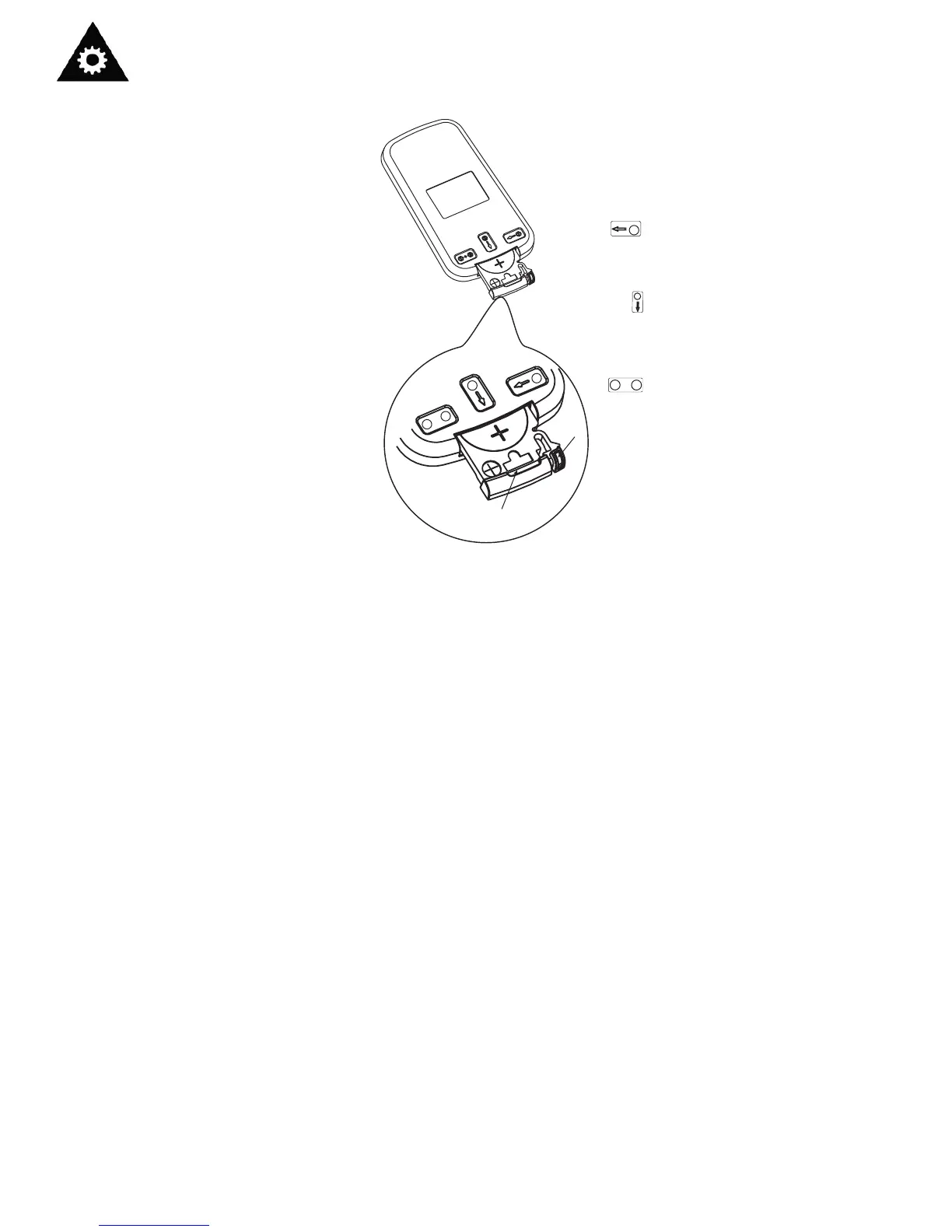
The remote controller is powered by
one button cell housed in the rear part
and protected by a cover. Remove the
button cell according to the arrow
marked at the back of the remote
controller.
1. Slightly press “A” position
according to the number 1
arrow direction by your
forefinger.
2. Press “B” position and pull it
according to the number 2
arrow direction by your
thumb.
3. The above step 1 and 2
should be done simultaneously
to slide the button cell out.
1
2
1
2
+
14
Protect the remote control from high
temperatures, and keep it away from
radiation exposure.
Keep the control panel receiver out of
direct sunlight.
If the remote control will not be used for
extended periods of time (vacations etc.),
batteries should be removed.
Do not mix old and new batteries.
Do not mix alkaline,standard (carbon-zinc),
or rechargeable (ni-cad,ni-mh,etc) batteries.
This Class B digital apparatus complies with
Canadian ICES-003.
The remote operates within a range of 8
meters (26 ft.) from the receiver located
inside the main unit.Any obstruction between
the receiver and remote may cause signal
interference, limiting the ability to program
the main unit.


 To Next Page