OPERATING INSTRUCTIONS
9
MICROWAVE COOKING
1. Press the POWER LEVEL button repeatedly to choose the desired
cooking power as per the below chart.
2. Use the number pad to enter the desired cooking time. The
maximum amount of time that can be set is 99 minutes and 99
seconds.
3. Press the START/+30SEC button to begin operation.
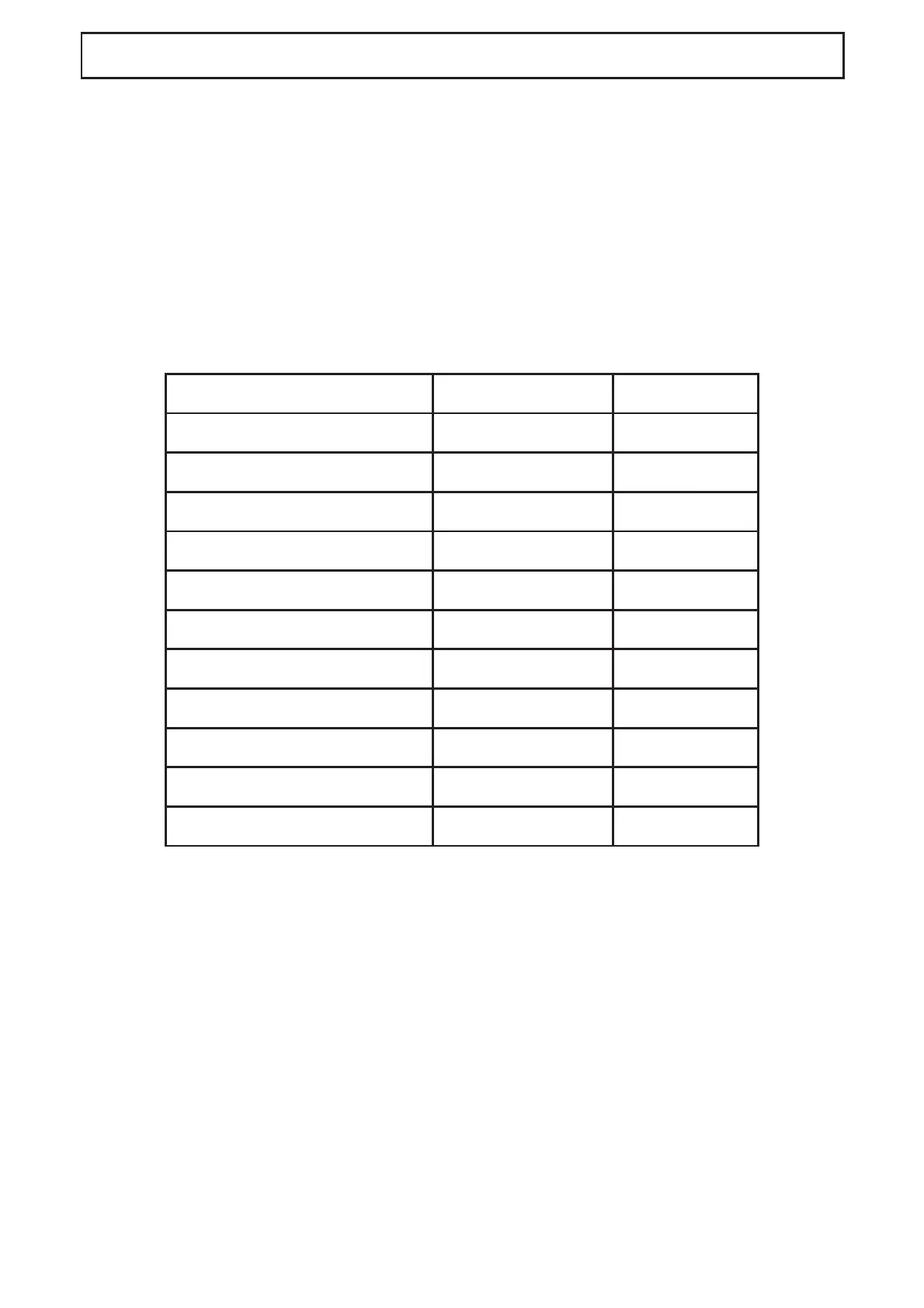
Press POWER LEVEL Power Level Display
Once 100% P100
Twice 90% P-90
3 times 80% P-80
4 times 70% P-70
5 times 60% P-60
6 times 50% P-50
7 times 40% P-40
8 times 30% P-30
9 times 20% P-20
10 times 10% P-10
11 times 0% P-00
TWO STAGE COOKING
Some recipes require different stages of cooking at different
temperatures. To set a two stage cook program:
1. Enter the fi rst cooking program but do not press the
START/+30SEC.
2. Enter the second cooking program.
3. Press the START/+30SEC button to begin opoeration.
Note that express cooking, weight defrost and auto cooking menus
cannot be set during a multi-stage cooking program.



 To Next Page