OPERATING INSTRUCTIONS
12
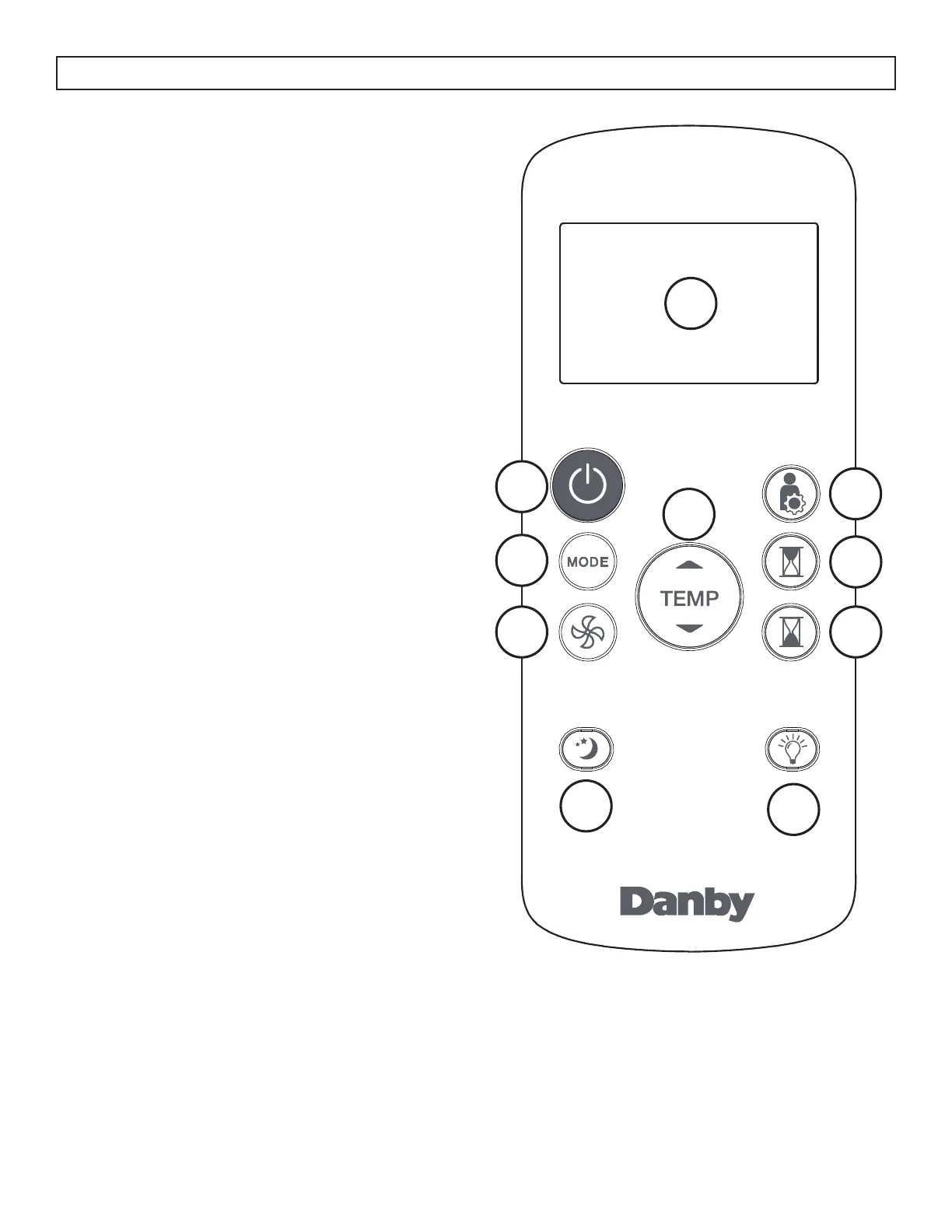
REMOTE CONTROL
1. Power button: Press to turn the appliance on or
off.
2. Mode button: Press to select the desired mode.
3. Fan button: Press to select fan speed.
4. Sleep button: Press to start the sleep function.
5. LED button: Press to turn the LED display on or
off.
6. Timer off button: Press to set the Auto-off timer.
7. Timer on button: Press to set the Auto-on timer.
8. Shortcut button: Press to set and activate the
short cut function.
9. Temperature control buttons:
• Used to set the temperature.
• Press and hold both temperature control buttons
for 3 seconds to change the temperature display
from °C to °F.
10. LED Display: Shows the set temperature in °C or
°F or the auto-timer settings.
Note: The remote control can be used at a
maximum distance of 8 meters (26 feet) from the
appliance. Using the remote control more than 8
meters (26 feet) away from the appliance can result
in poor reception of the signal.
1
2
3
4
5
6
7
8
9
10



 To Next Page