Features
ELECTRONIC CONTROL INSTRUCTIONS AND OPERATING MODES
5
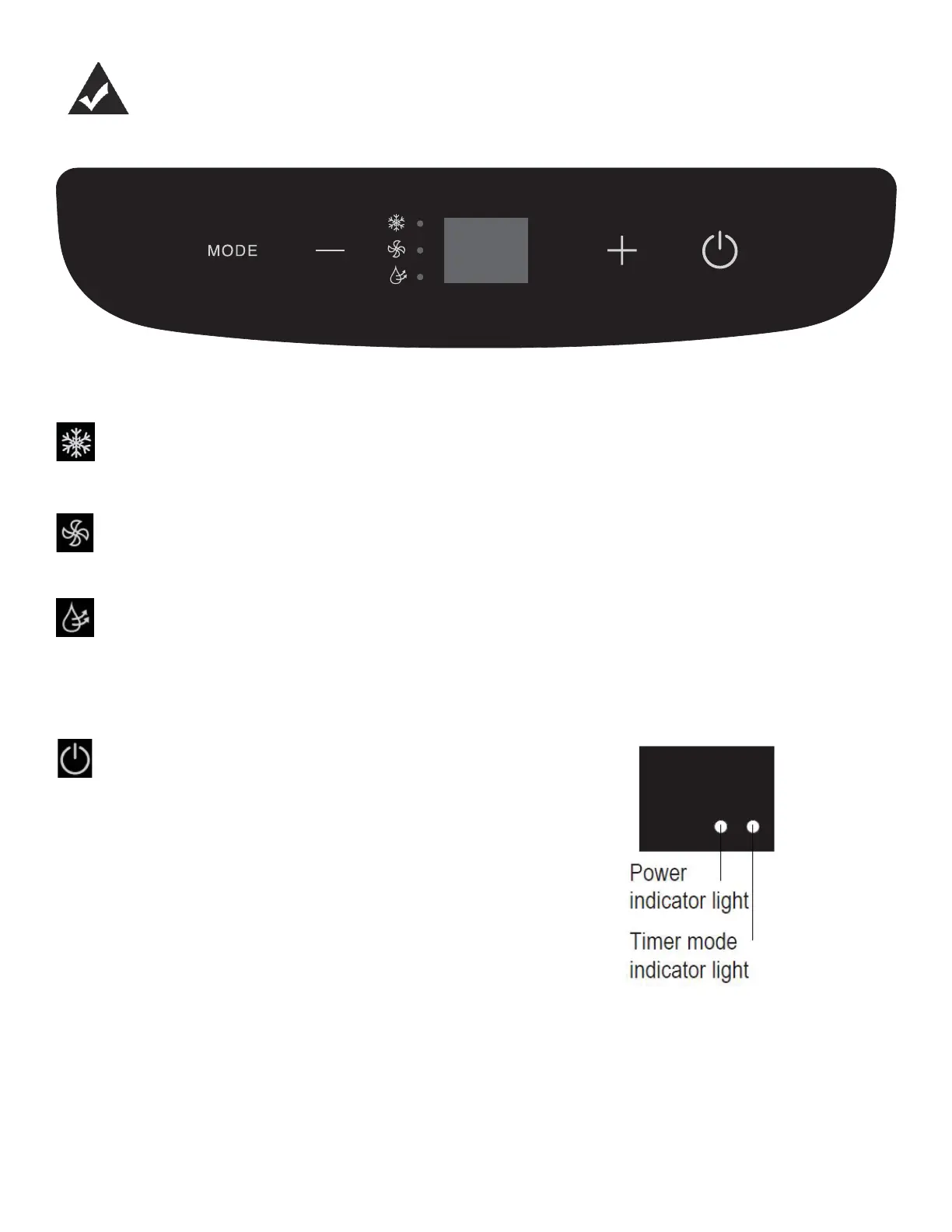
Mode Button: Press to select the desired mode. Modes will cycle in sequence with each press
of the button; COOL, DRY, FAN. Light will indicate current mode. Fan speed can be chosen on
COOL and FAN modes using the remote control.
COOL mode Note: The hose should be exhausted during COOL mode
- Press the mode button until the COOL icon illuminates
- Press the UP or DOWN arrow buttons to select the desired room temperature
- The temperature can be set within a range of 17-30°C / 62-86°F
FAN mode
- Press the mode button until the FAN icon illuminates
- Fan speed can be adjusted using the remote control
DRY mode
- Press the mode button until the DRY icon illuminates
- The display will show the current room temperature
- Fan speed and temperature cannot be adjusted in this mode
Up and Down Buttons: Used to adjust temperature settings in COOL mode. Press and hold
both Up and Down buttons for 3 seconds to change the temperature display from °C to °F.
Power Button: Press to turn the unit on or off.
LED Display:
- While on COOL mode shows the set temperature in °C or °F
- When on FAN and DRY mode shows the room temperature
- Displays error codes
AUTO mode
- Can only be activated by remote control
- There is no AUTO mode display on the control panel
- Display will show COOL or FAN based on ambient room temperature
SLEEP mode
- Can only be activated from the remote control
- Conserves energy during sleeping hours
- Once activated, SLEEP mode will increase the set temperature by 1 degree for 30 minutes.
The set temperature will increase another degree in the next 30 minutes and then will maintain
temperature for 7 hours before returning to the original setting.
- The SLEEP function is only available in COOL mode



 To Next Page