P I 02 9604 1226 E I sales@danielaappliances.com.au W | danielaappliances.com.au
PAGE 7
P I 02 9604 1226 E I sales@danielaappliances.com.au W | danielaappliances.com.au
PAGE 6
QUICK OPERATION GUIDE
For detailed operating method read the corresponding content on the instruction manual.
22
2.Quick operation guide2.Quick operation guide
For detailed operating method read the corresponding content on the instruction manual.
Compartment A:
For each wash cycle.
Compartment B:
For programs with pre-wash only.
(Follow the user instructions)
Mechanical indicator C.
Electric indicator on control panel (if provided).
Check the rinse aid level
Load the baskets
Select a program
Running the dishwasher
Switch off the appliance
Turn off the water tap,
unload the baskets
Fill the detergent dispenser
Warning: wait a few minutes (about 15 minutes) before unloading the dishwasher to avoid scald,as
the dishes and utensils are still hot and more susceptible to break.
They could also dry better.Unload the appliance, starting from the lower basket.
Changing the program
Add forgotten dishes in the
dishwasher.
Scrape off any large food particles. Soften remnants of burnt food in pans,
then load the baskets. Refer to the dishwasher loading instructions.
When the working cycle is finished, the buzzer of the
dishwasher will sound 8 times, then stop.
Turn off the appliance using the On/Off Button.
If the appiance was under standby mode, it will be power off automaticly after 30 minutes without any operation.
If the appliance is switched
off during a wash cycle.
Open the door carefully.
Hot steam may escape
when the door is opened!
WARNING!
If the appliance is switched off during a wash cycle, when switched
on again, please re-select the washing cycle and operate the dishwasher
according to the original Power-on state ).
Switch on the appliance
Open the door, press the On/Off button to switch on the appliance.
T urn on the water tap and press the
Start/Pause Button. The machine will start working
after about 10 seconds.
Close the door,press the Program Button until the selected program lights up.
( See the section entitled Operation instruction )
1. A running cycle can only be modified if it has been running for a short time. Otherwise the detergent
may have already been released and the water already drained. If in this case, the detergent
dispenser must be refilled.
2. Press the Start/Pause button, the machine will be in standby state, press the program
button more than 3 seconds then you can change the program to the desired cycle setting.
3. Press the Start/Pause Button, the dishwasher will run after 10 seconds.
1.Press the Start/Pause Button to stop the washing.
2.Open the door a little.
3.After the spray arms stop working, you can open the door
completely.
4.Add forgotten dishes.
5.Close the door.
6.Press the Start/Pause Button, the dishwasher will run
after 10 seconds.
A
B
C
OPERATION INSTRUCTION
IMPORTANT
To get the best performance from your dishwasher, read all operating instructions before using it
for the first time.
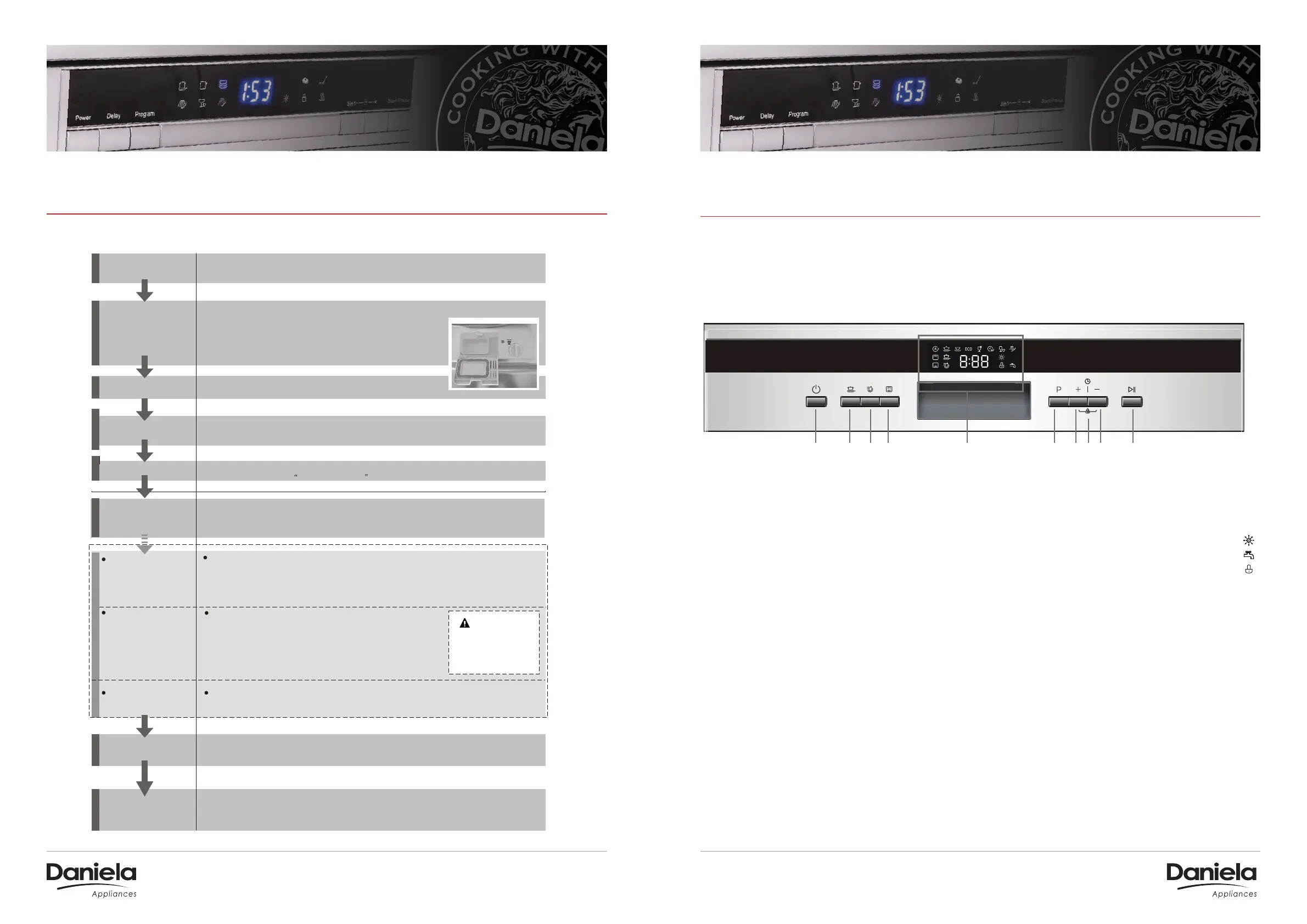
CONTROL PANEL
1. On/O Button:
To turn on/o the power supply.
2. Strong Wash function Button:
improve the cleaning ecienc
(only Intensive, Heavy, ECO, Glass and
90 min have this function).
3. Extra Drying function Button:
improve the drying eciency
(only Intensive, Heavy, ECO, Glass and
90 min have this function).
4. Alt Button:
Dual zone wash function, press the button
to select either upper basket or lower
basket loaded. The response indicator
will light (only Intensive Heavy, ECO, Glass
and 90 min can be used).
33
3.Operation Instruction3.Operation Instruction
before using it for the first time.
To get the best performance from your dishwasher, read all operating instructions
IMPORTANTIMPORTANT
Control PanelControl Panel
Dishwasher FeaturesDishwasher Features
11 22 33 44 55 66 77 99 1010
88
1.On/Off Button: To turn on/off the power supply.
2. Strong Wash function Button: improve the cleaning
efficiency(only Intensive, Heavy, ECO, Glass and
90 min have this function)
5.Display screen: to show the reminding time, program
error code, Rinse Aid indicator etc.
4.Alt Button: Dual zone wash function, press the button
to select either upper basket or lower basket loaded.
And the response indicator will light(only Intensive
Heavy, ECO, Glass and 90 min can be used.)
3.Extra Drying function Button: improve the drying
efficiency(only Intensive, Heavy, ECO, Glass and
90 min have this function )
7.Delay Button: Press the button to increase dealay time.
10.Start /Pause button: To start the selected
washing program or pause the washing program
when the machine is working.
6.Program Button: To Press the button to select.
8.Child lock button: press the two buttons for 3 seconds
simultaneously to lock the all button.
9.Delay Button: Press the button to decrease dealay time.
Faucet is not open
Rinse detergent need to be refilled
Child lock
Back View
1
2
3
4
5
7
8
9
10
Front view
Lower basket
Salt container
Dispenser
Cup shelf
Spray arms
Filter assembly
Inlet pipe connector
Drain pipe
Upper basket
Cutlery rack
Top spray arm
1
Inner pipe
5
6
7
8
9
10
12
11
3
2
4
6
Adjuster
13
13
11
12
33
3.Operation Instruction3.Operation Instruction
before using it for the first time.
To get the best performance from your dishwasher, read all operating instructions
IMPORTANTIMPORTANT
Control PanelControl Panel
Dishwasher FeaturesDishwasher Features
11 22 33 44 55 66 77 99 1010
88
1.On/Off Button: To turn on/off the power supply.
2. Strong Wash function Button: improve the cleaning
efficiency(only Intensive, Heavy, ECO, Glass and
90 min have this function)
5.Display screen: to show the reminding time, program
error code, Rinse Aid indicator etc.
4.Alt Button: Dual zone wash function, press the button
to select either upper basket or lower basket loaded.
And the response indicator will light(only Intensive
Heavy, ECO, Glass and 90 min can be used.)
3.Extra Drying function Button: improve the drying
efficiency(only Intensive, Heavy, ECO, Glass and
90 min have this function )
7.Delay Button: Press the button to increase dealay time.
10.Start /Pause button: To start the selected
washing program or pause the washing program
when the machine is working.
6.Program Button: To Press the button to select.
8.Child lock button: press the two buttons for 3 seconds
simultaneously to lock the all button.
9.Delay Button: Press the button to decrease dealay time.
Faucet is not open
Rinse detergent need to be refilled
Child lock
Back View
1
2
3
4
5
7
8
9
10
Front view
Lower basket
Salt container
Dispenser
Cup shelf
Spray arms
Filter assembly
Inlet pipe connector
Drain pipe
Upper basket
Cutlery rack
Top spray arm
1
Inner pipe
5
6
7
8
9
10
12
11
3
2
4
6
Adjuster
13
13
11
12
5. Display screen:
To show the reminding time, program
error code, Rinse Aid indicator etc.
Rinse detergent need to be refilled.........
Faucet is not open.........................................
Child lock..........................................................
6. Program Button:
To Press the button to select.
7. Delay Button:
Press the button to increase delay time.
8. Child lock button:
press the two buttons for 3 seconds
simultaneously to lock the all button.
9. Delay Button:
Press the button to decrease delay time.
10. Start /Pause button:
To start the selected washing program
or pause the washing program when the
machine is working.


 To Next Page
 Loading...