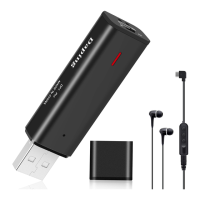
Charging method
playback, the battery level is low.
Note: If the battery level is low, stop playing or recording
and charge the battery.
Time synchronization setting
10
Low power indicator: When the recording light and the
playback light flash simultaneously during recording or
After connecting the product to your PC, open the drive
of the product in "My Computer". Then open the "Settime"
folder. Finally, you can click the "SetDigitRecorderTm.exe"
file to synchronize it with your PC.(As shown)
Please connect to the product’s USB port with the supplied
USB cable. You can charge it by connecting the included
USB cable to the power supply (PC, AC adapter, mobile
battery). (Note: Please charge with DC5V == 1A power
supply).
Charging status: The blue playback light will flash while
charging. When the battery is fully charged, the playback light
and recording light will light on simultaneously.
Recording while charging: Connect charger during recording,
the recording light lights up, and the playback light flashes at the
same time.(Note: Connect the charger during recording, if the
battery is full, the red and blue indicator lights will be solid.)


 To Next Page