Connecting the Element (Read carefully!)
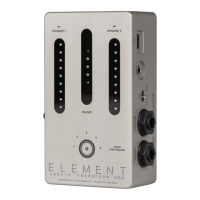
The Element is loaded with flexible audio connection options
· Two 6.3 mm jacks that can be used as:
· Balanced/unbalanced instrument input and output
or
· Amplifier input and speaker (through) output
· 3.5 mm jack for aux input
· Bluetooth input for wireless backing/click tracks
· Two 3.5 mm headphone outputs
· Balanced XLR output with ground lift
Power: Use a 9-12V DC power supply (center negative 2.1/5.5 mm barrel
plug)
USB: One USB-C port for transferring impulse responses and firmware XLR
outputupdates
Bluetooth connection
You can playback Bluetooth audio through the Element into your
headphones. For Bluetooth pairing press and hold the touch sensor on the
Element until all 5 of the surrounding LEDs stay lit. It will show up as
"Element" on your Bluetooth device list, unless the name has been changed
by the user. Use the blend control slider to set the mix between the
instrument/amp input and the Bluetooth audio for your headphones. The
Bluetooth audio does not pass to the XLR output or the 6.3 mm
instrument/speaker out.
Aux Input
You can connect the line/headphone out of your laptop/keyboard/mixer etc.
into the 3.5 mm aux input on the Element . Use the blend control slider to set
the mix between the instrument/amp input and the aux in audio for your
headphones. The aux in audio does not pass to the XLR output or the 6.3 mm
instrument/speaker out.


 To Next Page