EasyManua.ls Logo

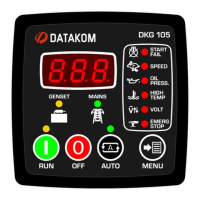
Datakom DKG-105 - User Manual

Datakom DKG-105
12 pages
Print Icon
To Next Page IconTo Next Page
Loading...
DKG-105 User Manual V-17
DKG-105 AUTOMATIC
MAINS FAILURE UNIT
Automatic engine starting and stopping
Gas engine support
Automatic mains failure monitoring
Automatic load transfer
Automatic shutdown on fault condition
Test mode available
Survives cranking dropouts
Provision for energize to stop, preheat &
choke outputs
Mains phases voltage limits checking
Generator phase voltage limits checking
Delayed overspeed and underspeed
alarm
Digitally adjustable low & high mains
voltage limits
Digitally adjustable low & high generator
voltage limits
Digitally adjustable underspeed &
overspeed limits
Digitally adjustable delay for speed alarm
Digitally adjustable timers
Digital display of mains & generator
voltages
Digital display of generator frequency
Digital engine run-hours display
Plug-in connection system for easy
replacement
Low cost
Small dimensions
Standard panel dimensions, (72x72mm)
FEATURES
Question and Answer IconNeed help?

Do you have a question about the Datakom DKG-105 and is the answer not in the manual?

Summary

Features

Programming Summary

Installation

Introduction to the Control Panel

Provides an overview of the control panel's design for user friendliness and non-volatile memory.

Mounting the Unit

Details how to mount the unit in a standard panel opening using its spring mechanism.

Wiring the Unit

Explains the necessary external fuses for mains and generator phases, and battery connection.

Inputs and Outputs

Describes the function and connection of each terminal for mains, generator, and control signals.

Displays

Explains the information shown on the digital display and indicator LEDs for status.

Alarms

Details the various alarms, their triggers, and how they affect the unit's operation.

Modes of Operation

Describes the functions of OFF, AUTO, TEST, DISPLAY TEST, and PROGRAM modes.

Maintenance

Troubleshooting

Programming

Technical Specifications

Declaration of Conformity

Connection Diagram

Summary

Features

Programming Summary

Installation

Introduction to the Control Panel

Provides an overview of the control panel's design for user friendliness and non-volatile memory.

Mounting the Unit

Details how to mount the unit in a standard panel opening using its spring mechanism.

Wiring the Unit

Explains the necessary external fuses for mains and generator phases, and battery connection.

Inputs and Outputs

Describes the function and connection of each terminal for mains, generator, and control signals.

Displays

Explains the information shown on the digital display and indicator LEDs for status.

Alarms

Details the various alarms, their triggers, and how they affect the unit's operation.

Modes of Operation

Describes the functions of OFF, AUTO, TEST, DISPLAY TEST, and PROGRAM modes.

Maintenance

Troubleshooting

Programming

Technical Specifications

Declaration of Conformity

Connection Diagram

Datakom DKG-105 Specifications

General IconGeneral
Panel Cut-out Size92 x 92 mm
CategoryGenset Controller
DC Supply Range9-35 VDC
Alternator VoltageUp to 300 VAC
Alternator Frequency45-65 Hz
Operating Temperature-30°C to +70°C
Maximum Humidity95% RH (non-condensing)
Frequency45-65 Hz
Humidity95% RH (non-condensing)