2-16
Part No. 001-4008-101/102
2.4.4 Apply Station Reset
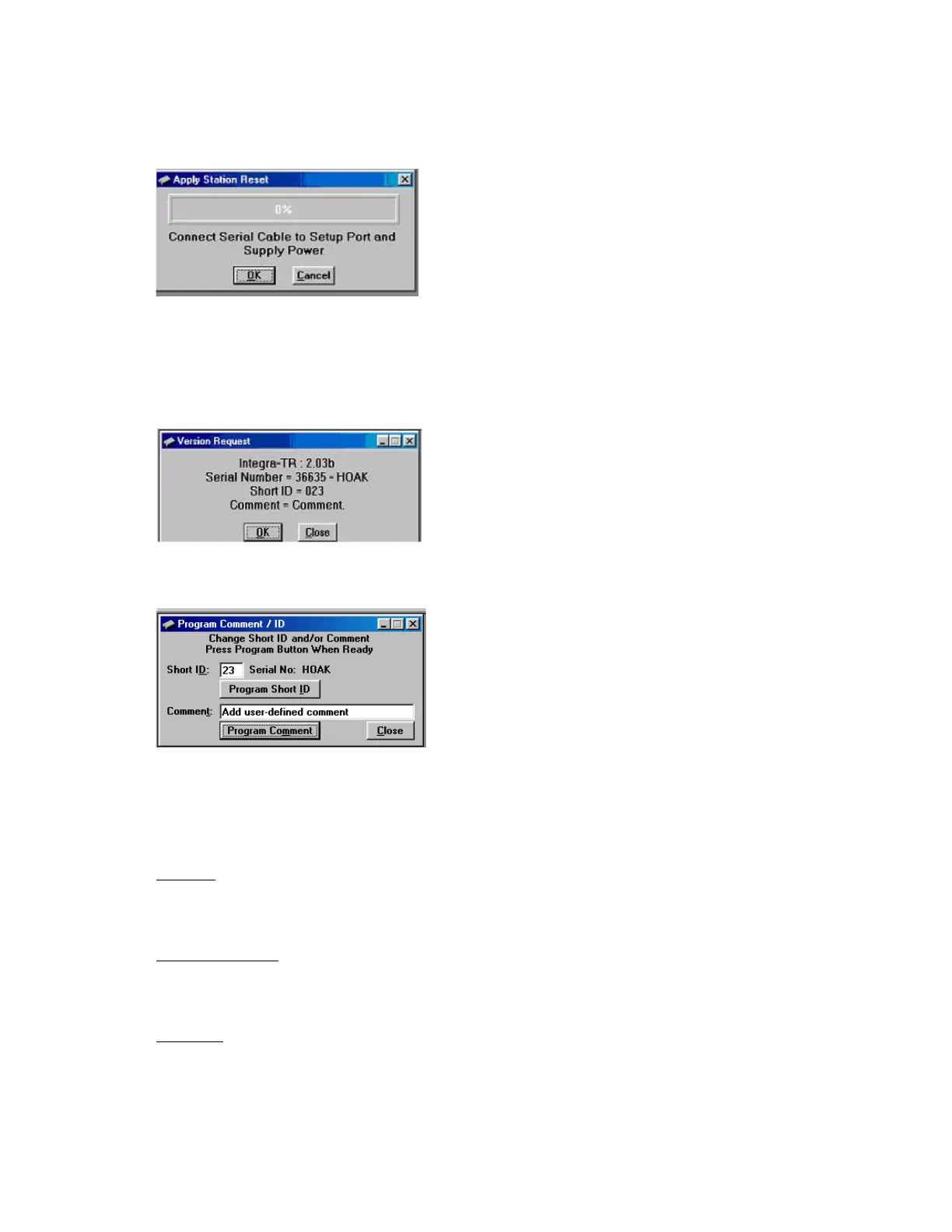
Station Reset tells the Integra-TR to perform a software reset. Performing a Station Reset reacts the same as
cycling power to the unit.
Figure 2-13 Station Reset Screen
2.4.5 Version Request
Selecting Version Request causes the Integra-TR Field Programming Software to display information about
the version of the Integra-TR hardware and firmware.
Figure 2-14 Version Request Screen
2.4.6 Program Comment / ID
Figure 2-15 Program Comment / ID Screen
The Program Comment/ID field allows the user to program a Short ID and/or Comment. This function is
used if the Integra-TR to be programmed was cloned from another unit (See Figure 2-15)
Short ID
The number (1 to 254) that identifies an individual unit in a network.
Program Short ID
Clicking this button programs the new Short ID.
Comment
This field allows the user to give each unit a unique description (s), or add customer name, location,
technical information, or other user desired information. Comments must be text and are limited to 24
characters, including spaces.



 To Next Page