EasyManua.ls Logo

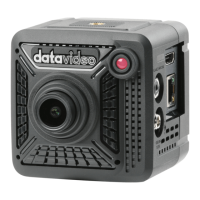
Datavideo BC-50 - User Manual

Datavideo BC-50
112 pages
Print Icon
To Next Page IconTo Next Page
Loading...
BC-50
BLOCK CAMERA
Instruction Manual

Questions and Answers

  • M
    maldonadojanetAug 11, 2025
    How to fix a Datavideo BC-50 Camcorder when the display shows no image?
    • P
      Patricia JonesAug 11, 2025
      If your Datavideo Camcorder display shows no image, verify that the camera power supply is correctly connected and that the supply voltage is correct. Ensure the power light is on and that the SDI cables are properly connected. Also, check the manual lens aperture and make sure it is open.
  • S
    sfowlerAug 19, 2025
    What to do if there is sometimes no image on Datavideo BC-50?
    • C
      Cindy KellyAug 19, 2025
      If you sometimes get no image on your Datavideo Camcorder, check that the SDI cables are correctly connected. Also, make sure the camera is installed stably and is not subject to strong shocks.
  • T
    Travis WelchAug 26, 2025
    Why is the image blurring on my Datavideo Camcorder?
    • L
      Lisa McphersonAug 26, 2025
      If the image from your Datavideo Camcorder is blurring, verify the focus of the camera lens is accurate. Also, check to see if the surface of the lens is clean.
  • P
    Paul PerezSep 3, 2025
    What to do if Datavideo BC-50 Camcorder can’t be controlled by the serial port?
    • L
      Linda MarshallSep 3, 2025
      If your Datavideo Camcorder can’t be controlled by the serial port, check that the camera control parameter is set correctly and that the control wire is connected correctly.

Summary

Warnings and Precautions

3. Connections

4. OSD Menu Options

5. Equipment Setup and Internet Connection

6. Visit and Control the BC-50 by LAN

6.1. Setup the IP Address

Instructions for setting up the camera's IP address for network access.

6.2. Change the IP Address

Steps for modifying the camera's IP address.

6.3. Visit;Access the BC-50

How to access the camera's web interface for control.

6.5. Parameter Setting

Configuration of various camera parameters.

7. Maintenance & Warnings

8. Failures & Troubleshooting

Datavideo BC-50 Specifications

General IconGeneral
BrandDatavideo
ModelBC-50
CategoryCamcorder
LanguageEnglish

Related product manuals