The Datavideo TC-200 Title Creator is a portable and rugged overlay box designed to simplify and facilitate video production by enabling the creation of professional and eye-catching DSK (Downstream Key) subtitles using a Windows laptop. It works in conjunction with Datavideo's Windows-based Character Generator software (such as CG-200, CG-250, CG-350, and CG-500) to form a complete DSK subtitle system.
Function Description:
The TC-200 allows users to create subtitles in two primary ways:
- Downstream Key (DSK): Users can assign alpha (key source) and T-signal (fill source) to the respective outputs of the TC-200, which are then connected to switchers equipped with DSK functionality, such as Datavideo's HS-2800 or HS-1200 switchers.
- CG Overlay: The TC-200 can be configured as a CG overlay device. In this mode, it accepts external SDI video, combines it internally with the subtitles, and delivers the combined output to the device's output. This is particularly useful for switchers without DSK capability or for videos created without subtitles.
The device is designed for field use, offering quick and easy setup without the need for a high-end desktop PC with PCIe cards.
Important Technical Specifications:
- HDMI input x 1 (for laptop CG overlay input)
- HD/SD-SDI video input x 1 (for overlay or optional genlock)
- HD/SD-SDI output x 1 (can be configured as separate Key & Fill or CG overlay with video)
- LAN port x 1 (for firmware upgrade and control)
- HD Video: 1080i50 / 59.94 / 60, 720p50 / 59.94 / 60
- SD Video: 720i 576 / 480
- Supports video resolutions up to 1080i, including PAL & NTSC.
- 1920 x 1080i/50Hz, 1920 x 1080i/60Hz, 1920 x 1080i/59Hz
- 1920 x 1080i/60Hz (instead 1920 x 1080i/59Hz)
- 1280 x 720p/50Hz, 1280 x 720p/60Hz, 1280 x 720p/59Hz
- 1280 x 720p/60Hz (instead 1280 x 720p/59Hz)
- 720 x 576i/50Hz
- 1920 x 1080i/50Hz (crop to 720 x 576i/50Hz)
- 720 x 480i/59Hz
- 1920 x 1080i/60Hz (crop to 720 x 480i/60Hz)
Power:
- DC IN 12V 6W
- Can be powered from Battery DC voltage (7 to 15 V DC Input) when using an accessory battery mounting plate.
Control:
- DIP switch configuration
- PC control via RJ-45 input
Usage Features:
Character Generator Software Compatibility:
- The CG user interface runs on Windows XP/7/8.
- CG fonts are compatible with Windows fonts.
- CG software is compatible with all languages available on Windows.
- Supports still and animated file formats such as JPG, TAG, GIF, BMP, and PNG.
- News ticker can be positioned on either side of the screen (top, bottom, left, and right).
- CG subtitles can be created on any computer and delivered to the TC-200 via HDMI.
Conversion Modes (configurable via DIP switches):
- HDMI signal is split into titles and alpha channel: This mode separates the HDMI input into distinct title and alpha (key) signals.
- HDMI titles overlay over the input SDI signal: This mode overlays the HDMI-generated titles onto an incoming SDI video signal.
- HDMI signal is split into titles and alpha channel with Genlock: Similar to the first mode, but with genlock synchronization.
- CG overlay: HDMI input is CG; SDI in is live video.
- Gen-lock mode: HDMI input is CG; SDI in is reference signal.
- Reference with internal signal: HDMI input is CG; SDI in isn't in use.
DIP Switch Control:
The TC-200 features a 6-pin DIP switch on the front panel for configuring video format, conversion mode, and control interface.
- DIP Switch 1,2,3 (Device Modes): Selects output video format (e.g., 1080i50Hz, 720p60Hz, 576i50Hz, 480i59.94Hz).
- DIP Switch 4 & 5 (Conversion Modes): Selects how the HDMI signal is processed (split into titles/alpha, overlay, or split with genlock).
- DIP Switch 6 (Control Modes): Determines if the TC-200 is configured from the RJ-45 input (PC) or by the DIP switches.
Connectivity:
- SDI IN: Connects an SDI video source via an SDI cable. The TC-200 uses the sync of the SDI input source for synchronization, as it does not support external tri-level sync and black burst genlock signals.
- PC IN HDMI: Connects a video input from the PC via an HDMI cable. An optional DVI to HDMI cable or Display Port adaptor to HDMI cable may be required depending on the laptop.
- SDI OUT (FILL/KEY): Provides Fill and Key channel outputs.
Power LED: Indicates when power is connected.
Minimum Computer Requirements: Refer to the separate CG software manual for detailed requirements.
VGA Graphics Card Compatibility: Compatible with ATI and Intel VGA graphics cards. Color difference may result if used with NVIDIA graphics cards.
Maintenance Features:
Firmware Update:
Datavideo regularly releases new firmware to introduce new features or fix bugs. The firmware upgrade process takes approximately 10 minutes and should not be interrupted once started to avoid making the unit non-responsive.
- Requirements: TC-200 unit, 12V Power adapter, Windows PC, Ethernet Cable, Flash Update Software (downloadable from the official website).
- Procedure:
- Connect the TC-200 to a Windows PC via the Ethernet interface. The TC-200 has a default IP address of 192.168.0.211.
- Set the PC's IP address to 192.168.0.11.
- Before running the Flash Update software, set TC-200 DIP SW 6 to 1 (DOWN).
- Run
FlashUpdate_x.xx.exe and click "Next".
- Select "Device is connected via Ethernet" and click "Next".
- Power ON the TC-200. Once discovered by the computer, select "Automatically update the device to latest firmware version" and click "NEXT".
- Confirm the firmware update when prompted.
- After the update process (approx. 15 minutes), close the application and power cycle the TC-200.
Warranty:
- Standard Warranty: One year against manufacturing defects from the date of purchase. Requires original purchase invoice. The warranty period starts 30 days after shipment from a Datavideo office if the purchase date is unknown.
- Exclusions: Damage from accident, misuse, unauthorized repairs, sand, grit, water, viruses, malware, or unauthorized third-party software installations. Mail/transportation costs are at the owner's expense. Accessories (headphones, cables, batteries) are not covered.
- Three-Year Warranty: Datavideo products purchased after July 1st, 2017, are eligible for a free two-year extension to the standard warranty if registered within 30 days of purchase on Datavideo's official website or with a local office/distributor.
- Limited Lifetime Expectancy Parts (1-year coverage): LCD panels, DVD drives, Hard Drive, Solid State Drive, SD Card, USB Thumb Drive, Lighting, Camera module, PCIe Card.
Disposal (WEEE Marking):
The product features the WEEE symbol, indicating it should not be disposed of with household waste. It must be handed over to a designated collection point for recycling of waste electrical and electronic equipment to conserve natural resources and protect human health and the environment.
CE Marking:
The product bears the CE marking, signifying "Conformité Européene" (European Conformity), in accordance with Directive 93/68/EEC.

 Need help?
 General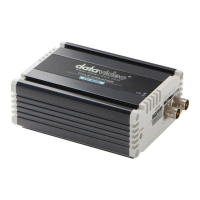

 To Next Page
