H.264 Network Video Streaming Server
NVS-25
8
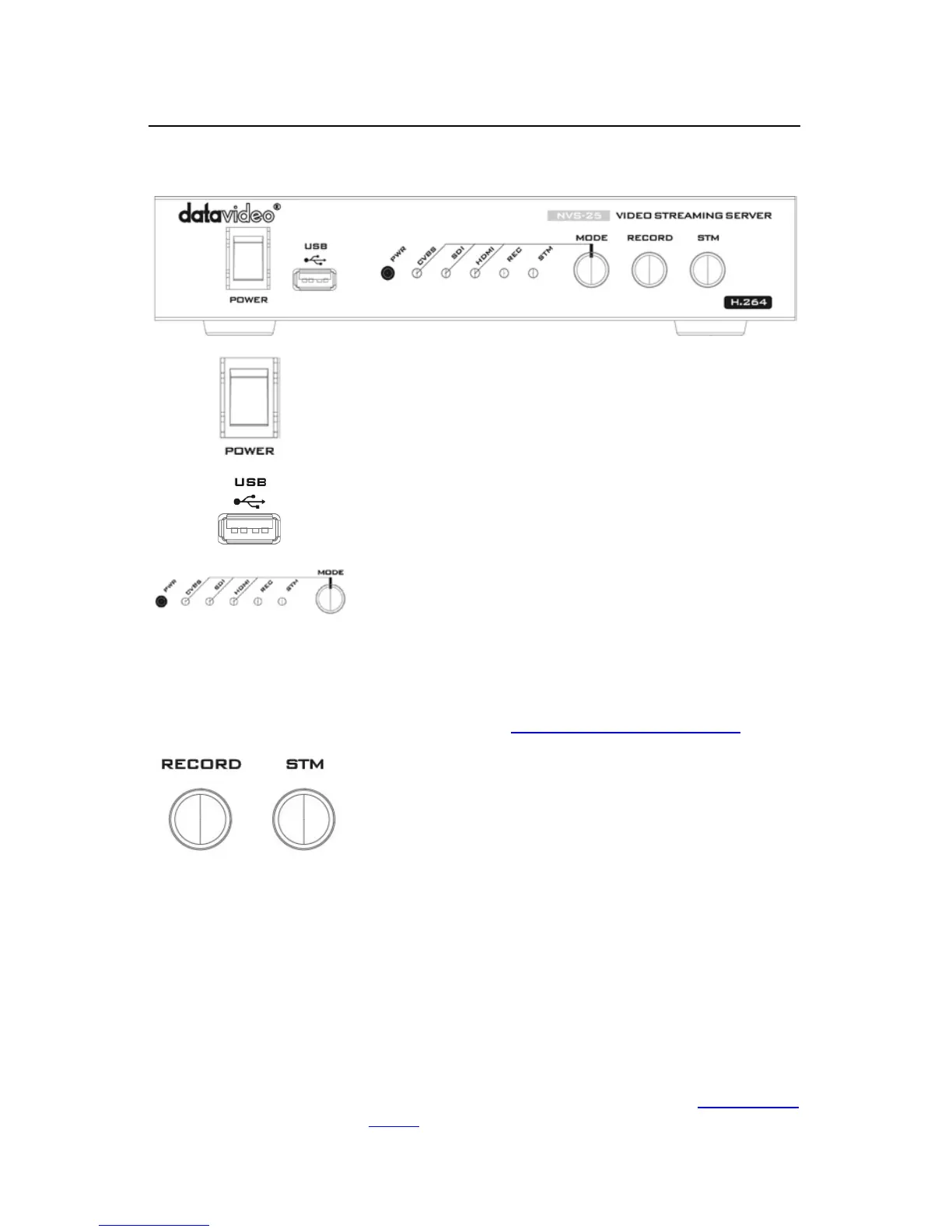
2. Front Panel
Switches the power On / Off
USB 2.0 interface for connecting external storage
Mode Button - Select Input source between
CVBS / SDI / HDMI.
REC – Displays the recording status
STM – Displays the stream server status
PWR – Displays the power status
See the section on LED Status & Button Behaviour
Turns ON/OFF the recording feature
STM
Turns ON/OFF the network streaming feature
Note: Before using this button, the user should first make
sure the network and stream settings are properly
configured.
Restore factory defaults from the front panel.
From power off. Press and hold the STM button and turn
on the NVS-25 power; keep holding the STM button for 40
seconds. When released, the NVS-25 will take a further 30
seconds to finish the boot-up process. Remember to login
with the default username and password (
Default Login


 To Next Page