
 Need help?
Do you have a question about the Datavideo TVS-1000 and is the answer not in the manual?
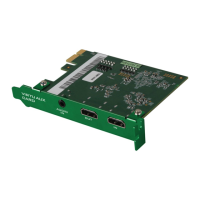
The Datavideo TVS Virtu AUX Card is an expansion card designed primarily to facilitate PowerPoint file input via an HDMI port, as well as to support other applications such as media player or camera input within Datavideo's TVS-1000 and TVS-1200 PC systems. This Quick Start Guide outlines the installation process and key specifications for the card.
The TVS Virtu AUX Card acts as an auxiliary input interface, allowing external HDMI sources to be integrated into the Datavideo TVS virtual studio systems. Its primary function is to enable the seamless display of PowerPoint presentations, but its HDMI input versatility also extends to connecting media players, cameras, or any other device that outputs an HDMI signal. The card features both an HDMI input and an HDMI output, with the output specifically designated for preview purposes without audio. This allows users to monitor the incoming video signal before it is fully integrated into the production workflow. Additionally, the card includes a mini phone jack for audio input, providing an alternative or supplementary audio source to the HDMI embedded audio.
These specifications highlight the card's capability to handle common high-definition video formats, making it suitable for professional video production environments. The inclusion of both HDMI embedded audio and a separate mini phone jack for audio input offers flexibility in managing audio sources.
The TVS Virtu AUX Card is designed for integration into specific Datavideo PC systems, namely the TVS-1000 and TVS-1200. The installation process varies slightly depending on the motherboard model used in the TVS-1000 system (ASUS H87-PRO or ASUS H97-PRO) and the TVS-1200 system.
The cable connection between the TVS Virtu AUX card (green PCB) and the TVS Virtu HDMI card (black PCB) or TVS Virtu SDI card (red PCB) is crucial for proper operation. The diagrams clearly indicate the specific slot for this connection, ensuring correct installation. The design ensures that both cards have an identical slot at the same location for ease of connection.
While the manual does not explicitly detail maintenance features, the design of the card as an internal component suggests that its maintenance would primarily involve ensuring proper installation and connection within the PC system. As an electronic component, it is generally designed for long-term reliability without requiring frequent user intervention. Should any issues arise, troubleshooting would likely involve checking cable connections, verifying proper slot insertion, and consulting the Datavideo support resources. The emphasis on a "Quick Start Guide" implies that the card is intended for straightforward installation and operation, with minimal ongoing maintenance. Users are encouraged to refer to the Datavideo website for the latest version of the manual and support information, indicating that software or firmware updates might be available to enhance functionality or address potential issues. The provided contact information for various Datavideo regional offices also serves as a direct channel for technical support and service, ensuring that users can obtain assistance if needed.
 General
| Brand | Datavideo |
|---|---|
| Model | TVS-1000 |
| Category | DVD Player |
| Language | English |

 To Next Page