IDEOAUDIO
INPUT
SOURCE
AC VOLTS
DIGITAL INPUT
COMP ONENT VI DEO OUTPUT
Y/ G P / B P / R
BR
230VAC
2 7 6 5
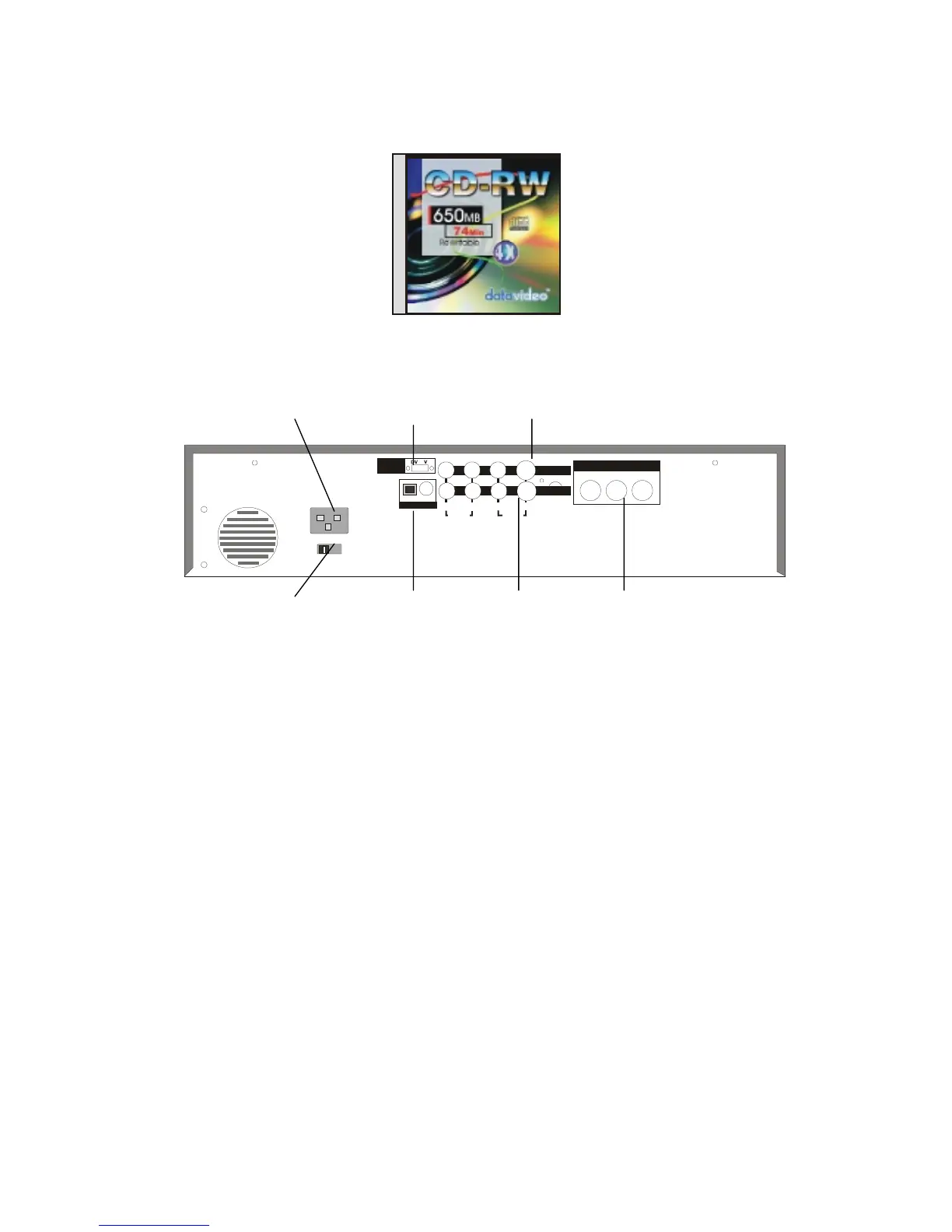
1. Main Power Cord connecting socket
To connect to the main power supply
2. AC Main voltage selector
Sets the voltage input to 115 VAC or 230VAC. Note: This setting does not need to be
changed under normal conditions. Do not adjust this setting without consulting your
dealer or a qualified electrician.
3. Input Source Selector Switch (DV Model only)
To select DV or Analog Video Input
4. Audio and Video Inputs
To connect left and right audio and composite or S-Video signals from a
camcorder/VCR etc.
5. Component Video Output
Component Y.U.V. or R.G.B. video signal output for project or big screen TV/Monitor.
Note: The component video output cannot be used with the S(Y/C) output and the
composite output at the same time. Outputing to both outputs will lower the video
output level.
6. Audio and Video Outputs
To connect to a TV or Monitor


 To Next Page