14
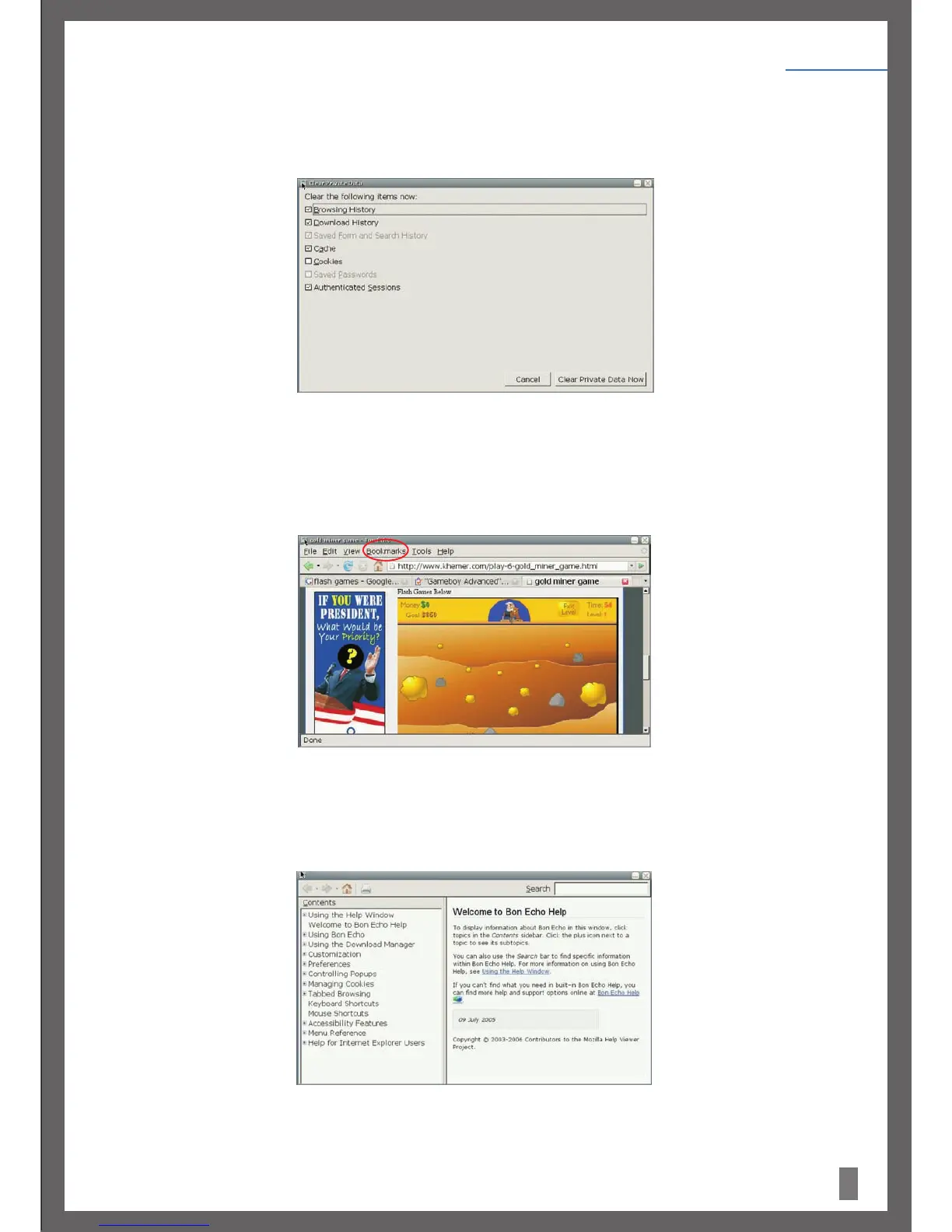
5.Over time and with usage, personal information gets stored in the browser. Firefox provides a Clear Private Data function through the
Tools menu. Click on Tools and then scroll to Clear Private Data in the menu. (As displayed in Figure 11) Check the data to be cleared
and then click the ‘Clear Private Data Now’ buttontoclearthis information.
6. The bookmark management function of Firefox is similar to the My Favorite function of other major browsers. To open the bookmark
manager, click on Bookmarks and scroll to OrganiseBookmarks in the menu. With this function. you can add a bookmark to the current
page or manage bookmarks.
7. If you require more help, click on Firefox's link, and scroll to HelpContents in the menu, as shown in Figure 13:
For more information about Firefox, visit http://www.mozilla.com/en-US/.
Figure 11.
Figure 12.
Figure 13
Figure 2:
Getting Started
Chapter 4


 To Next Page