
 Need help?
Do you have a question about the Datel Go-Tcha Ranger and is the answer not in the manual?
Explains how to charge the device using a USB port and monitor charging status via LED.
Details using the Go-tcha Ranger to charge a smartphone, including the iPhone adapter.
Instructions on how to use the built-in compass and LED torch features.
Step-by-step guide to connect the Go-tcha Ranger to the Pokémon GO app.
Describes how the Go-tcha vibrates and animates for Pokémon encounters and catches.
Explains how the device alerts for Pokéstop range and item collection.
Instructions on how to turn the 'Auto-catch' function on and its behaviour.
Instructions on how to turn the 'Auto-catch' function off.
Details screen animations for auto-catch status, new Pokémon, and catch success.
Explains screen icons related to Pokéstop range, item collection, and auto-collect status.
Covers screen alerts for intro, out of Pokéballs, journal, pairing status, and vibration.
States the product is unofficial and not sponsored by Pokémon or Niantic.
Lists compatible smartphone OS, Bluetooth version, and RAM requirements.
Provides contact details for technical support via email and web.
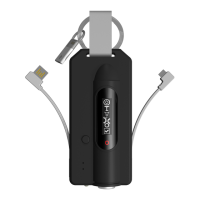
The Go-tcha Ranger for Pokémon GO is a portable accessory designed to enhance the Pokémon GO experience by allowing users to interact with the game without constantly looking at their smartphone. This device is fully rechargeable and offers a range of features, including automatic catching of Pokémon, automatic collection of items from PokéStops, and additional utility functions like a power bank, LED torch, and compass.
The primary function of the Go-tcha Ranger is to facilitate gameplay in Pokémon GO. It connects to the Pokémon GO app on a smartphone via Bluetooth and provides alerts and interactions for in-game events. When a new or duplicate Pokémon is nearby, the Go-tcha Ranger vibrates and animates its screen to notify the user. Users can then press the Go-tcha button or touch the screen to attempt to catch the Pokémon. The device will subsequently vibrate and animate the screen to indicate whether the catch was successful or unsuccessful. Similarly, when a PokéStop is in range, the Go-tcha Ranger will vibrate and animate its screen. Users can press the button to retrieve items from the PokéStop, and the device will confirm successful or unsuccessful collection, along with the number of items obtained.
Beyond manual interaction, the Go-tcha Ranger offers an "Auto-catch" function. When enabled, the device will automatically attempt to catch Pokémon and collect items from PokéStops without requiring user input. This feature is particularly useful for players who want to continue playing while on the move or when their smartphone is not readily accessible. The device will still provide visual and haptic feedback for successful or unsuccessful catches and item collections, even in auto-catch mode.
In addition to its core Pokémon GO functionalities, the Go-tcha Ranger integrates several practical utility features. It includes a built-in power bank, allowing users to charge their smartphone on the go. An integral charger cable can be extended and connected to a suitable USB port for charging the Go-tcha Ranger itself. The device also features an LED torch, which can be activated by pressing and holding the Torch button for three seconds and turned off by double-clicking the button. A compass is also integrated into the device, providing basic directional guidance.
To begin using the Go-tcha Ranger, it must first be connected to the Pokémon GO app on a smartphone. The connection process involves opening the Pokémon GO App, navigating to the Main Menu, then Settings, and selecting 'Pokémon GO Plus'. The user then presses the button on the Go-tcha Ranger to make it discoverable to the app. Finally, the user touches their 'Pokémon GO Plus' under the Available Devices list to establish the connection.
When the Go-tcha Ranger is connected and a new or duplicate Pokémon is nearby, the device will vibrate and display an animation on its screen. To attempt a catch, the user simply presses the Go-tcha button or touches the screen. The device will then provide feedback on the success or failure of the catch through vibrations and screen animations. For PokéStops, when one is in range, the Go-tcha Ranger will vibrate and animate its screen. Pressing the Go-tcha button will initiate item collection. The device will then confirm the collection status and the number of items received.
The "Auto-catch" function can be toggled on or off by pressing the Go-tcha button until 'Auto-catch ON' or 'Auto-catch OFF' is selected on the screen. When auto-catch is enabled, the device will automatically attempt to catch Pokémon and collect items from PokéStops without requiring manual input. This allows for a more passive gameplay experience. Even in auto-catch mode, the device will still provide visual and haptic feedback for in-game events.
The Go-tcha Ranger can be used to provide a power boost to a smartphone. Users can ease out the phone charger cable from the Go-tcha Ranger and connect it to their smartphone. An iPhone adapter is provided for compatibility with Apple devices. The phone charge LED on the Go-tcha Ranger will indicate when the smartphone is connected and receiving power.
The LED torch feature is activated by pressing and holding the Torch button for three seconds. To turn the torch off, the user simply double-clicks the same button. The integrated compass provides a basic navigational aid.
The Go-tcha Ranger utilizes a series of distinct screen animations and vibration patterns to communicate various in-game events and device statuses. These include alerts for duplicate Pokémon found, waiting for a Pokémon, Pokémon caught, Pokémon not caught, auto-collect PokéStop ON/OFF, PokéStop in range, PokéStop not in range, PokéStop items collected (with indications for x2, x3, x4, and 5+ items), PokéStop items not collected, new Pokémon discovered, Go-tcha intro screen, out of Pokéballs, open journal to see escaped Pokémon, device paired, device not paired, and vibration alerts ON/OFF. These visual cues, combined with haptic feedback, allow users to quickly understand the device's status and in-game interactions without needing to consult their smartphone.
The Go-tcha Ranger is fully rechargeable. To charge the device, users need to ease out the integral charger cable and connect it to a suitable USB port. A blue charge LED on the device will flash to indicate that it is currently charging. Once the Go-tcha Ranger is fully charged, the blue LED will become static, signaling that the charging process is complete. This ensures the device is always ready for use.
While not explicitly detailed as maintenance, the manual implies general care through its design and usage instructions. Keeping the device clean and dry, and handling the integral charger and phone charger cables with care, will contribute to its longevity. The robust design, with its integrated cables, suggests a focus on convenience and durability for on-the-go use. The device's ability to provide power to a smartphone also highlights its utility as a reliable companion for extended Pokémon GO sessions, reducing the need for multiple power sources.
 General
| Connectivity | Bluetooth |
|---|---|
| Compatibility | iOS, Android |
| Compatible with | Pokémon GO |
| Features | Auto-catch, Auto-spin |
| Battery | Rechargeable |
| Charging Method | USB charging |

 To Next Page