EN DATEQ BCS50 user manual BCS53 settings 25
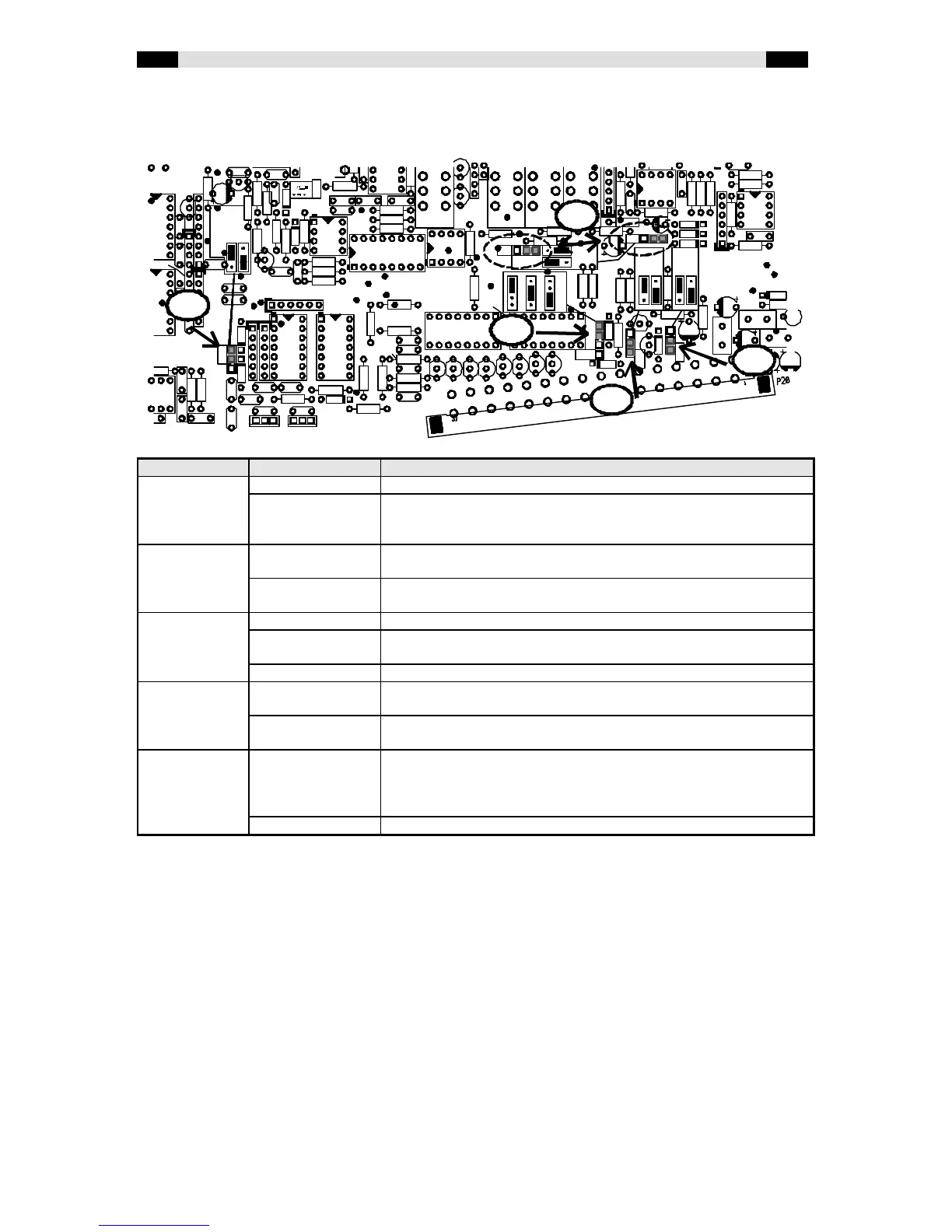
Jumper settings
The jumpers in a BCS53 and BCS53T module have the same functionality and the same
position. That is why only the BCS53 PCB is shown below.
Jumper name Possibilities Description
CUE (1) FADER (D) The channel is activated when the fader is opened.
SWITCH The channel is activated when the ON-key is pressed. When the fader
is opened and the ON-lamp does not light up no audio will be fed
through.
AUX (2) POST (D) The after-fader signal is routed to the AUX-buss. Both jumpers (P6
and P7) have to be in the same position!
PRE The pre-fader signal is routed to the AUX-buss. Both jumpers (P6 and
P7) have to be in the same position!
ON-AIR (3) OFF (D) No ON-AIR outputs will be activated when the channel is switched on.
ON-AIR1 When the channel is switched on ON-AIR1 will be activated. The
studio output will be muted to prevent an acoustical feedback.
ON-AIR2 When the channel is switched on ON-AIR2 will be activated.
MSTR (4) ON (D) When the PFL-switch is pressed the CR will switch automatically to
PFL. This makes the signal directly audible for the technician.
OFF The signal is mixed to the PFL-buss, but the CR-selector will not
automatically switch to PFL.
DJ (5) ON When the module is activated all PFL-buttons will reset and the CR
output will be muted to prevent from an acoustical feedback with the
DJ-microphone. It is also possible to let the CR-selector switch to AIR
or PGM. This will be explained later.
OFF (D) This function is disabled.
(D) indicates the default setting


 To Next Page
 Loading...