EN
SPL2(TS) and SPL3(TS) user manual Operation
9
Operation
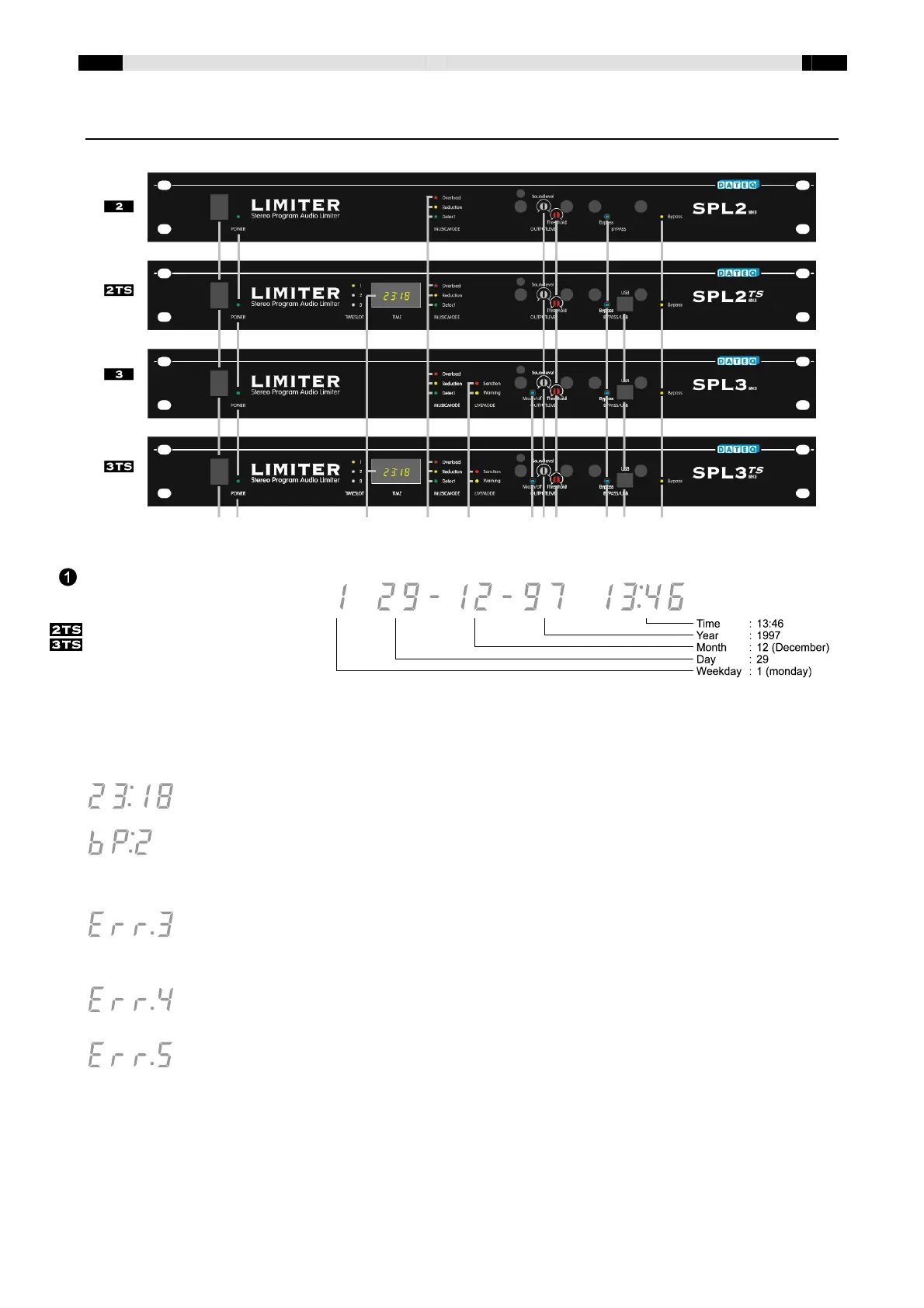
14 13 1 10, 9, 8 12, 11 4 5 6 3 2 7
TIME display. In normal mode
the LED-display shows the
time-of-day, in military format
(24h-format). When switching
on the limiter, the date and
time will scroll through the
display. This is the easiest way to check if the time and date are set correctly. The 3 LED's on the left
side of the display indicate which TimeSlot is active. Be sure the installation engineer or authority
who programs the limiter leaves a programmed settings list, so the settings can always be checked
afterwards. Other messages than time-of-day can appear on the display:
This is the normal mode of the display. The display indicates the time-of-day.
The timer switched the limiter in bypass-mode. The number indicates the active
bypass-period: in this case bypass-period 2. This message alternates with the time.
The timeslot-data in the memory of the timer is corrupted. The limiter has to be
programmed again to solve the problem. As long as the problem persists, the limiter
will remain in error-mode: the maximum output of the limiter will be reduced
considerable.
Something went wrong when programming the timer. The timer needs to be
reprogrammed, otherwise the limiter will remain in error-mode.
The internal check of the limiter failed. Have the limiter repaired by authorised service
personnel.


 To Next Page
 Loading...