EasyManua.ls Logo

Dateq SPL-D2 - User Manual

Dateq SPL-D2
3 pages
Print Icon
To Next Page IconTo Next Page
Loading...
DATEQ BV
E-mail: info@dateq.nl
Bank: IBAN NL 88 RABO 0301019444
De Paal 37, 1351 JG Almere – Holland
Internet: www.dateq.nl
Bank swift RABO NL2U
Tel.: +31 36 5472222 Fax: +31 36 5317776
Skype: dateq_audio
Chamber of commerce no: 39031467
Spl-D2 Next generation
DATEQ SPL-D2 Manual
Introduction
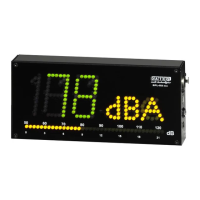
The SPL-D2 unit is a separate sound-level meter. Besides it can be linked to the SPL5 limiter. The
unit is a large LED display, showing the actual sound-pressure level.
By means of the PC software it is possible to change the settings.
Product support
For questions about the SPL limiter series, accessories and other products please contact:
DATEQ Audio Technologies
De Paal 37
1351 JG Almere
The Netherlands
Telephone: +31 36 - 5472222
Fax: +31 36 - 5317776
E-mail: info@dateq.nl
Web: www.Dateq.nl
Question and Answer IconNeed help?

Do you have a question about the Dateq SPL-D2 and is the answer not in the manual?

Dateq SPL-D2 Specifications

Inputs IconInputs
mic input typeXLR-3 female
jack input type6.3 mm Jack
USB connectionYes
Power IconPower
input voltage24 V dc
power consumption9 W
Weight and Dimensions IconWeight and Dimensions
cabinet dimensions255 mm x 125 mm x 47 mm
weight1 Kg

Summary

Introduction

Product Support

Operation

Display Connected to SPL5

How the display shows SPL values when linked to the SPL5 unit.

Connecting to SPL5

Details on physically connecting the display unit to the SPL5 via jack connector.

Using Display Stand-Alone

Instructions for using the display unit independently with a connected microphone.

Common Settings

Adjusting display dimming, number intensity, and VU meter response time.

Technical Specifications

Inputs

Details on XLR mic, jack, and USB input connections.

Common Specifications

Covers supply voltage, power consumption, cabinet size, and weight.