7
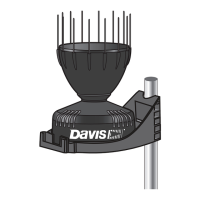
Maintaining the Rain Collector
For greatest accuracy, you should thoroughly clean the rain collector at least once or
twice a year.
1. Disconnect the rain collector cable from the sensor interface in the transmitter
shelter.
2. Separate the cone from the base.
3. Use a soft, damp cloth to clean pollen, dirt, and other debris from the cone, drain
screens, and spoon.
4. Use a pipe cleaner to clear the funnel hole in the cone and the drain screens in the
base. When all parts are clean, rinse with clear water.
5. Reattach the cone and replace the debris screen. Reconnect the rain collector
cable to the sensor interface.
Troubleshooting Guide
Rainfall is not registering on the console or the console has a large error.
• Check the cable connections from the sensor to the transmitter. Cable connections
account for a large portion of the potential problems. Connections should be firmly
seated in the jacks and plugged in straight. If a reading appears intermittently on
the display as you jiggle the cable, the connection is faulty.
• Make sure there is no magnetic, steel, or iron object near the rain collector.
• Make sure the funnel hole in the cone is clear so water can empty into the spoon.
• Make sure the spoon moves freely and comes back up when tipping. The console
should show an increase in rainfall for each tip of the spoon. (If the spoon does not
move at all, check that you have cut the cable tie that held it in place during
shipping.)
• Make sure the rain collector is mounted so that it is level.
Contacting Davis Technical Support
If you have questions about your rain collector, or encounter problems installing or
operating it, please contact Davis Technical Support.
Note: Please do not return items to the factory for repair without prior authorization.
Online: www.davisinstruments.com
See copies of user manuals, product specifications,
application notes, software updates, and more.
E-mail: support@davisinstruments.com
Telephone: (510) 732-7814
Monday – Friday, 7:00 a.m. – 5:30 p.m. Pacific Time


 To Next Page
 Loading...