GB
After 20 seconds without any button being
pressed, the weather station switches from
setting mode to displaying the time.
Press the MODE button to change between
displaying the calendar, time with seconds or
You can adjust the brightness in 3 steps or
turn it off by pressing the UP button one or
The weather station displays the temperature
and relative humidity indoors and outdoors
Press the DOWN button to change between
the 2 sensors. If the symbol is displayed,
the channel automatically changes every 5
If you press the MEMORY button once, the
highest values registered since the last reset
If you press the MEMORY button twice, the
lowest values registered since the last reset
If you press the MEMORY button 3 times, the
current values will be displayed.
If you press and hold the MEMORY button for
around 3 seconds, the stored values will be
If the values are lower or higher than the
weather station’s measurement range, LL.L or
HH.H respectively will be displayed.
The “TREND” arrows indicate if the
temperature and relative humidity are rising,
If the temperature outside falls to between
-1 and +3 °C, the frost warning symbol will
The weather station has a built-in barometer
and shows the current air pressure.
The “TREND” arrow indicates if the air
pressure is falling, stable or rising.
The weather station can calculate a simple
weather forecast for the next 12 hours based
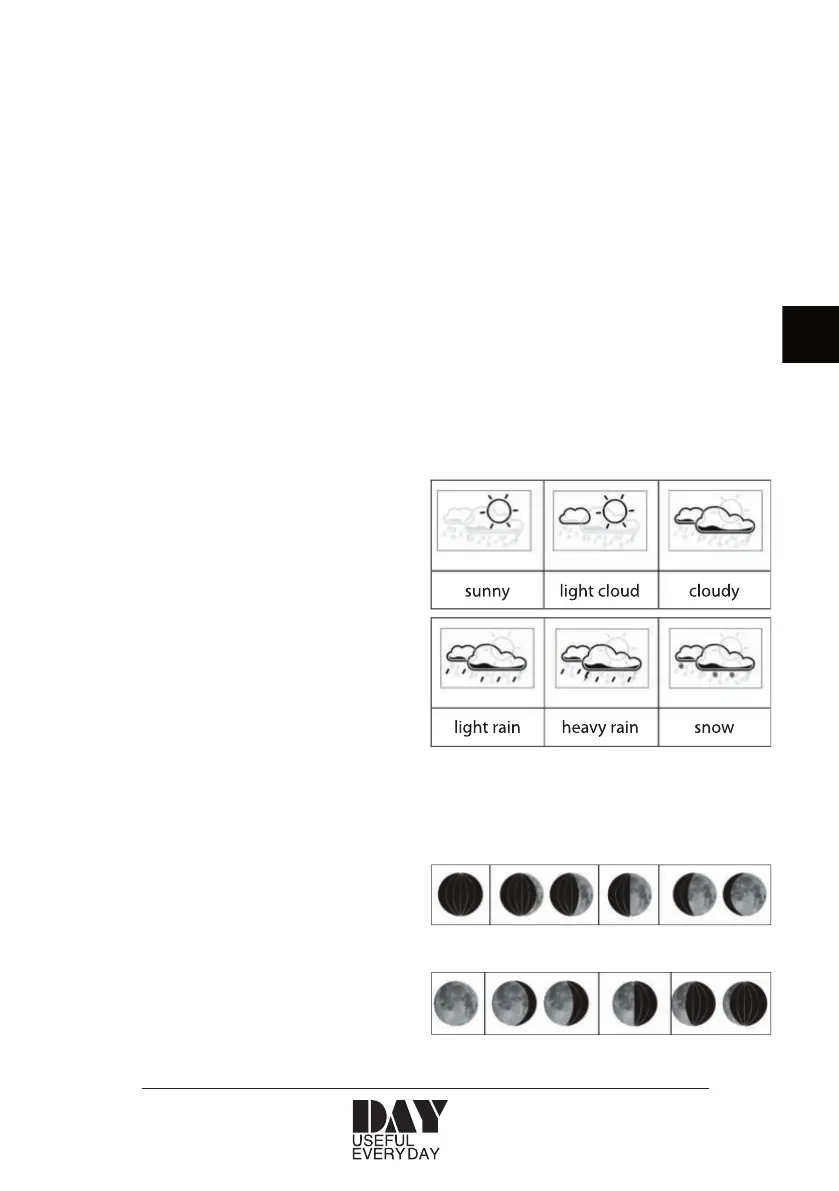
The weather forecast is displayed with the
The weather station displays the moon phase


 To Next Page